
To help us provide you with free impartial advice, we may earn a commission if you buy through links on our site. Learn more
You know how it goes: you help a relative buy a PC for their simplistic needs and then you spend the rest of your life giving out free technical support. If that’s a familiar story, Broadband Computer Co’s Alex could well be of interest.
The idea behind it is to provide a laptop with an operating system that’s incredibly simple to use for people unfamiliar with computers, and provide the support for £9.99 a month (plus £400 for the laptop). Alternatively, you can pay £25 a month with broadband included. It’s subject to a 3GB monthly fair usage policy, which is plenty for normal use. We’ve seen similar concepts before, but Alex is the first time we’ve seen it done with any success.
The operating system is a Linux distribution that’s been heavily modified to make it easier to use and, just as importantly, locked down so that it’s harder to break. To reduce the chances of problems even further, Alex is updated and managed centrally, so the user doesn’t have to worry about applying patches or important security updates.
Access to the Alex is a little strange as it requires a USB Latchkey to be plugged into the computer first. The Latchkey is used to identify the computer to the central Alex servers and renders the PC unusable if it’s not connected (a user password acts a secondary line of defence). The Latchkey can also be used on another Alex computer, transferring user settings in the process, letting users effectively carry their computer around on a USB key wherever they go. Should the key be lost, Broadband Computer Co can simply send out a replacement.
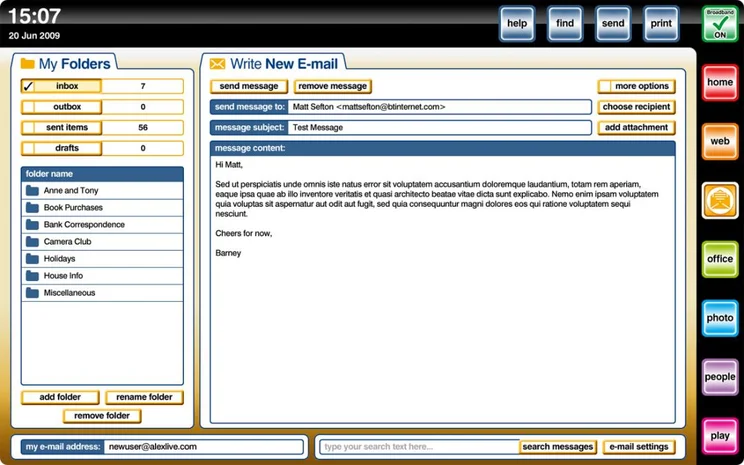
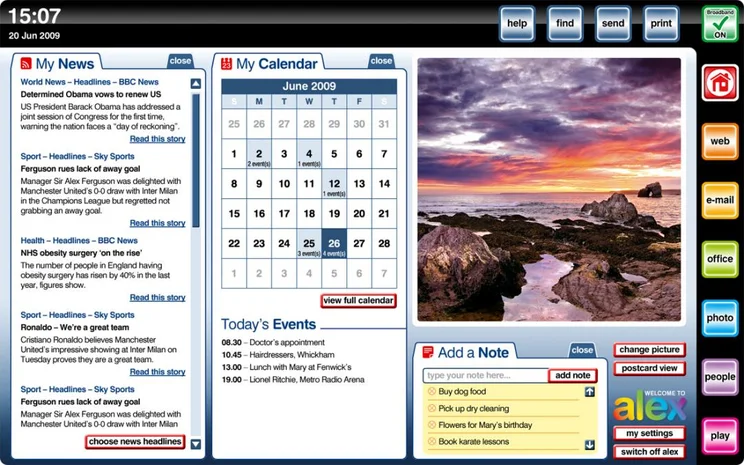
Once into the main computer, Alex has been designed to keep things as simple as possible. As such, there’s not the usual desktop layout; so, there’s no start menu or task bar, windows can’t be resized or moved and there’s only the choice of applications that come preinstalled. While most operating systems have bright, large icons, but Alex is back to basics using buttons with clear text labels. Admittedly, it might not look as pretty as, say, Windows 7, but it’s instantly easier to understand.
The main ‘welcome’ screen is used to display RSS feeds (My News), a calendar with a list of today’s events, and notes. On the right-hand side of the desktop are quick-launch icons to the only applications that can be used on Alex. As there’s no taskbar and you can’t alt-tab between applications, these icons are also used to switch between Windows. Once an application has been opened, it fills the entire screen and there’s no way to move a window or resize it. This is a pretty major limitation and means you can’t view documents side-by-side.
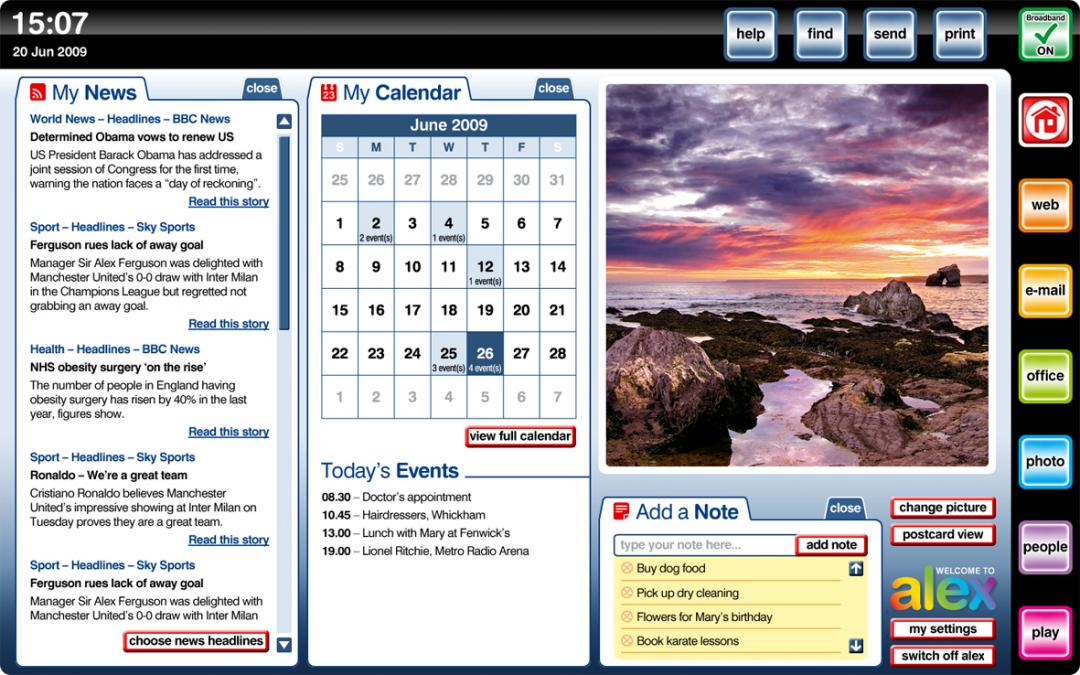
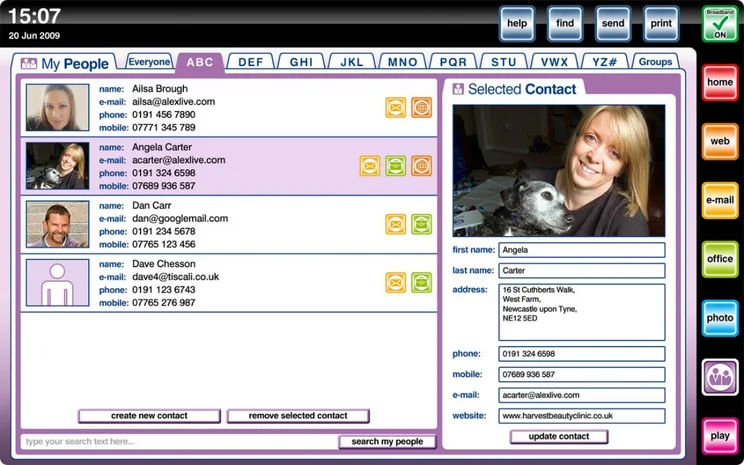
The available applications are a web browser, email client (each Alex is sold with an @alexlive.com account automatically), office (Word and Excel clones only), photo editor, contacts manager (called People), and a video and music player. No other applications can be installed, although the provided ones cover most bases and should suffice for simple use.
The web browser reports itself as Safari 4, although we think it’s more likely to be a modified WebKit browser, as Safari uses this engine. It’s a simplistic browser, though it does have tabs for multiple windows. The usual navigation options are there, but rather than using icons, clearly-labelled buttons (‘back’, ‘forwards’, etc) are used. They look a bit cheaply produced, although it’s instantly more obvious what they do.
Broadband Computer Co has preinstalled a Flash plug-in for the browser, although we found that some websites would not work and Adobe’s own page checker failed to recognise the plug-in at all. Similarly, there aren’t any plug-ins to play streaming video, such as QuickTime. Plug-ins can’t be installed manually, so there’s no way to rectify this; however, we’ve been told that Alex will be updated soon to better support Flash and online video.
The browser, and Alex in general, is pretty clever at presenting error messages in a meaningful way. For example, if you’re not connected to the internet a message that reads “Broadband Off” is displayed in the top-right of the screen; if you ignore it and try and open the browser, you get a message that says, “Alex is not connected to the internet and is therefore unable to browse the web. Please check your broadband connection.”
To aid diagnostics clicking the ‘Broadband Off’ message gives you the option to connect to a wireless network or to change router settings. The latter option automatically connects the browser to your router’s web-management page so that settings can be edited. It’s a neat and quick way for a support technician to help identify and correct internet faults without having to try and explain how to find the router’s IP address. This is particularly useful if you opt for the Alex broadband, as the support line will be able to quickly talk you through the provided router’s options.
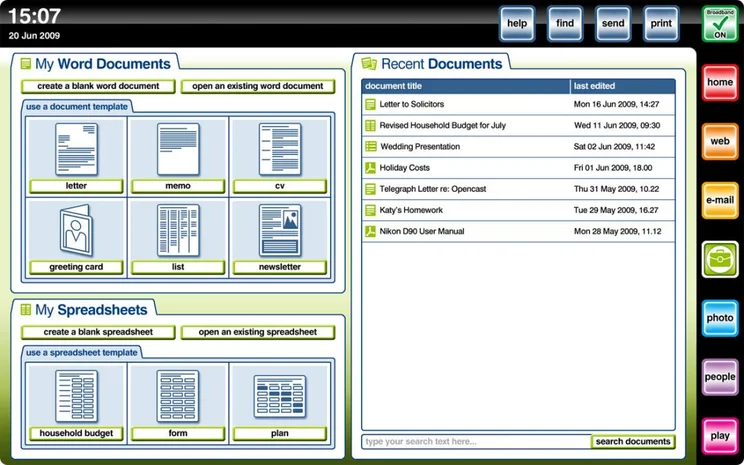
The Office applications provide basic Microsoft-compatible Word and Excel clones, with a similar range of features to Google desktop. They’re nowhere near as feature-rich as Microsoft’s suite, but provide basic word processing and spreadsheet capabilities that will suit the majority of home users. Annoyingly, the system won’t let you open more than one document at a time in either program, so you can’t work on multiple spreadsheets at once, for example.
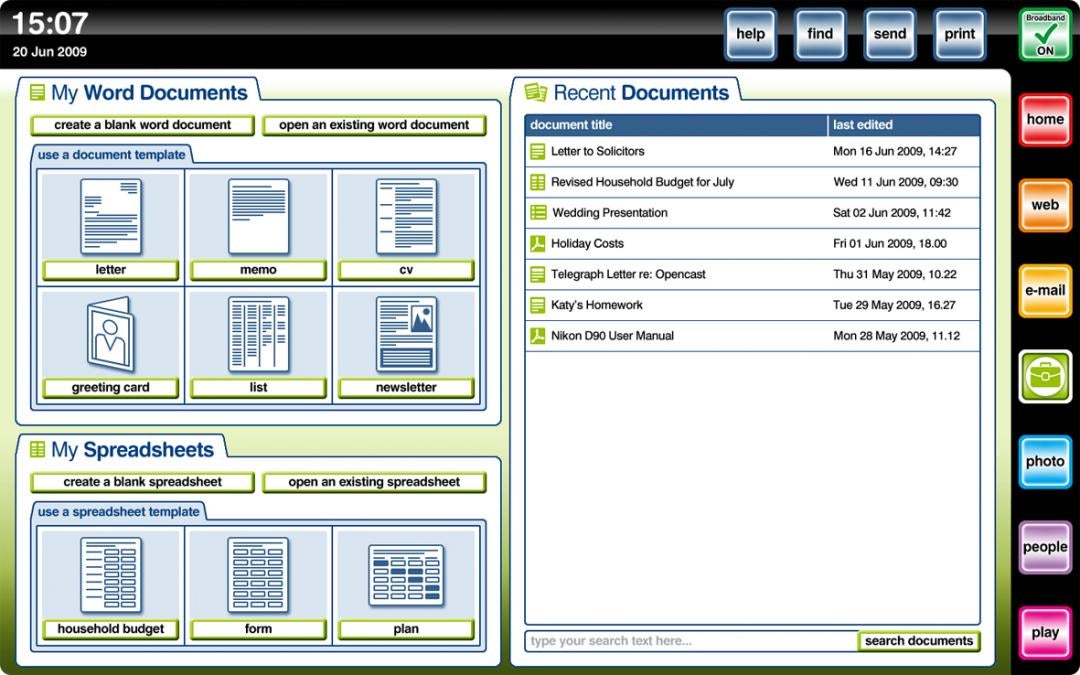
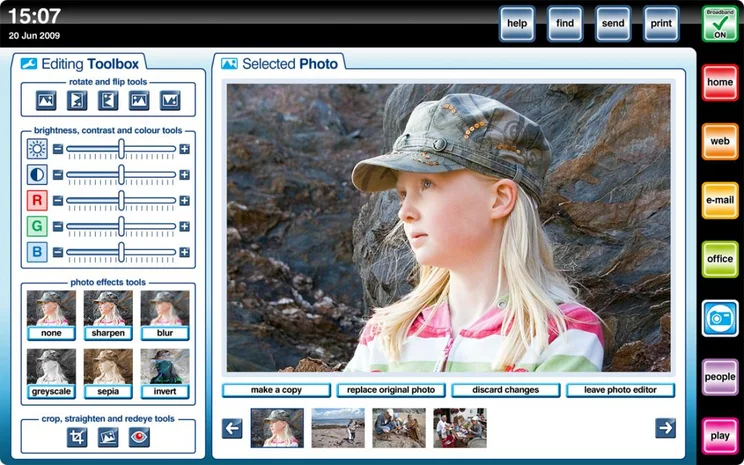
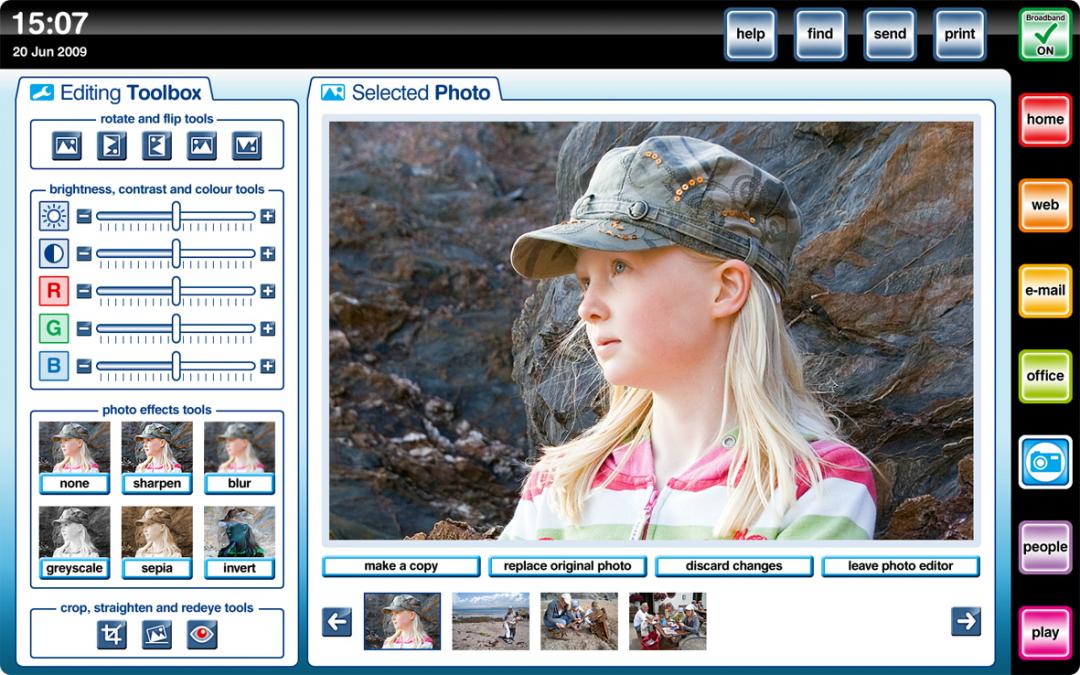
Photo editing is similarly very simplistic, offering basic colour, brightness and contrast correction, as well as cropping, red-eye removal and image straightening. Images can be organised into albums, and you can add captions.
The Play application lets you play music and video. By default, music is sorted by playlist, but you can also browse by album, track name and artist. Video playback lets you play files stored on the PC and DVDs, but you can’t add any missing codecs if you find a file that won’t play.
All of the applications are incredibly simple to use, although very basic. As such, this is definitely a computer that’s designed for light users rather than anyone with a modicum of computer knowledge. However, there are some strange interface quirks.
For starters, you often can’t double-click items to perform an action. For example, double-clicking a time slot in the calendar doesn’t automatically open a window to add a new appointment; instead, you have to click the Add event button. Oddly, keyboard shortcuts for copy and paste work in all applications, except for the web browser: here, it’s impossible to copy text from a web page, although you can copy text from the browser’s address bar.
Your files and documents are stored locally on the computer’s 250GB hard disk, which is a little small by today’s standards. Using the File manager you can move files and organise your hard disk, and copy data to an external flash drive. Alex also comes with My Vault: 10GB of online storage. This can be used to back up important files, so that they’re safe should the computer crash.
If anything, the backup seems slightly at odds with the rest of the computer, as it’s a manual process that will need to be explained. Some kind of automatic system would have been preferable. It’s also a little frustrating that there’s currently no way to recover a broken system. Although Alex will suffer fewer problems than Windows, as it’s so locked down and doesn’t allow third-party applications to be installed, a power cut or disk error can prevent the OS from loading and files could be corrupted. Currently, the only solution is to phone support and arrange for your computer to be repaired, although we’ve been told that a recovery disc is being investigated.
There are some fairly hefty limitations to the system as the moment. Primarily, there’s very little hardware support. Broadband Computer Co currently lists a single printer on its website, although we’ve been told that any printer that supports Linux should work. For those interested in using additional models, you can call for support and check a printer’s compatibility before you buy. Even so, there will be lots of models that don’t have support making it harder to buy a printer for a relative or friend with an Alex computer. Similarly, proprietary hardware that requires drivers will not work, so you’ll be unable to use devices such as iPods.
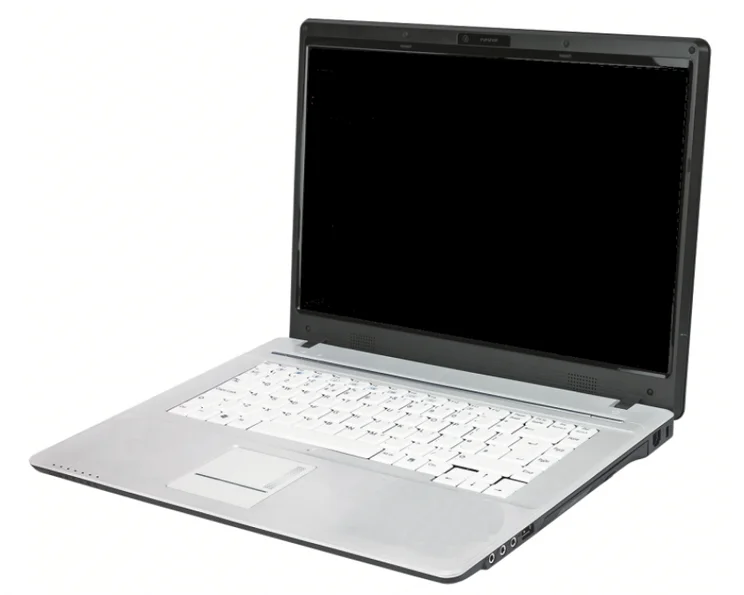
The laptop bundled with the service costs £400 and is a Clevo M760T. This plain-looking 15.4in model is familiar to us, as many other manufacturers use this chassis for their own-brand models. It’s a little underpowered by today’s standards with a 1.66GHz Celeron T1600 dual-core processor and only 1GB of RAM. After installing Windows on the laptop to run our benchmarks, an overall score of 41 shows that this is a pretty slow machine; however, for Alex and its basic set of applications it’s more than powerful enough. Battery life at two hours 59 minutes is a little disappointing, and means that this laptop isn’t suitable to regular use on the go.
The screen size means there’s room for a decent keyboard and each key’s full-sized, making it comfortable to type on. We found that feedback was excellent, so typing long documents was no problem. A large responsive touchpad makes mouse movements easy.
The widescreen display has a resolution of 1,280×800, which is plenty for the applications that Alex provides, particularly as application windows can’t be resized or moved around the screen. Display quality is pretty good and we found that the screen was evenly lit and produced bright, vibrant colours. Viewing angles were good, too, so you don’t have to position the laptop carefully to get the best picture.
Alex is the first computer we’ve seen to really make things simple, but it’s almost too simplistic in many ways, while the supplied laptop is expensive for its specification. If you’re buying a computer for a novice and don’t mind helping them out, you can get a better-specified Windows PC for less and set it up to boot straight into a browser. From here you can use free Google applications (such as GoogleDocs, Gmail and Picasa), thus avoiding having to pay any monthly charges, better still this easy-to-use PC won’t expire if you stop paying the monthly fee, like the Alex does.
However, if you don’t want your life to be about technical support and you know someone who has very light computing needs, Alex is a decent choice that could save you a lot of hassle.


