To help us provide you with free impartial advice, we may earn a commission if you buy through links on our site. Learn more


PhotoPlus is a photo editor with a price and features that put it in direct competition with Adobe Photoshop Elements. It stands up well to the comparison, with support for layers and masks so that you can create photo-composites, adjustments layers for non-destructive colour correction and a wide array of brushes and creative filters. A non-destructive crop feature means cropped pixels are hidden rather than discarded, so you can change your mind later.

Non-destructive colour correction and cropping mean you don’t have to commit to changes until you’re ready to export
We like how the Blemish Remover Tool allows the clone source and destination to be adjusted in tandem before being applied. There’s also a Patch Tool for removing larger blemishes by drawing around them, while the Scratch Remover tackles areas using brush strokes. All three include the ability to adjust the colour of cloned pixels to match their new surroundings, but it’s a bit odd that they also retain some of the colour of the blemish you’re trying to hide. There’s a strong set of tools for selecting parts of an image, but nothing to match Photoshop Elements’ sophisticated Refine Edge tool.

There’s a wide array of brush types, with the ability to randomise the position, colour and opacity
PhotoPlus isn’t split into beginner, intermediate and advanced modes as Photoshop Elements is, but this isn’t a huge loss. PhotoPlus’s unified working environment is well laid out and encourages new users to explore the more advanced features. We’re not so keen on the accompanying Organiser module, though. It’s light on features and relatively slow to browse large libraries.
One of our favourite features in Photoshop Elements is the Liquify editor, so it’s great to see the uncannily similar Warp Studio make its debut in PhotoPlus X7. There are brushes to warp, pinch, punch, twirl and push pixels around. You can also Unwarp, returning pixels to their original position. The brush size is limited to 1,000 pixels and it becomes slow to respond when using larger brush sizes. However, we appreciated having options to mask off areas to avoid them being warped, and also to Unwarp the entire image by a percentage value, two features that Photoshop Elements doesn’t offer.

Warp Studio lets user push pixels around the screen, and the Mask feature helps to avoid warping the wrong areas
The new Lens Correction module has controls to fix lens distortion, chromatic aberrations and vignetting, which are problems that virtually all lenses suffer to some degree. However, these are corrections that an increasing number of cameras are able to apply internally when saving JPEGs, which is much more convenient than having to fix each photo manually.
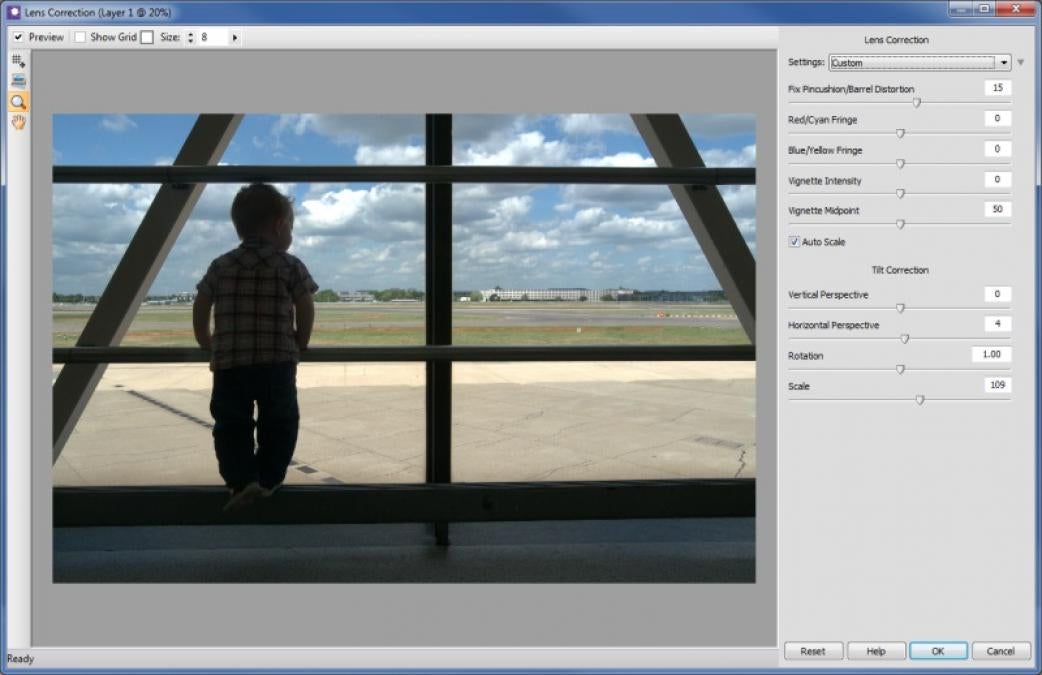
Lens correction is comprehensive but an entirely manual process
That’s not possible when shooting in RAW mode, as the camera saves the image data straight off the sensor, so any processing must be performed in software. PhotoPlus’s RAW-processing module already included a similar set of controls for fixing lens problems, but here too, it’s an entirely manual process. Adobe Photoshop Elements and Lightroom are much better with their database of lens profiles for distortion and vignetting, and the ability to detect and correct chromatic aberrations automatically.

Noise reduction of RAW files is okay but not as effective as Photoshop Elements
Otherwise, PhotoPlus’s handling of RAW files is reasonably accomplished, with precise control over colours and the ability to adjust limited areas of the frame using brush strokes or a gradient mask. Support for 16-bit colour in the main application maintains the highest possible colour fidelity for RAW images, and is something Photoshop Elements doesn’t offer.
However, PhotoPlus’s RAW processing engine isn’t in the same league as Adobe’s. It wasn’t as adept at rescuing over-exposed highlights without adversely affecting other parts of the image. We missed Adobe’s Clarity control for accentuating contrast, although this is now available in the main PhotoPlus editor, and can be applied after RAW processing is complete. PhotoPlus’s noise reduction struggled with very grainy images, and the preview was slow to update after making adjustments to noise reduction settings. It’s also frustrating that the software doesn’t remember RAW processing settings in case you want to re-tweak a photo at a later date.
Our biggest concern regarding PhotoPlus’s RAW processing is its limited camera support. It had no problem with RAW files from a Nikon D5200 but colours were skewed in the D5300’s RAW files, and it had similar problems with the Panasonic G-M1 and Canon G16. We can forgive a few months’ delay in supporting the latest cameras, but these models have been available for many months at the time of review. Support for Fujifilm and Samsung RAW files was worse, with PhotoPlus failing to open RAW files from camera models that are many years’ old.
Photoshop Elements’ superior RAW support is enough reason by itself to keep it as our favourite photo editor. PhotoPlus provides some stiff competition, but there’s no area where it’s significantly better. Still, if you only work with JPEGs, it’s a dependable choice.
| Details | |
|---|---|
| Price | £80 |
| Details | www.serif.com |
| Rating | **** |





