
To help us provide you with free impartial advice, we may earn a commission if you buy through links on our site. Learn more


Serif PagePlus X7 isn’t dramatically different from PagePlus X6, but Serif lists several new features, including explicit support for Windows 8 and a new 64-bit engine.
The first thing anyone upgrading from an earlier version is likely to notice is the new Startup Assistant browser, which provides tutorials and helps you start projects. Its neat, tiled design is clearly inspired by the Windows 8 Start screen, and it has a similar search tool for quickly tracking down template or help content. Templates are previewed as thumbnails, but you can quickly zoom in to get a better look at interesting ones.

The new Startup Assistant looks fresh and is easy to use; it’s great for browsing the supplied templates
Serif also says it has overhauled the look of the main interface with this version, but here the differences aren’t so obvious. There’s been some subtle de-cluttering of the interface in comparison to PagePlus X6, and a couple of small usability improvements such as the introduction of colour to the RGB slider bars. More noticeable are new features such as an effects tab and context sensitive smart hints.

The main interface has been overhauled, but there’s still a huge amount to fit in – a large or second screen is ideal
Its behind-the-scenes improvements are probably more significant. There’s support for the PDF/X-3 standard, which should help minimise compatibility problems when publishing work to professional print shops. EBooks published in the EPUB format are also now compliant with standards checked by the EpubCheck tool, which should help self-publishers ensure they meet book stores’ technical criteria.
USER INTERFACE
PagePlus X7’s main interface may have slightly less clutter, but there’s no getting away from the fact that this is feature-rich software. There’s a lot to fit on screen, and things are quite cramped, even at middling resolutions such as a 1,366×768 laptop screen.
As you’d expect, the project you currently have open occupies the most space, with various simple tools located to the left and menus at the top of the screen. There’s also a system of tabs that contain enhanced toolsets and functions; these can float on the workspace or be docked to any if its edges. It’s a helpful system that’s generally easy to use but, with 21 tabs to choose from, there’s quite a learning curve. We also felt there was room for improvement in the design of a couple, most notably the frequently used Pages tab, as you can’t zoom in on the rather small page thumbnails, which makes it tricky to spot specific parts of longer documents where many pages share a common layout. We think it should have a similar look and feel to the Startup Assistant.
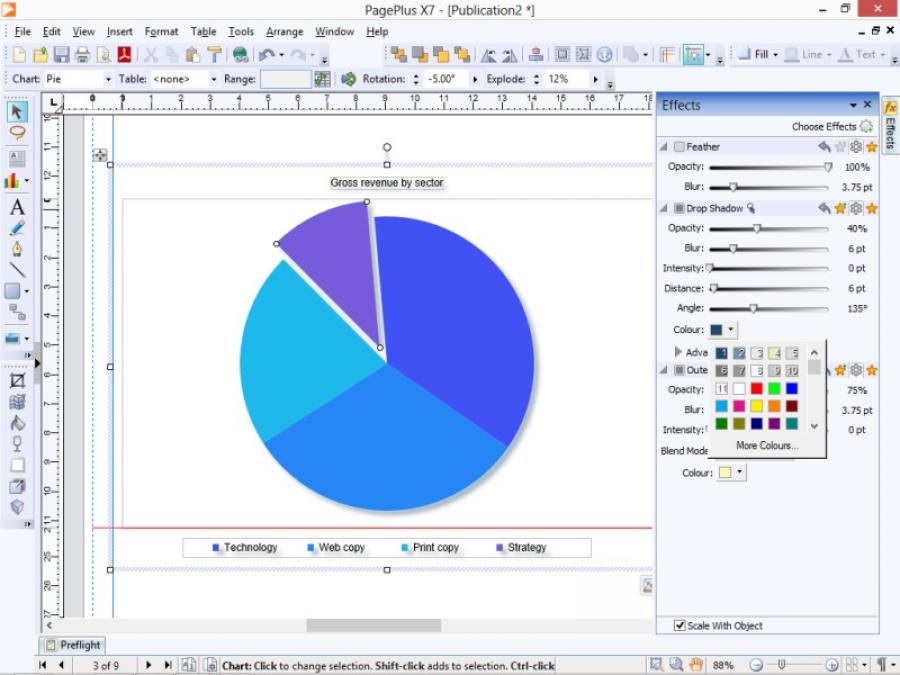
All charts start out blue, but they’re easy to customise. You can explode one or more pie segments to add impact
New to PagePlus X7 is the Chart tab, which lets you present standalone data as pie, line, bar, column and area charts, among other types. Charts initially appear in blue regardless of the publication’s colour palette, but it doesn’t take long to change this or add other enhancements such as the Instant 3D feature or an effect such as drop shadow. There are other pleasant features, too, such as an ability to explode one or more segments from a pie chart to give emphasis to particular groups of data.
It’s possible to use data in tables and from external databases, but we ran into problems when trying to do so. The help file says supported formats include Access, Excel and various delimited text files, but we could only see .sdb files and ODBC sources when we tried to browse for databases.
IMPROVEMENTS
PagePlus X7 doesn’t let you implement a baseline grid, but it is possible to position specific guide lines and the system dynamically shows and snaps to automatic guides to help you line things up. We like the ability to press Alt while positioning to disable snapping temporarily.

Guide lines (coloured red) can either appear dynamically as you position elements or you can create fixed ruler guides. Sadly, there’s still no grids
Unfortunately, there are still no eBook-specific templates. You can publish any project to eBook format, but it’d be good to start from an optimised template. However, PagePlus X7 comes with an excellent help resource that properly documents PDF forms and interactive elements. We found the online tutorials, help and community very helpful, too.
Our criticisms are minor when you consider that PagePlus X7 is an extremely rich and detailed piece of software. There are many features here and nearly all of them work very well. This version remains competitively priced, too, being a little cheaper than Microsoft Publisher 2013.
We’re not sure that the new features are worth an upgrade for PagePlus X6 users, but if you have older desktop publishing software in need of an update, or you’re looking for a comprehensive new package, you should try PagePlus X7.
| Details | |
|---|---|
| Price | £82 |
| Details | www.serif.com |
| Rating | ***** |






