To help us provide you with free impartial advice, we may earn a commission if you buy through links on our site. Learn more


On the 19th of July 2017, the iPhone 5 received its very last iOS update: 10.3.3. This might have come as a surprise to some, but for a phone that was released in 2012 – it served its time well. Coincidentally, Apple stopped supporting the device in its later iterations of iOS.
The iPhone 5 is now over six years old. It has definitely reached the end of its lifespan, and it’s well worth upgrading if you haven’t already or consider switching to a non-Apple alternative instead. In fact, the regular iPhone 5 is seemingly impossible to find brand-new, and even on eBay you’ll struggle to find one used.
For our pick of the best budget phones you can currently buy – head over to our dedicated article here. If you’re intrigued to know more about the iPhone 5, keep on reading David’s original review, below.
Apple iPhone 5 review
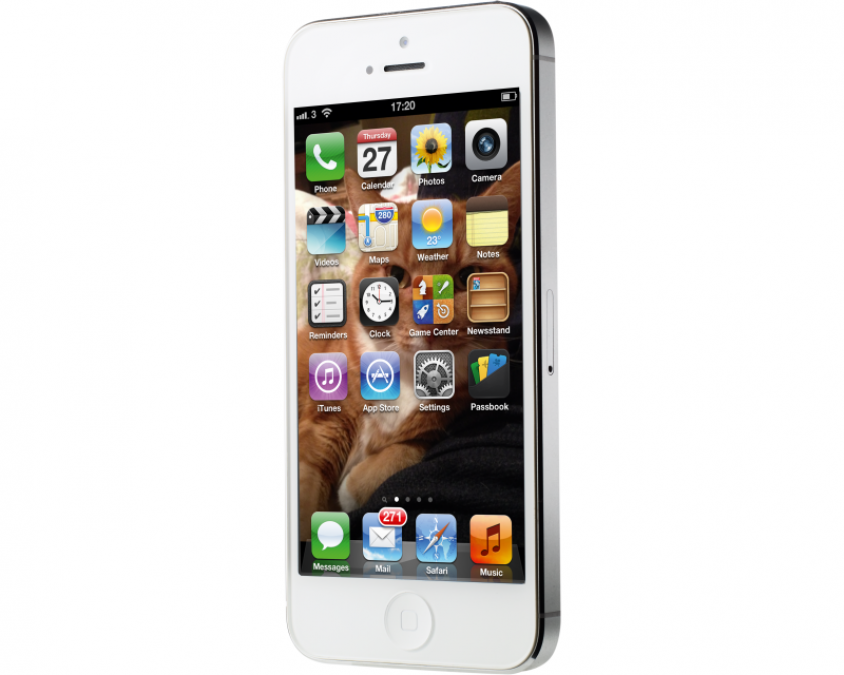
You can sum up the iPhone 5 in three words, taller, slimmer and lighter. Apple has managed to shave 1.4mm of the thickness of its previous phone. When you compare them side-by-side, what Apple has done is immediately obvious. While the iPhone 4S’ screen and back bulged out from the side, the iPhone 5 has a flush back, while the screen is barely raised at all.

It’s easy to tell the difference is size from photos, but weight’s an altogether harder thing to describe. In pure stats, the iPhone 4S weighed 140g, while the iPhone 5 is 28g lighter at just 112g. Trust us, this is a big difference and it’s immediately noticeable when you pick the iPhone 5 up: you get the feeling that it simply should weigh more, it’s that light.
While the iPhone 4S and iPhone 5 are clearly related, there are some cosmetic changes to the new model, which give it a different look and help keep the weight down. Gone is the all-glass rear, replaced instead with an aluminium panel that covers most of back of the phone, bar two glass panels at the top and bottom. We’ve been told that during manufacturing the rear of the phone is photographed with the aluminium panel in place, so that the best-fitting glass panels can be found. Our review model was certainly well put together, with a flush fitting rear.

Apple iPhone 5 review: Screen
One of the biggest reasons for the change in size of the iPhone 5 is because it has a larger 4in screen with a 16:9 aspect ratio, rather than the 3:2 aspect ratio used on the iPhone 4S. What this means in practice is that both screens are the same width, but the iPhone 5’s is slightly taller, with a resolution of 1,136×640 (the iPhone 4S had a resolution of 960×640), maintaining the same high 326ppi. That’s still a Retina display, which Apple defines as a screen where you can’t see the individual pixels.

Extra resolution is useful, as you can now fit five rows of icons on the homescreen, up from four on the iPhone 4S. It also makes sense when you use a lot of the applications: you can view more calendar appointments and emails in a list, for example.

Typing with the phone in portrait mode is also easier, as there’s more space above the keyboard for text, making it easier to see what you’re writing and correct any mistakes is necessary.

It’s not just a bigger screen, though, as the iPhone 5’s display embeds the touch components with the actual pixels, removing a layer from the old screen. As well as being thinner, the new screen is brighter with higher colour saturation. Compared side-by-side with an iPhone 4S, we really noticed the difference with the iPhone 5 looking a lot more vibrant, with more pleasing colours. The screen is evenly lit and viewing angles are excellent, with the display easy to see from any angle. A 16:9 display also makes more sense if you’re watching a lot of TV programmes or films on your phone, as the screen better suits the aspect ratios typically used, leading to a reduction or complete removal of black bars.
While Apple used to be a way ahead of the competition in resolution, we’re seeing more Android phones with full 720p displays. The trade-off is that these Android devices typically have a larger screen with a slightly lower PPI. As we see it, a larger screen will give you more resolution, but you’ll lose some of the pocketability of the iPhone 5, so it’s a matter of choosing what is most important to you.
Apple iPhone 5 review: Processor
Along with its new phone comes a new processor, the Apple A6. Apple promises that it’s twice as fast for the CPU and provides double the graphics performance. Impressively, it’s also 22 per cent smaller. It’s hard to fully test a phone’s processor, but this dual-core model certainly proved itself in the tests we performed.
The Sunspider Java test completed in 944.1ms on the iPhone 5 and took more than twice as long on the iPhone 4S, completing in 1,917.3ms. Web browsing in general is very quick, with the BBC News home page rendering in less than four seconds.
We noticed that the iPhone 5 was every-so-slightly snappier than the iPhone 4S, opening applications, such as Photos, which was filled with images, that little bit faster. As you’d expect from Apple, iOS is beautifully smooth throughout, effortlessly rendering all of the little animations. Google has come on a long way with Project Butter in Android 4.1, which made its debut on the Google Nexus 7, but Apple maintains its crown for smoothness.
Apple iPhone 5 review: Operating system
The iPhone 5 ships with iOS 6, which is available for older iPhones and iPads as a free upgrade. This in itself is a massive benefit of going with an Apple handset, as you’ll get the next OS upgrade the day it’s released: Android still lags painfully behind, with some manufacturers taking months to release a new update.
For the most part iOS 6 is a tweak to what’s gone before, making the iPhone work better in the cloud and with other Apple devices. Improvements are mostly small but handy, such as Safari now having iCloud Tabs, where you can see browser tabs open on your other Apple devices. We like the way that you can share Photo Streams with people on iOS 6 devices or, for everyone else, via a public website.
We have to comment on new Maps app, which is built by Apple rather than Google. In terms of interface, it’s the same as before, but the underlying data and search just isn’t as good at the moment. There are plenty of omissions (there’s no Tottenham Court Road station), it often struggles to find what you’re searching for and does strange things, such as jumping to the US rather than looking up a UK street address.
As it currently stands using postcodes is currently the only sure-fire way of finding the address that you want. Apple is working on its problem at the moment, but it’s a little sad that Maps has currently taken a step backwards.

In its favour, Maps introduces turn-by-turn directions. You’re given a clear choice of three routes, with traffic problems highlighted, making it quick and easy to choose your own journey. Prompts are spoken clearly by the Siri voice, and we like the way that the next turn indicator counts down the distance, so you know exactly when to make the manoeuvre.

We also like the 3D Cities view, which gives you a 3D model of the place you’re looking at to virtually fly over. The centre of London is covered, but that’s about it for now in the UK, although Apple is expanding its content.
Apple iPhone 5 review: Siri
Siri has had a few improvements to make it faster to respond, while you can also post Facebook or Twitter updates using it. Again, Siri swings between scarily accurate and annoyingly wrong, but it’s often a quick way to use a feature: we think it’s brilliant for setting reminders.
Passbook is a brand-new app, which is a digital wallet for tickets, store cards and coupon codes. Currently, it’s a bit limited in the UK, but we expect more partners to come online in the coming months. When it has full UK support, it could be really useful: Passbook is location-aware, so it can, for example, pop up your airline boarding pass as you reach the airport, saving you having to hunt through your bag for the old paper version.
Apple iPhone 5 review: Lightning dock connector
Gone is the old Universal Dock connector, which had been in place since the first iPod. Instead, there’s the new Lightning connector. Anyone with loads of existing peripherals will probably be gnashing their teeth. Apple will sell a Dock-to-Lightning adaptor for the princely sum of £25, but we haven’t been able to try it out as there’s currently no stock until . If you want to charge at home and at work, you’ll need to buy extra Lightning cables, with Apple selling each one for £15.

It’s also a little annoying that the headphone port has been moved to the bottom of the phone. If you buy a Lightning charging dock at some point in the future (there aren’t any at the moment) you can’t charge and listen to your headphones.
Apple iPhone 5 review: Camera
A thinner case has meant that Apple has had to redesign the lens and sensor for the iPhone 5, although it still has the same 8-megapixel resolution as the iPhone 4S. There’s little difference in practice between the two models, as you can see from our detail shots below.
As with the iPhone 4S, the iPhone 5 has one of the best smartphone cameras. Shots are bright, vibrant and very detailed. For most purposes, you can happily use your phone rather than a compact camera.
New to the iPhone 5 is a panorama mode. All you have to do is hold the phone steady and pan up to 270-degrees to create one massive image. It’s very easy to use – just keep the arrow on the horizontal line – but you’ll need to keep your hand steady to avoid any artefacts or odd blobs in the final image. When you use it properly, the final results can be stunning.
Video is shot at 1080p at 30fps, and the quality is generally excellent. Footage is detailed with punchy colours and it’s easy to see why there’s no need for Flip video cameras or the like any more. We’ve got footage of the iPhone 4S and iPhone 5 below, so you can compare the two. The iPhone 5 shoots similar high-quality 1080p video to the iPhone 4S
Apple iPhone 5 review: Battery
Battery life is quoted by Apple as the same as on the 4S, which is impressive considering the iPhone 5 has the larger screen. In our video playback test, the iPhone 5 lasted 12h 4m, which is pretty much the same as the iPhone 4S in the same test.
Apple iPhone 5 review: Conclusion
If anything’s missing from the iPhone 5, it’s NFC. This technology has been in several Android handsets, but Apple so far hasn’t bothered with it. We don’t see this as a massive problem at the moment, as there isn’t the infrastructure to use it, but it’s still a slightly surprising omission.
Overall, the iPhone 5 is a great bit of work. It’s brilliantly made, and very fast with an incredibly responsive mobile operating system. While previous iterations have been way ahead of the competition, the iPhone 5 just doesn’t maintain the gap. In particular, Maps is a big step backwards, while iOS 6 feels more like a tweak than a genuine step forwards.
The biggest threat to the iPhone 5 is that the competition has gotten a lot better and it’s cheaper: the Samsung Galaxy S3 and the HTC One X have similar features and both are free on a contract.
Don’t get us wrong, the iPhone 5 is still a brilliant handset and iOS is still incredibly easy and smooth to use, it’s just that the poor Maps app and comparatively high price mean that this model just misses out on an award.