
To help us provide you with free impartial advice, we may earn a commission if you buy through links on our site. Learn more
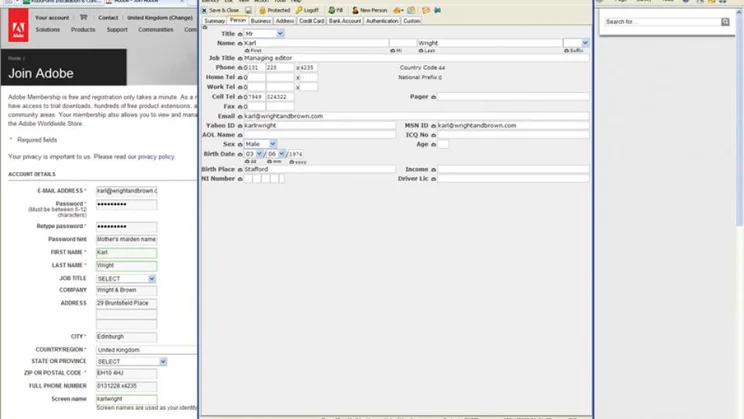
Roboform is a password and identity management application that remembers your passwords so that you don’t have to. Each time you log in to a site, the program – which installs itself as a toolbar on Internet Explorer – prompts you to create an identity for it. The next time you visit the site, you can tell Roboform to fill in your login details for you with a single click. It’s beguilingly simple and means you won’t have to bother remembering all those different passwords any more. As you’d expect, your Roboform identities are password protected, with a master password that you choose during setup. It’s also encrypted with the AES encryption standard, which the US government uses to protect classified data. Roboform will even generate random passwords made up of gibberish that’s practically impossible to guess. As well as logging into websites, Roboform can fill in web forms for you. Simply provide the Identity Editor with any details you’d like Roboform to be able to fill in – anything from your name and address to more sensitive information such as your bank or credit card details. Then, when you have to fill in a form, for instance when signing up to a website, click on your name on the toolbar and Roboform will fill in the fields for which it has data. The online password store allows you to save your identities Roboform’s server so that you can access and use them from any PC. This allows you to access your favourite sites while you’re at a friend’s house or in an internet café. This feature is still in beta, it worked in our test.
Some will be uneasy about storing all their personal details this way, but it’s the same information most of us enter into numerous online shops. Still, we were in two minds about Roboform: £20 isn’t cheap, and many browsers already offer password management functions. It’s very good at what it does, with online storage, auto-generated passwords and form filling convenience – but we would keep a paper backup of everything somewhere safe, too.
| Details | |
|---|---|
| Price | £20 |
| Details | www.roboform.com |
| Rating | **** |






