Login|Register
Log In

Remember me

Gigabyte GA-Z77-D3H review

  • Gigabyte GA-Z77-D3H
  • Gigabyte GA-Z77-D3H
  • Gigabyte GA-Z77-D3H
  • Gigabyte GA-Z77-D3H

Verdict:

A good value Ivy Bridge motherboard, but back up before you set up an SSD cache

Review Date: 1 Jun 2012

Price when reviewed: £80

Buy it now for: £76
(see more store prices)

Supplier: http://www.amazon.co.uk

Reviewed By: Chris Finnamore

Our Rating 5 stars out of 5

User Rating 5 stars out of 5

Powered by Reevoo

Gigabyte's GA-Z77-D3H is at the other end of the Ivy Bridge price scale from Asus' P8Z77-V Pro. This is a good-value motherboard for Intel's latest processors which doesn’t have quite so many fancy features, but still acquits itself well on the specification front.

Gigabyte GA-Z77-D3H

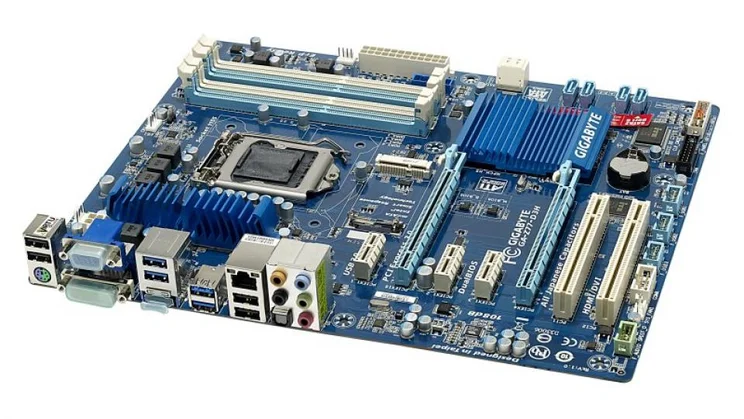
The motherboard has as much room for expansion as most people will need. You get two SATAIII and four SATAII ports, and you can create a RAID array across the four SATAII or two SATAIII connectors. There are two full-length PCI Express slots, but one of them only runs at x4 speed. This won't be a problem with most expansion cards, but could slow down a CrossFireX configuration. There are three PCI Express x1 slots, one of which will be blocked by a dual-slot graphics card, and a couple of PCI slots.

Gigabyte GA-Z77-D3H

The rear panel has a sensible four USB2 and four USB3 ports; the four USB2 are useful when installing Windows from a flash drive; Windows 7's installer doesn't support USB3 yet, so the four USB2 ports mean there's room for the installer flash drive as well as a keyboard and mouse. You get HDMI, DVI-D and VGA display outputs for Ivy Bridge's internal graphics, and you can run up to two monitors from the motherboard's graphics outputs.

Gigabyte GA-Z77-D3H

We had no problems with performance; the GA-Z77-D3H was as quick as Asus's more expensive P8Z77-V Pro in our benchmarks, managing a strong overall score of 117. There is some scope for overclocking in the motherboard's mouse-driven UEFI BIOS, which, despite its cheesy looks, is well laid out and easy to use. The overclocking options aren't as comprehensive as on Asus's board, though, and we couldn’t find a way to increase the voltage going to the RAM.

The motherboard's Z77 Express chipset supports Intel's Smart Response Technology, which uses a small-capacity SSD to cache frequently-accessed information to help speed up your system. The motherboard support miniature mSATA SSDs, which slot into a dedicated space on the motherboard between the processor socket and PCI slots. This saves you having to use a 3.5in drive bay for a normal-sized SSD in your PC's case.

To use Smart Response you have to set your motherboard's SATA controller to RAID mode, but, unlike on Asus's P8Z77-V Pro, doing so wipes your hard disk so you'll have to reinstall Windows. The manual mentions this, but only in the small print, which we missed to our cost. We would have preferred the option to add an SSD cache later without having to back up and start a Windows installation from scratch. Once we'd installed the cache our PC's boot time went from 47s to 14s, so it's certainly effective.

It's a shame about the tricky SSD cache setup, as otherwise Gigabyte's GA-Z77-D3H has a lot to offer for its price. If you're after an inexpensive start to an Ivy Bridge system, it’s a good buy.

Prev Next

User Reviews

Best Prices

Price comparison powered by Reevoo

£76
£82
£85
£85 £95
£93
£95
< Previous   Reviews : Motherboards Next >
Sponsored Links
User comments

How many slots again?

The review says this board has 3 PCI-Expressx16 (physical) slots, but the photographs show only two.

By derek_c on 11 Jun 2012

Only two slots

Sorry - my mistake. There are two full-length slots, one of which runs at x16 and one at x4 speed. Thanks for pointing out the error - that's now corrected.

By chrisexpertreviews on 11 Jun 2012

I am about to set this board up using a sandisk 128 gb sata SSD and a 1 TB drive for storage, From reading the review, before I format the drive with my OS I should switch my SSD mode to RAID, is this correct? And then I can format it and be good to go using smart response?

By stevenmac5 on 17 Sep 2012

Not reading hard drive

Just bought a Gigabyte GA-Z77-D3H but it isn't reading the hard drive. Has anyone else had this problem? - what to do???

By Taffy on 1 Nov 2012

Hi,

I'm looking at the nVideo GTX 660 Ti, which requires a dual-slot motherboard. As stated in the review, this one has two PCI-e slots, but one is x16 and the other, x4. Will that affect the performance of the card?

By OliverLacota on 15 Feb 2013

Graphics card advice

The GTX 660 Ti is a dual-slot graphics card in the sense that its cooling fan blocks off the expansion slot directly below the PCI-E x16 slot. It doesn't actually plug into that slot, so you don't need to worry about different slot speeds affecting performance. The only exception is if you're planning on running two graphics cards in SLI, but the difference will be tiny.

By Shopper_Tom on 15 Feb 2013

Thanks for responding to my previous question so quickly! I'm afraid I'm back with another, haha.

I'm a little confused about setting up Smart Response on an SSD (having never done it before) - is it just a one-off thing and then you can use your HDD without care, or is it something that has to be done every time you access your SSD (thus repeatedly wiping the HDD)?

I ask because on the PC I'm hoping to build, I want to have a 128GB SSD to have my OS and games I'm currently playing installed on, and everything else on a 2TB HDD. Would I set up Smart Response when starting the computer for the first time, then get everything installed appropriately on the SSD and HDD? Or does Smart Response mean I'm restricted to using one or the other?

Thanks again!

By OliverLacota on 18 Feb 2013

Leave a comment

You need to Login or Register to comment.

(optional)

advertisement

Award-winning Motherboards

Asus Z87-Pro review

Asus Z87-Pro

Category: Motherboards
Rating: 5 out of 5
Price: £157
Gigabyte Z87-D3HP review

Gigabyte Z87-D3HP

Category: Motherboards
Rating: 5 out of 5
Price: £107
Asus F2A85-M review

Asus F2A85-M

Category: Motherboards
Rating: 4 out of 5
Price: £56
Gigabyte F2A55M-HD2 review

Gigabyte F2A55M-HD2

Category: Motherboards
Rating: 3 out of 5
Price: £54
Asus M5A99X EVO R2.0 review

Asus M5A99X EVO R2.0

Category: Motherboards
Rating: 4 out of 5
Price: £103
Sponsored Links
 

advertisement

Also in this category...
 
Computer Shopper

advertisement


advertisement


Expert Reviews Printed from www.expertreviews.co.uk

Register to receive our regular email newsletter at http://www.expertreviews.co.uk/registration.

The newsletter contains links to our latest PC news, product reviews, features and how-to guides, plus special offers and competitions.