
To help us provide you with free impartial advice, we may earn a commission if you buy through links on our site. Learn more
- Windows 11 review: A new look
- Windows 11 review: Window management, virtual desktops and widgets
- Windows 11 review: Performance
- Windows 11 review: Battery life
- Windows 11 review: Gaming upgrades
- Windows 11 review: Less intrusive updates
- Windows 11 review: A smarter Store – with Android apps on their way
- Windows 11 review: Verdict

- Cleaner look and snappier feel
- Improved update management
- Android compatibility promised for the future
- Not available to everyone
- Slightly slower performance
- Some older features removed
Windows 10 was meant to be “the last version of Windows”. At its launch, Microsoft declared that future features and improvements would be added through incremental updates, meaning there would never be a need for Windows 11.
Six years later, the company has evidently changed its mind. Windows 11 brings a fresh version number and a fresh look to the platform, although it will still be arriving on your PC as a free upgrade via Windows Update, just like previous Windows 10 releases (and indeed the original release of Windows 10 itself).
While Insiders have been testing early code for several months, the final release date has been set for Tuesday 5 October. Not everyone will be offered the upgrade on that day – Microsoft plans a staged rollout lasting until mid-2022 – but if you’re keen to make the move you’ll be able to download the updater from the Microsoft website and kickstart your upgrade manually.
READ NEXT: Our guide to the best laptops to buy right now
Like its predecessor, Windows 11 comes in Home and Pro editions, and you’ll get whichever version corresponds to your current Windows 10 installation. The former should be fine for anyone not on a corporate network, while the latter includes business deployment and management features, as well as BitLocker device encryption (see here for the full feature breakdown).
You’ll only need to buy a licence if you’re looking to switch editions, or to install the new OS on a machine that isn’t already running Windows 10 – for example, one you’ve built yourself. Microsoft hasn’t yet shared pricing details for Windows 11, but you can buy an upgradeable Windows 10 Home licence from around £40, while Pro deals start at around £80.
You should also note that Windows 11 is finicky about what hardware it will run on. Officially the new OS only requires 4GB of RAM and 64GB of storage, but if your processor is older than an eighth-generation Intel Core CPU or a second-generation AMD Zen model, it’s unlikely to make the cut. Microsoft says this is for security reasons, which suggests that it doesn’t want people using older CPUs that are vulnerable to the Spectre and Meltdown hardware exploits. For the same reason, you’ll also need a motherboard with TPM and UEFI boot capabilities.
If your computer doesn’t make the grade, don’t panic: Windows 10 will be fully supported until October 2025, by which time it’s pretty likely you’ll have upgraded your hardware. But whenever you’re ready to install Windows 11, what should you expect?
Windows 11 review: A new look
As soon as the desktop appears it’s clear that the new Windows has a new personality. Actually, it looks a lot like Microsoft’s earlier Windows 10X project but, since that idea was binned a few months back, we can henceforth call this the Windows 11 look.
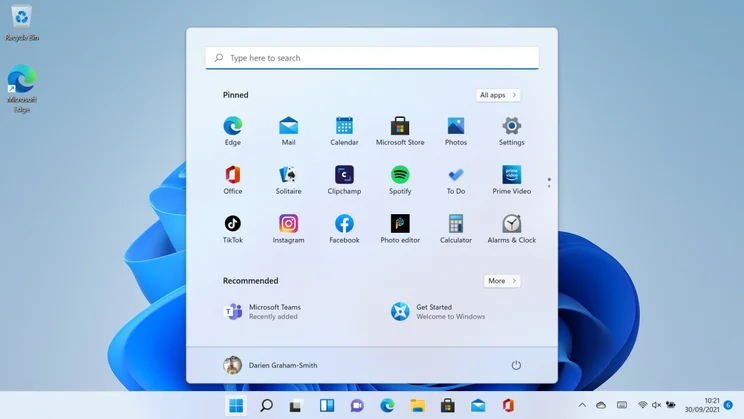
One change you’ll spot immediately is that the familiar pinned apps have moved from the left-hand side of the Taskbar to the centre. The Start button has changed too, from a flat design to a shiny blue square, and when you click it you’re greeted by a simplified app view, with a grid of pinned apps and a lower “Recommended” section for programs that have been recently installed.
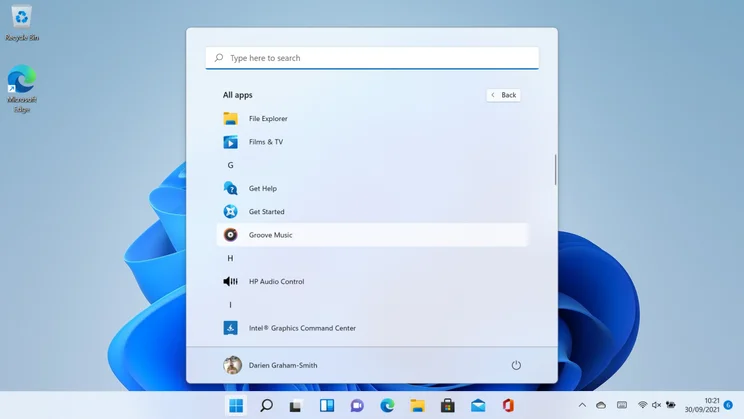
In my view, this is an improvement over the old design. It’s cleaner and easier to find what you’re looking for, and the icons are more generously spaced out, which will be helpful to touchscreen users and mouse-fumblers alike. The simplification has incurred some casualties, however: the full list of installed applications is now hidden away behind a very small “All apps” button, and the Live Tiles that were supposed to be a key feature of Windows 8 and 10 are completely gone.
The Timeline and Cortana icons on the Taskbar have both vanished, too, as have the features themselves. The Search field in Windows 10 has now been reduced to an icon, but it still does the same thing as hitting Start and starting to type.
Next to it there are new icons for desktops and widgets, which I’ll discuss below, plus an icon for Microsoft Teams Chat. This is now Windows 11’s standard messaging app: the Windows 10 Skype app survives the upgrade but it’s clear which way the wind’s blowing. Since you can initiate and receive Skype calls from within Teams, this isn’t a problem anyway. My only niggle is that the icon for Teams Chat looks extremely similar to Zoom, which might cause some confusion.
As you work with the OS you’ll notice numerous little visual updates, including a new system font (Segoe UI Variable) that’s designed to look cleaner at all sizes and weights, and more use of colour in icons and controls, making the whole thing feel a little warmer and more organic than Windows 10. Active windows gain a subtle tint too, while inactive ones remain grey, and I’m pleased by the return of rounded window corners, last seen in Windows 7. Microsoft does need to update the mouse controls to match this, though: right now if you want to resize a window from its corner you have to move the pointer past the window frame and drag from the point where the old square corner would have been.
For those using touch controls, the Start menu isn’t the only thing that’s become more spaced out. Icons and controls are generally less crowded throughout the operating system, and the network, volume and power controls have been combined into one pop-up panel, with a triple-size button in the system tray that’s impossible to miss. There are some less visible updates too, with new touchscreen gestures and support for haptic feedback with stylus devices.
Windows 11 review: Window management, virtual desktops and widgets
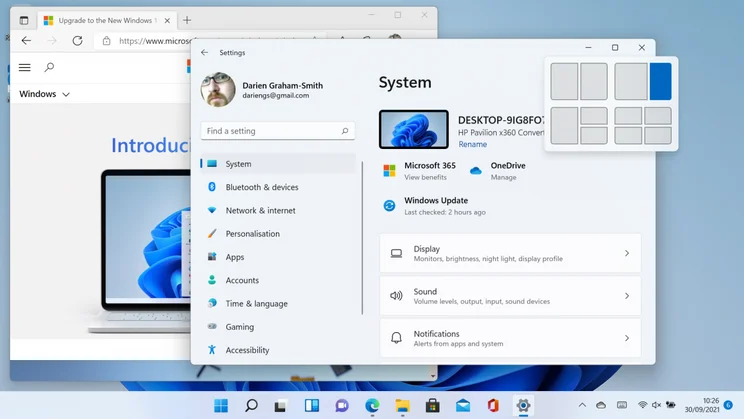
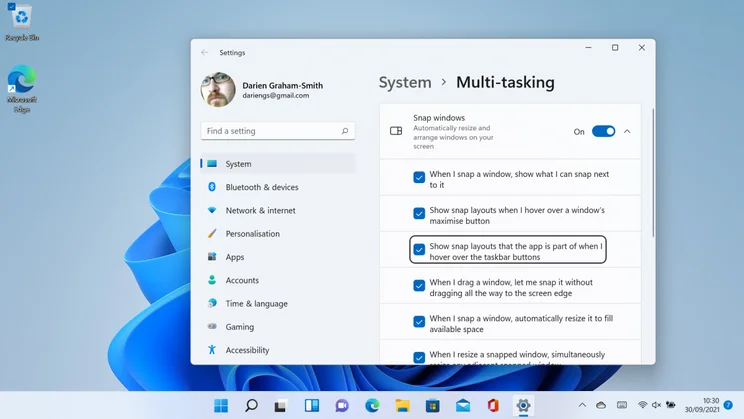
One thing that hasn’t visibly changed in Windows 11 is the standard trio of Minimise, Maximise and Close controls in the upper-right-hand corner of each window. However, if you hover over the Maximise icon (the middle one), you’ll now see a set of window layout options pop out below it. Clicking on a subdivision causes the window to instantly snap to a defined size and shape, and you can then click on thumbnails to choose additional windows to fill out the “Snap Group”.
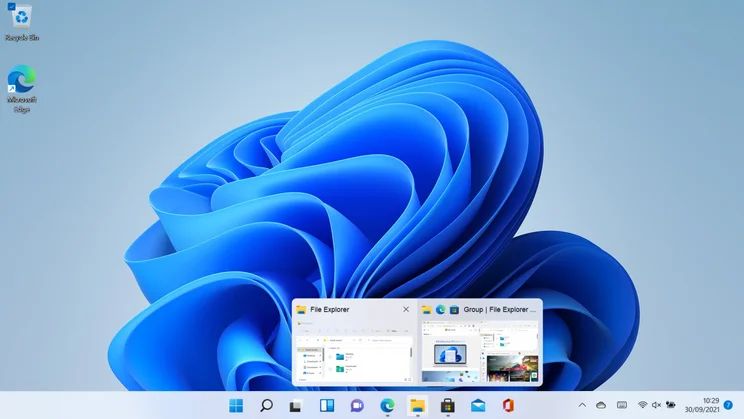
Admittedly, you can already do something like this in Windows 10, by dragging a window to the edge of the screen or using a Windows-plus-arrow-key shortcut. However, Windows 11 supports more complex layouts that split the screen into three or four sections, and it also shows Snap Groups as single items on the Taskbar, so you can minimise and maximise them as one.
If you frequently dock and undock a laptop, you’ll also be pleased to learn that Windows 11 now remembers how your windows were arranged or snapped the last time you connected to an external display, and tries to restore this arrangement – another small improvement that makes the whole experience feel slicker.
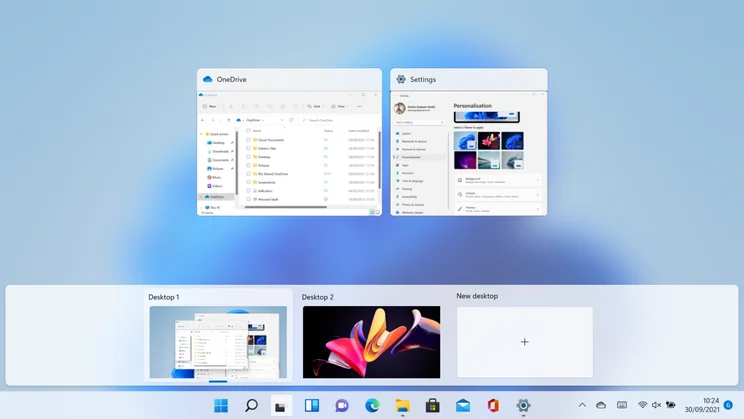
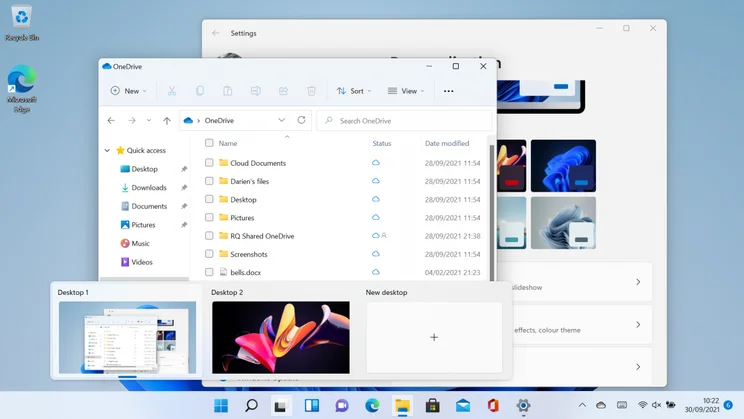
On the subject of desktops, the new desktops icon on the Taskbar aims to make it easier to work across multiple virtual spaces. Hover over it and live thumbnails of your desktops pop up instantly, along with a placeholder that you can click to create a new desktop. A similar view was available in Windows 10 but it was inconveniently located at the top of the Timeline view; Windows 11 puts it within easy reach. You can also now set different wallpapers for your different desktops, making it much easier to differentiate between your workspaces at a glance. Windows 10 users don’t entirely miss out, however, as this feature is due to be included in the forthcoming 21H2 update.
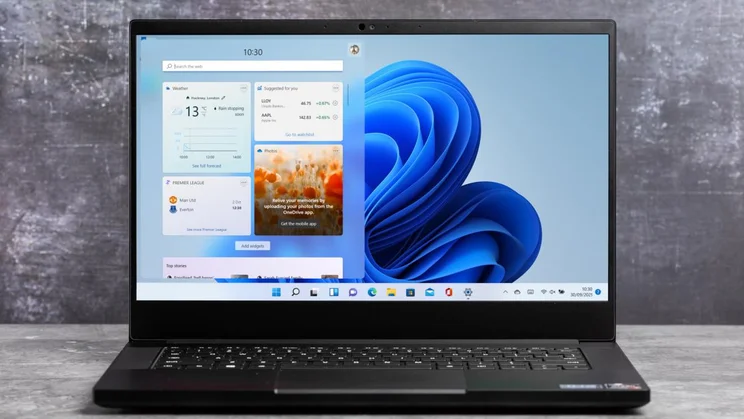
The last new desktop feature is widgets. Actually, “new” isn’t quite the word: Microsoft has been experimenting with widgets in various forms since the Windows Vista Sidebar. Indeed, the Windows 10 21H1 update added a little weather icon on the Taskbar that can be clicked to bring up news, sports and stock reports.
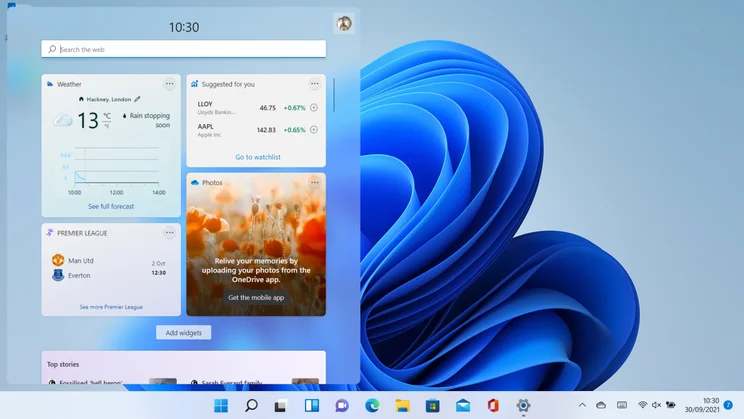
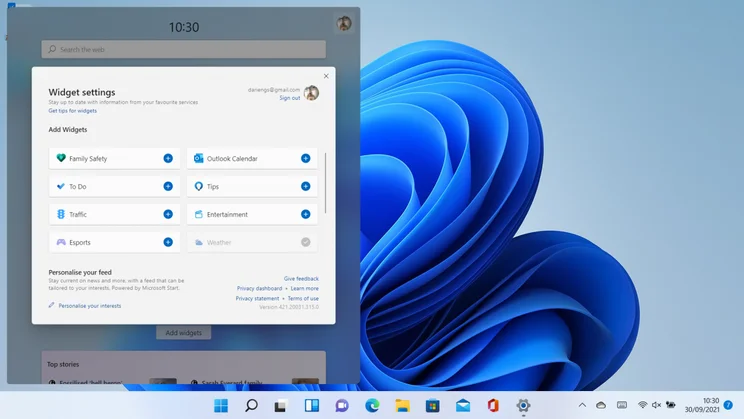
Windows 11 develops that concept. When you click the new widget icon (or hit Windows+W), a translucent overlay flies in from the left looking quite a lot like the Windows 10 feed. By default, it shows tiles for weather, sports results, news stories and photos plucked from the OneDrive mobile app, but you can rearrange or remove the various panels, and optionally add calendar events, traffic updates, Family Safety alerts and more.
I was disappointed, however, to find that Windows 11’s widgets live strictly inside this view – there’s no way to bring at-a-glance information out onto your desktop or Taskbar, as with Windows 10’s weather display. There’s also currently no way to add extra widgets, nor to change the size or location of the overlay. Even after 15 years of tinkering, Microsoft’s widget implementation still feels half-baked.
READ NEXT: The best desktop PCs to buy right now
Windows 11 review: Performance
One of my favourite things about Windows 11 is how snappy it feels. It boots quickly, and when you’re using the Start menu or Explorer, windows seem to spring up and respond to your input with impeccable promptness. Search results come up almost instantly, too.
These speed improvements are very much focused on the front end, however. To test underlying system performance, I ran our standard benchmark suite on a typical mid-range laptop: an HP Pavilion x360 convertible with a Core i5-8250U processor and 8GB of RAM. Running the latest edition of Windows 10 Home (21H1), this system achieved an overall score of 79 in our benchmarks; after I’d upgraded to Windows 11, the video-editing test proved 5% slower, while the image-editing and multitasking scores fell by around 7%, for an overall score of 74.
This is a shame, but it isn’t a difference you’ll notice in everyday use. The streamlined, snappier front end makes a bigger difference to the experience: there’s more of a sense of having your tools at your fingertips, and that can only make you more productive.
Windows 11 review: Battery life
Microsoft has suggested in blog posts that upgrading to Windows 11 can extend the battery life of a laptop, but it hasn’t given full details of how this is supposedly achieved. We do know one way: a new dynamic refresh rate feature automatically switches the display between 60Hz and 120Hz refresh rates depending on what you’re doing. However, this won’t do anything for laptops that don’t have 120Hz screens in the first place, which at this point in time is very nearly all of them.
To see whether there was any more general benefit, I carried out our standard video rundown test on my HP Pavilion x360 laptop, again comparing the most recent release of Windows 10 to the initial release of Windows 11. In Windows 10 it lasted precisely 7hrs 30mins; after the upgrade this went up to 7hrs 40mins. That’s hardly a huge benefit, but it could conceivably make a difference if you really need to finish off a document before your computer goes to sleep – and hey, it’s free.
Windows 11 review: Gaming upgrades
For gamers, Windows 11 comes with DirectX 12 Ultimate – the latest and most powerful version of Microsoft’s gaming API, which already powers the Xbox Series S and X consoles.
The new OS inherits a few additional tricks from the Xbox, too: one is the Auto HDR feature, which uses machine learning to render HDR graphics in games that weren’t originally designed for it. It’s a neat trick that provides a free visual upgrade for a huge range of titles – as long as you have an HDR-compatible monitor.
Another incoming technology is DirectStorage, which improves gaming performance by streaming compressed graphical data directly from your SSD to the GPU, reducing the load on your system RAM and CPU resources.
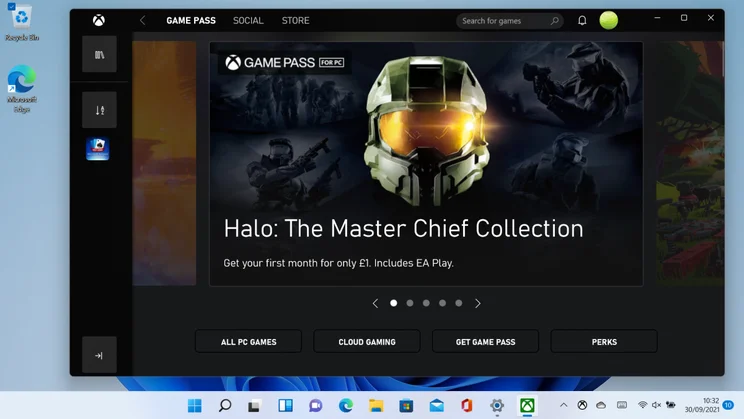
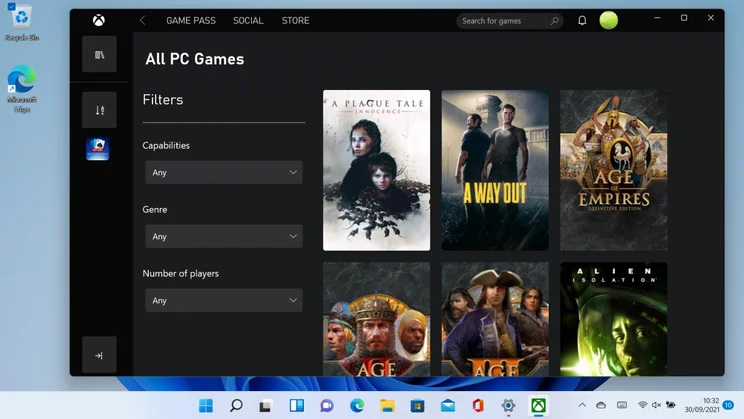
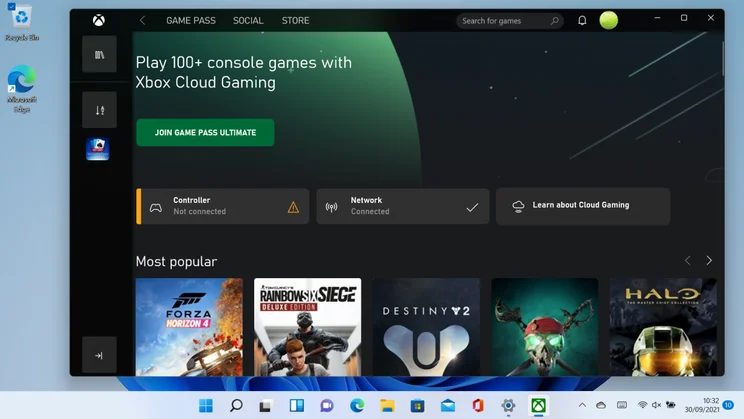
To help you take advantage of these new features, Windows 11 now comes with the Xbox Game Pass app preinstalled, so Game Pass Subscribers can simply fire up the client and start gaming. You don’t even necessarily have to wait for a game to download – the Xbox Cloud Gaming feature lets you stream dozens of games, including Gears 5, Halo 5, No Man’s Sky and The Sims 4. In this way you can enjoy high-quality gaming even on a lightweight laptop, although streaming naturally requires a decent internet connection (the official minimum requirement is 20Mbits/sec).
While this is all good stuff, I can’t help noticing that DirectX 12 Ultimate is already available on Windows 10 and, regardless of which OS version you’re using, you’ll need a suitably powerful graphics card to take advantage of all of its features.
Auto HDR can also be enabled on the older OS, and Microsoft even plans to backport DirectStorage, although it suggests the full performance benefit will only be attained on Windows 11. The Game Pass and Cloud Gaming apps, meanwhile, can be installed from the Microsoft Store, so while Windows 11 is conveniently designed for gamers, there’s nothing here that you can’t get on Windows 10.
Windows 11 review: Less intrusive updates
While Microsoft may have cooled on the idea of an everlasting OS, it intends for Windows 11 to evolve over the coming years, with periodic feature updates in addition to regular monthly security patches.
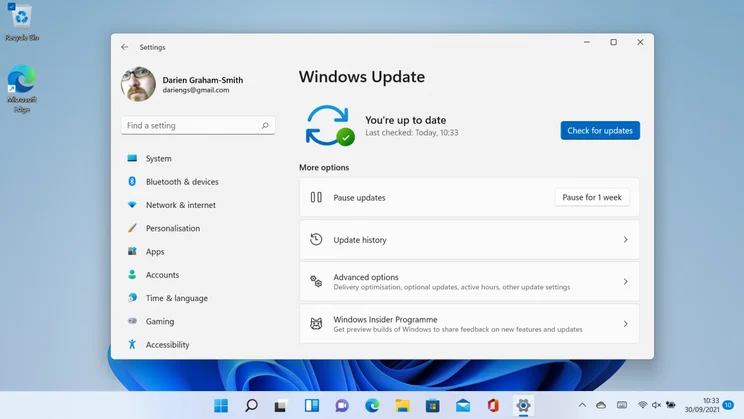
However, the process should be less intrusive than before. The Windows Update engine in Windows 11 is designed to download only the specific code components that are needed on your machine – Microsoft claims this could reduce the payload size by as much as 40% – and, where possible, updates will be installed silently in the background while you’re away from your PC.
When a restart is required, Windows 11 now gives an estimate of how long it will take, so you can decide whether to reboot right away or wait until later. Based on early experience, I’d say this errs on the side of caution: after the initial OS installation Windows 11 warned me that it might take five minutes to install the first round of updates but, in fact, it took a little under 40 seconds.
Big updates will come around less frequently, too. Where Windows 10 received two major releases a year, the new OS is moving to an annual schedule. This is probably a smart decision; it’s debatable whether the rate of change in Windows 10 was really a good thing for many people. For businesses wanting even greater stability, Microsoft has also confirmed that the next LTSC (“long-term servicing channel”) release of Windows will move to the Windows 11 code base and will be supported for five years after release.
READ NEXT: The best budget monitors to buy
Windows 11 review: A smarter Store – with Android apps on their way
Believe it or not, the Microsoft Store has now been with us for a full decade, having made its debut in Windows 8. It’s never exactly seemed to catch fire, though; I’ve certainly never heard of anyone choosing it as their first stop for content.
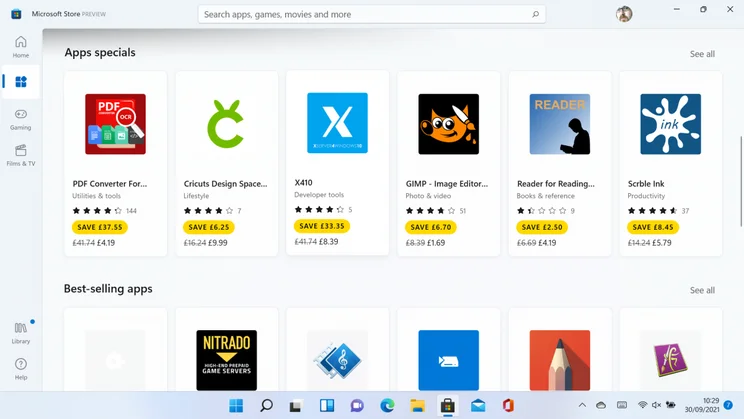
In Windows 11 it gets a revamp and, Microsoft will hope, a new lease of life. A completely redesigned front end showcases new apps and integrates your purchased videos neatly with the Films & TV app, while new browser integration aims to let you discover apps on the web, then click to install them through the Store. We’ve yet to see this in the wild, so it will be interesting to find out how seamlessly it works, especially with non-Microsoft browsers.
There’s a broader range of apps to choose from, too. When the Store was originally introduced in Windows 8, it contained only apps written using the new portable, sandboxed UWP framework (known at the time as Metro). Now, Microsoft has opened up the Store to support all types of app, including progressive web apps that run in a browser, Java programs that run in a virtual machine and good old-fashioned EXE files. Even third-party storefronts such as the Epic Games Store have been welcomed in and, to encourage as much content onto the Store as possible, Microsoft has also recently slashed its commission rates.
Intriguingly, Microsoft also intends for the store to start distributing Android apps, which will run alongside regular Windows apps courtesy of an under-the-hood technology layer (similar to the existing Windows Subsystem for Linux). Since many Windows laptops now come with touchscreens, this could be a clever way to open up a whole new universe of apps and games at minimal cost, as Google has already done with its Chromebooks.
The jury’s still out on this one, though. For one thing, the Android subsystem isn’t quite ready for prime time; statements from Microsoft suggest Android apps will appear in the Store in early or mid-2022. It’s also noteworthy that Microsoft will be sourcing Android apps through the Amazon Appstore, rather than partnering directly with Google. This shouldn’t grievously limit the range of apps available, but it could have implications for updates and for cross-platform purchase sharing.
Windows 11 review: Verdict
When Microsoft first announced that Windows 11 was on its way, I wondered whether the new version number reflected some innovative reworking of the core platform. It didn’t: fundamentally, this is still the Windows we know. Aside from the updated visuals, 99% of your interactions with the new OS will be identical to how they were in the previous release.
That’s not necessarily a bad thing. It means that anyone who’s familiar with Windows 10 will need little or no training or assistance to get going with 11. And, while most of the changes are minor, they’re almost all positive; together, they add up to a refined, sharpened-up refresh of the familiar Windows environment.
There are a few disappointments along the way, and not just for those of us who had dreamt of a more ambitious upgrade. After years of being encouraged by Microsoft to love Cortana, Live Tiles and the Timeline view, some might be irked to see those features now ditched entirely. And while we didn’t expect the new OS to bring speed gains, it’s a pity to see that number-crunching performance has actually declined.
Despite all that, though, Windows 11 is a definite hit. Practically and aesthetically it’s a step up from Windows 10, with extra gaming advantages, better update management and, at last, bright prospects for the Store. With the promise of Android compatibility to come, Windows 11 could even be the release that finally turns Windows into a viable tablet OS.
And so, if you’re on a system that supports it, we recommend you don’t wait around for the upgrade to come down the line automatically. Do yourself a favour, download the updater and move up to Windows 11 as soon as you can: it might not be the radical reinvention some of us had hoped for, but it’s unquestionably the best version of Windows for modern hardware.






