
To help us provide you with free impartial advice, we may earn a commission if you buy through links on our site. Learn more
- Best budget monitor: At a glance
- How we test budget monitors
- The best budget monitors you can buy in 2025
- 1. AOC Gaming 27G4XE: The best budget monitor
- 2. BenQ GW2490: The best monitor under £100
- 3. ASUS MB169Q/MB169CK: The best portable budget monitor for USB-C laptops
- 4. AOC Q27V4EA: The best budget 1440p monitor for working from home
- 4. Iiyama ProLite XUB3293UHSN-B5: Best budget 4K monitor
- 5. Alienware AW2725D: Best budget OLED monitor for gamers
- How to choose the best budget monitor for you
- We’ve tested hundreds of monitors over the years, from office monitors to high-end gaming screens
- Every monitor we review is subjected to a battery of technical tests to assess a variety of performance metrics, from peak brightness and contrast to colour accuracy and gamut coverage
- Our favourite budget monitor is the AOC Gaming 27G4XE, a £125 monitor that impressed in our tests and packs in plenty of features for the cash
- If you’re on an even tighter budget, our pick is the BenQ GW2490 at £85. It isn’t quite as feature-packed, but its image is better than it has any right to be at this price
- Read on to find out which other budget monitors are worth considering

Not too long ago, budget monitors were known for poor colour accuracy, wobbly stands and hideous designs. As our favourite budget monitor – the AOCGaming 27G4XE – proves, however, times have changed. Today, you can buy a quality panel with a premium look that’s packed with features for well under £200.
The trouble is, there’s a huge range of products out there to choose from. To help you pick the best budget monitor for you, we’ve put dozens of displays through our thorough testing regime, measuring their performance with specialist hardware and trying them out in the real world to get a true feel for their performance and ergonomics.
Read on for full details of how we test budget monitors. Below that you’ll find our pick of the best budget monitors that have come through our labs. And, to help you make an informed decision, our buying guide at the bottom of the page explains what to look out for before you splash out.
Best budget monitor: At a glance
- Best overall: AOC Gaming 27G4XE | £125 | Check price at Amazon
- Best under £100: BenQ GW2490 | £85 | Check price at Amazon | Currys
- Best budget 4K monitor for working at home: Iiyama ProLite XUB3293UHSN-B | £350 | Check price at Amazon
- Best budget OLED for gamers: Alienware AW2725D | £450 | Check price at Amazon
- Best budget portable monitor: ASUS MB169Q/MB169CK | £99 | Check price at Amazon
How we test budget monitors
We put every monitor through a combination of real-world tests and in-depth performance measurements. We start by setting up the monitor and assessing build quality, stand adjustability and the number and type of ports. We weigh up how satisfactory all of these factors are, and how they compare to other similar monitors.
Then, for each monitor, we run a series of tests that measure the panel’s colour accuracy, gamut coverage, peak brightness/contrast and motion handling. Motion handling tests are done using BlurBusters’ suite of monitor testing tools; for the rest, we use an X-Rite i1Display Studio colorimeter and DisplayCal software to generate our results.
You can always find the results of our in-house tests in our full-length monitor reviews, along with our conclusions about the overall quality and value of each monitor – and our recommendation as to whether you should buy it or not.
READ NEXT: Best monitors for home offices
The best budget monitors you can buy in 2025
1. AOC Gaming 27G4XE: The best budget monitor
Price when reviewed: £125 | Check price at Amazon

- Excellent motion fidelity
- Great HDR support
- Superb value
- Wobbly stand
- Poor speakers
Reviewed by Alun Taylor
When you buy a budget monitor, there are usually one or two areas where you have to make a compromise, and that’s certainly the case with the AOC Gaming 27G4XE. Its stand is cheap and the speaker system is disappointing.
Fortunately, it ticks the boxes in all the right areas. Image quality is great from its 27in 1080p IPS panel. We found it produced 96.9% of the DCI-P3 colour gamut in our testing, registered a peak brightness of 314cd/m2 and it performed extremely well in colour accuracy tests.
Perhaps more importantly though, given its target market, is that motion handling is absolutely beyond reproach. Indeed, when our reviewer, Alun Taylor wrote his assessment, he was so impressed that he said he was “yet to encounter significantly better motion fidelity on IPS or VA gaming panels costing many times more”.
No doubt, this is a superb all-rounder. It’s great for gamers on a budget and it’s a pretty good office monitor as well. For the low price of £125, it’s a stunning bargain.
Read our full AOC Gaming 27G4XE (2024) review
Key specs – Screen size: 27in; Resolution: 1,920 x 1,080; Screen technology: IPS; Video inputs: 2x HDMI 2.0, 1 x DisplayPort 1.4; Speakers: Yes; Refresh rate: 180Hz

2. BenQ GW2490: The best monitor under £100
Price when reviewed: £85 | Check price at Amazon

- Outstanding value
- 100Hz refresh rate
- Good colour coverage
- Very basic stand
- Limited ports
Reviewed by Alun Taylor
The BenQ GW2490 delivers such astounding value for money that it’s hard to imagine anyone else getting anywhere close to it when it comes to sheer bang per buck. For a price well below £100 it has all the boxes ticked, from a 100Hz 24in IPS panel that’s both G-Sync and Freesync enabled, to reasonably good image quality. In our technical tests, its 1,920 x 1,080 panel delivered colours with decent accuracy levels and a solid contrast ratio of 1,118:1.
It isn’t perfect. Brightness only reaches 228cd/m2, but that’s fine for indoor use, and the stand it comes with is limited in its adjustability, offering only forward and backward tilt. However, there is a 100 x 100mm VESA bracket so you can add your own, more adjustable arm if that’s an issue.
Overall, though, these are small complaints given how little BenQ is asking for this highly capable monitor. It’s a brilliant budget screen that simply has no right being this cheap.
Read our full BenQ GW2490 review
Key specs – Screen size: 24in; Resolution: 1,920 x 1,080; Screen technology: IPS; Video inputs: 1 x DisplayPort 1.4, 2 x HDMI 1.4; Speakers: 2 x 2W; Refresh rate: 100Hz

3. ASUS MB169Q/MB169CK: The best portable budget monitor for USB-C laptops
Price when reviewed: £99 | Check price at Amazon
- Super cheap
- USB-C and HDMI inputs
- Lightweight and portable
- Not very bright
- Plasticky build
- Limited colour palette
Reviewed by Sasha Muller
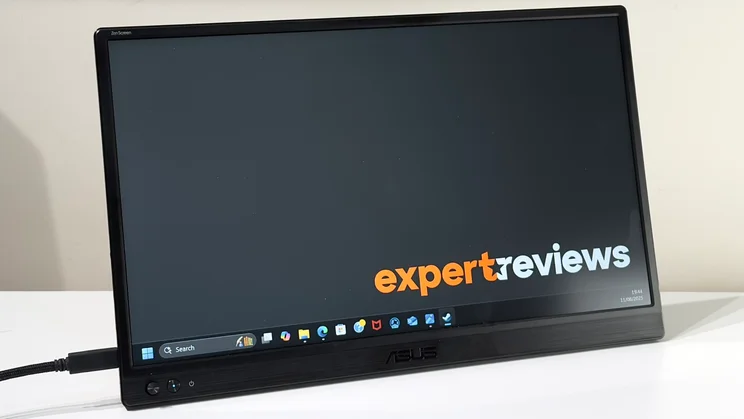
Monitors don’t get much more convenient than the Asus MB169Q/MB169CK, or much better value. For less than £100, you’re getting a second screen that you can chuck in a bag and set up anywhere to double your working area.
The resolution is Full HD (1,920 x 1,080), the size is a generous 15.6in across the diagonal, and when we tested it we were impressed with its flexibility and features – in particular, what comes in the box. Not only do you get the monitor itself, but Asus also throws in HDMI and USB-C cables and a padded sleeve to protect the monitor when it’s in transport.
Plus, it has a built-in kickstand, so you have pretty much everything you need to set up a multi-screen workstation on the move. The only caveat is that image quality isn’t the very best – we measured peak brightness at 205cd/m2 while colour coverage from the screen’s IPS is a mere 62% of the sRGB gamut. For this little cash, though, it’s perfectly serviceable and represents stunning value.
Read our full ASUS MB169Q/MB169CK (2025) review
Key specs – Screen size: 27in; Resolution: 1,920 x 1,080; Screen technology: IPS; Video inputs: 1 x USB-C, 1 x HDMI 2.1; Refresh rate: 60Hz

4. AOC Q27V4EA: The best budget 1440p monitor for working from home
Price when reviewed: £160 | Check price at Amazon

- Large, accurate IPS panel
- Stylish design
- Sharp 1440p resolution
- Stand isn't very adjustable
- Light on features
Reviewed by Will Georgeadis
The AOC Q27V4EA is a low-cost 27in 1440p monitor that, despite the price, actually looks pretty sleek. It’s a great performer as well, and it’s this that earns the Q27V4EA its place here.
In our lab tests, the monitor produced 88.7% of the sRGB colour gamut in default mode with little colour variance, a contrast ratio of 850:1 and peak luminance of 250cd/m². These figures are good for a budget monitor, and we found colours looked natural and content appeared bright, even in well-lit environments.
With a response time of 4ms G2G, a refresh rate of 75Hz and AMD FreeSync support, moreover, casual gamers will find that the Q27V4EA is great for a couple of rounds of Apex Legends after work. If you can deal with a stand that doesn’t have much scope for adjustability, the Q27V4EA is a lovely all-purpose monitor for anyone who works and plays in the same place.
Read our full AOC Q27V4EA review
Key specs – Screen size: 27in; Resolution: 2,560 x 1,440; Screen technology: IPS; Video inputs: 1 x HDMI 2.0, 1 x DisplayPort 1.4; Refresh rate: 75Hz

4. Iiyama ProLite XUB3293UHSN-B5: Best budget 4K monitor
Price when reviewed: £389 | Check price at Amazon

- Sharp 4K IPS panel
- KVM support
- Decent built in speakers
- No HDR support
- Ni PiP or PbP function
Reviewed by Alun Taylor
Proving that 4K screens don’t have to cost the Earth, the Iiyama ProLite XUB3293UHSN-B5 ticks all the boxes you need in a top quality office monitor. It has a large 32in IPS panel that’s not only bright – we measured it at 352cd/m2 in our testing – but also very colourful, covering 90.3% of the DCI-P3 colour space, while the contrast ratio of 1,046:1 delivers a solid, punchy image that’s impressive at this price.
This is no gaming display – its refresh rate is a mere 60Hz – and it doesn’t support adaptive sync. However, we do like its KVM features, which let you have two sources connected at once and switch between them seamlessly, while having only one mouse and keyboard connected.
We were also impressed by the comparatively powerful speakers and the adjustable stand, both of which round off a winning package.
Read our full Iiyama ProLite XUB3293UHSN-B5 review
Key specs – Screen size: 32in; Resolution: 3,840 x 2,160; Screen technology: IPS; Video inputs: 1 x USB Type-C, 1 x DisplayPort 1.4, 1 x HDMI 2.0; Refresh rate: 60Hz

5. Alienware AW2725D: Best budget OLED monitor for gamers
Price: £449 | Check price at Amazon
- Crisp, blur-free 280Hz gaming
- Great colour accuracy
- Ample brightness for SDR and HDR
- Poor text clarity
- No USB-C input
- Black level suffers in bright rooms
Reviewed by Sasha Muller
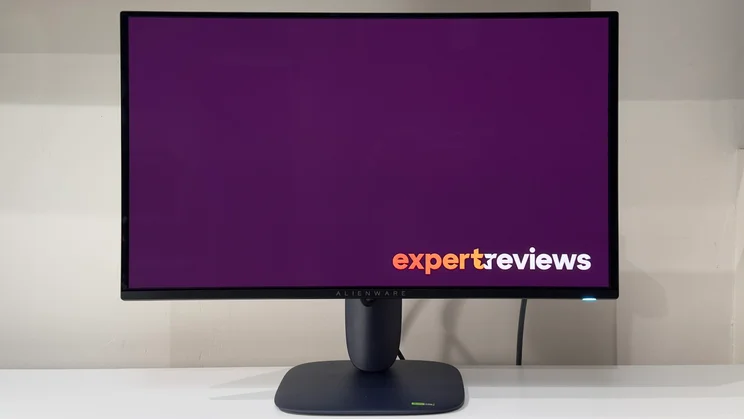
The Alienware AW2725D is the best value OLED monitor we’ve come across and, boy, do you get a LOT of monitor for your money. Not only does it have a bright, vibrant and colour accurate OLED panel, but it also refreshes at up to 280Hz and the resolution is a sharp 2,560 x 1,440.
This is a monitor that’s great for gamers looking for the best possible performance at a low price. HDR performance is stunning, and that high refresh rate means there’s little to no motion blur during fast-paced action. It isn’t the best monitor to use for work – our reviewer wasn’t particularly impressed with text clarity – but if it’s an OLED display you want, you won’t get better monitor for less money.
Read our full Alienware AW 2725D (2025) review
Key specs – Screen size: 27in; Resolution: 2,560 x 1,440; Screen technology: OLED; Video inputs: 2 x HDMI 1.4, 1 x DisplayPort 1.4; Speakers: No; Refresh rate: 280Hz
How to choose the best budget monitor for you
What monitor size and resolution should I choose?
A small budget no longer limits you to a small monitor. You’ll now find plenty of options between 22in and 27in – and a few even push past the 30in mark.There’s more than just panel size to think about, though – resolution is a key factor.
For instance, while a 22in monitor with a Full HD resolution will look pin-sharp, a 27in screen with the same resolution will look softer and more pixellated due to the lower pixel density, usually expressed in the number of pixels per inch (PPI). To put that in numbers: a 22in Full HD (1,920 x 1,080) monitor delivers pixel density of 100ppi, while a 32in Full HD panel is only 69ppi – 30% less.
We’d suggest sticking to 90ppi or above: a 24in Full HD monitor hits the sweet spot and similarly a 27in-32in 1440p (2,560 x 1,440) panel looks glorious, too. You can easily calculate the PPI with the help of a calculator or through this website.
One word of caution, though. Some older (read: rather elderly) computers with integrated graphics may not support higher-resolution panels. If your computer is a bit long in the tooth, then it may be wise to stick to Full HD, or at the very least check before you buy.
READ NEXT: Best 1440p monitors
Which type of panel is best?
There are lots of different types of LCD screens, but for a budget monitor, you want to look out for either IPS/PLS (in -plane/plane-to-line switching) or a vertical alignment panels (VA, AVA or MVA). OLED (organic) screens are slowly coming down in price but you’ll still pay more than other screen types.
VA panels typically have narrow viewing angles, but that’s not usually a problem for a monitor, where you’re sat directly in front of it. They tend to have much higher contrast levels than IPS screens but they tend to have slower response times and so suffer from a greater degree of motion smearing than IPS displays
IPS/PLS screens generally have decent colour accuracy and good viewing angles, but contrast typically isn’t as good as it is on VA panels or OLED monitors and they’re not generally the best for gaming, either.
OLED monitors are typically more vibrant than other technologies and perform better with HDR movies and games thanks to self-emissive pixels. However, they do also have downsides. Text can look coarser on an OLED screen and the panels can suffer from a phenomenon known as burn-in, where ghost images of static menus can remain on-screen permanently.
READ NEXT: Best 1080p monitors
Which other features should you consider?
Display inputs
The connection standards of choice for budget monitors are HDMI 2.1 and DisplayPort 1.4 and, for most purposes, any combination of these inputs should suffice. Despite the prevalence of USB-C across laptops, however, that connection standard has yet to make it across to the very cheapest monitors.
USB-C connections do have plenty of benefits, though, and we think it’s worth paying a little extra for. The main benefit is the ability to charge a laptop at the same time as displaying an image onscreen. This means you can connect your laptop with just one cable, keeping your desk clear of cable clutter.
Adjustable stand
Having an adjustable stand will you give you much more flexibility in your working setup, and you won’t need to stuff books or magazines underneath the monitor raise it to a comfortable height.
It’s not unusual to find a budget monitor with tilt and height adjustment. It’s not impossible to find one that can swivel and rotate, too, even if it is more of a rarity. But a budget monitor with vertical adjustment in addition is a rarity.
USB hub connectivity
Some budget monitors are equipped with a built-in USB hub, which is a genuinely useful thing. This works by ferrying the USB signal from peripherals connected to the monitor (such as mice and keyboards) to your laptop, either via a single USB-B to A cable or USB-C.
This makes it simpler and easier to connect and disconnect your laptop to a monitor at the start and the end of every day, and it also means you can expand the number of ports available on your machine.
Speakers
Bear in mind that built-in speakers are almost always terrible on budget monitors – they’re usually underpowered, tinny and don’t go particularly loud, so this is not a feature worth putting on your wish list.
You’re better off making sure your monitor comes with USB hub connectivity or USB-C and purchasing a cheap set of USB speakers – or simply using your laptop speakers.


