
To help us provide you with free impartial advice, we may earn a commission if you buy through links on our site. Learn more
- Gloriously sharp text and images
- 3:2 aspect ratio is brilliant for productivity
- Eye care features work well
- Colour accuracy could be better
- Motion clarity is middling
Marketing is everything. Take the BenQ RD280UG, for instance. If I told you it was designed as a programming monitor, you’d be forgiven for instantly clicking the back button. If you’re in the market for a monitor for your home office, however, you really should stay right here.
That’s because, while the RD280UG’s designers were primarily focused on the needs of coders and developers, those very same priorities are what make it such a great monitor for serious work. Ergo, if you’re someone who prizes work over play, and eye comfort over eye-popping pizzazz, it’s exactly the type of monitor you want on your desk.
What do you get for the money?
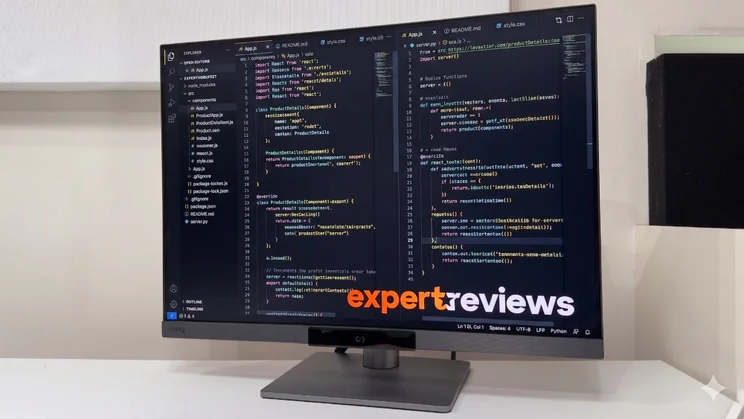
The RD280UG is the second generation of BenQ’s 28.2in programming monitor; it costs £600 – £50 more than its predecessor – and it brings with it several improvements over the original. One thing that hasn’t changed, however, is that it still uses a 3:2 ratio panel with a pin-sharp 3,840 x 2,560 pixel resolution.
For anyone who’s grown used to 16:9 and ultrawide monitors, it’s a refreshing change: the RD280UG presents a large, crisp desktop that works well in both portrait and landscape orientation. If you’re old enough to remember the days of 4:3 CRT monitors, you’ll probably feel right at home.
In practice, though, it feels pretty novel in 2026. The extra vertical height is designed to fit in several extra lines of code, but that means it’s also great for spreadsheets, documents and presentations. And it’s great for putting documents side by side, too – it’s like having two smaller portrait displays strapped together rather than the two cramped-feeling squares you get on a 16:9 screen.
To answer some of the criticisms of the previous model, BenQ has equipped the RD280UG with an upgraded IPS panel. The refresh rate has doubled from 60Hz to 120Hz, and while it doesn’t use one of LG’s official IPS Black panels, it does employ similar panel technology to bump up the contrast ratio from 1,200:1 to 2,000:1.
The result? The slightly greyish black level now looks a bit, well, blacker for want of a better word, and the 120Hz rate is easier on the eye for long working days. This also means it’s just that bit more responsive when you do decide to fire up a game, and AMD FreeSync Premium certification goes hand in hand with unofficial Nvidia G-Sync support. If your GPU can handle the 4K+ resolution, that is.
Is it easy to use?
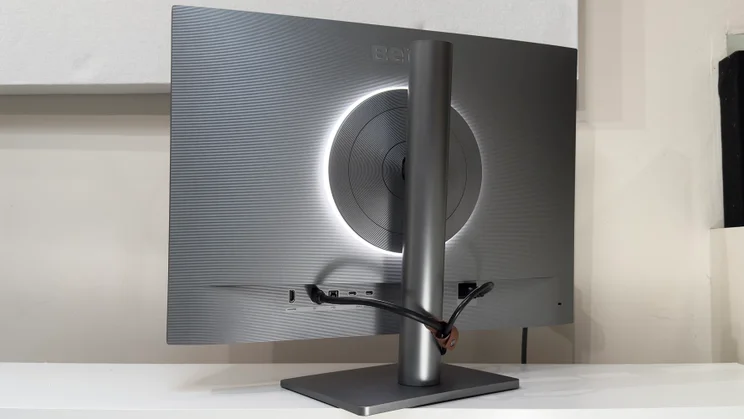
It’s not often you pay too much attention to the back of a monitor, but that’s where you’ll find one of the most unique aspects of the RD280UG’s design: the MoonHalo.
The MoonHalo is an integrated ring light on the rear of the monitor, designed to subtly illuminate the wall behind a monitor or display – a technique known as bias lighting. This is something that brings proven benefits. It reduces eye strain in low light conditions as there’s less of a contrast between the display and the wall behind it and, contrary to what you might expect, also boosts the perceived contrast, as your eyes no longer adjust to the darker background. The result is a noticeably punchier image due to the perception of deeper black levels and higher contrast.
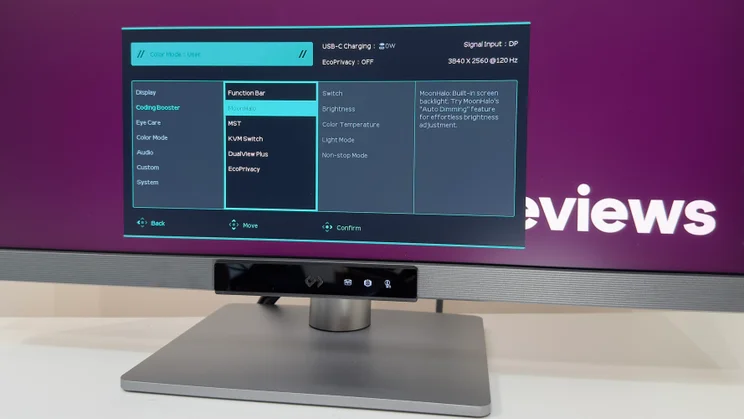
The MoonHalo doesn’t make its debut on the RD280UG – it’s present on other BenQ models – but here it works in conjunction with an integrated sensor that detects both ambient light levels and the colour temperature. Enable the RD280UG’s various eye care settings, and it can automatically adjust the brightness and colour temperature of both the onscreen images and the MoonHalo light at the rear, which is able to cycle through from a blueish white light to a warmer, more orangey tone.
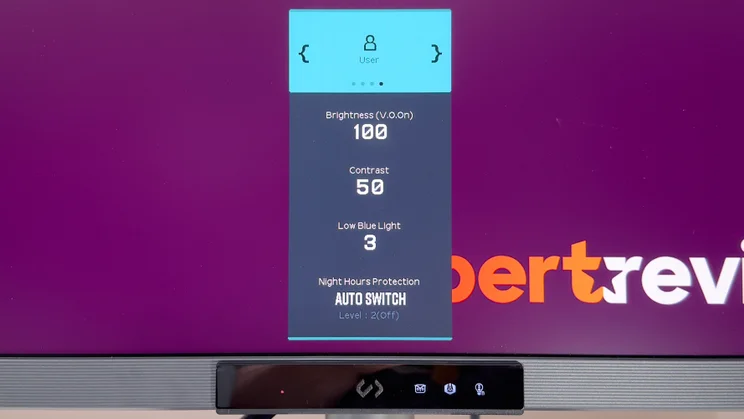
It seems silly to say it, but one of my favourite features of BenQ’s RD monitor family is the Function Bar – and more precisely, the hotkey. The former conceals the light sensor, but also shows you at a glance which of the various automatic picture optimising settings are active. Tap the little embossed icon at the centre of the bar, and it pings up a quick menu. Tap the button again, and you can cycle quickly through the various picture modes. It’s as quick and elegant a solution for rapidly switching between modes as I’ve seen on any monitor.
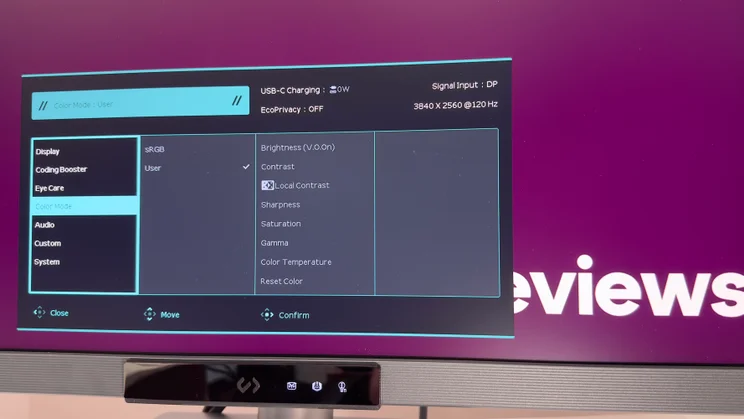
These picture modes are where you really start to see the RD280UG’s coding and productivity focus. While the User mode can be set up to prioritise natural colour reproduction, the RD280UG’s other modes favour eye comfort and legibility over accuracy, boosting contrast or lowering brightness where necessary.
There are picture modes for working in light mode environments – black text on white or light backgrounds – or in dark mode ones, which use white or coloured text on dark backgrounds. There’s also a Paper Color mode optimised for reading text that lowers the brightness and contrast to make for a more comfortable, e-paper-like experience. Quite understandably, these modes aren’t colour accurate – but for people who work long hours poring over text on a screen, comfort beats tonal accuracy.
Other features, such as Night Hours Protection, tie the various eye care features together and automate them. When the lights go down, the RD280UG can automatically enable its low brightness mode, dimming the screen right down, boosting contrast for improved legibility, and automatically managing the brightness levels of both the panel and the MoonHalo.
The key thing here is that all of these features are easily accessible. The on-screen display and four-way joystick under the monitor’s lip are a quick and intuitive combination. The menus are clear and sensible, with nice large text and an uncluttered design, and once you’ve got the various modes tweaked to your liking, you can either bounce between the modes with a prod of the hotkey, or just stick in one mode and let the light sensor manage the rest.
How good is the build and connectivity?
The build quality and design is solid and utilitarian. The dark and lighter charcoal grey plastics are finished with a striped texture at the rear, and while it’s anything but slimline it feels reassuringly well put together. The adjustable stand has a big stable base and it moves smoothly through its range of movement. The generous 150mm of height adjustment is married with 90 degrees of pivot in either direction and plenty of tilt and swivel, too.
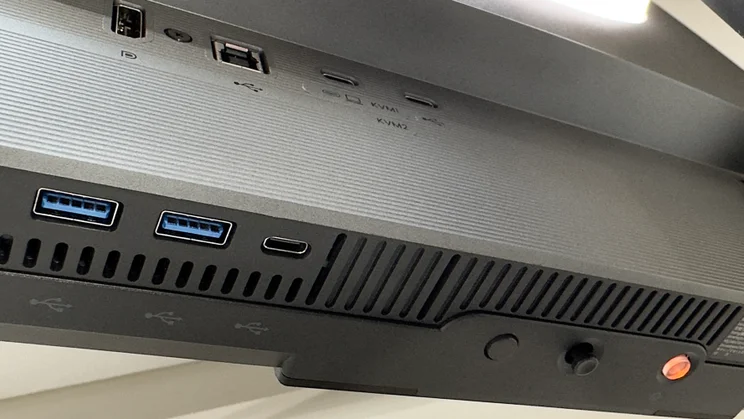
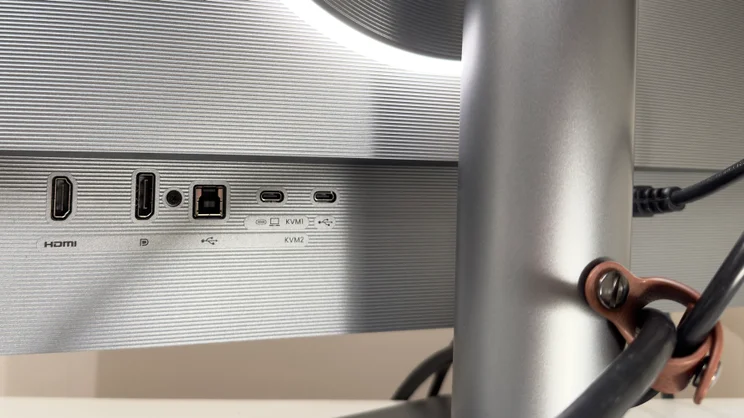
The RD280UG is clearly designed for people who tend to bounce between a desktop PC and laptop – or just multiple machines. It has an integrated KVM switch, which allows you to easily connect peripherals to the monitor’s USB ports and share them between two machines. The only downside here is that those ports are positioned under the monitors’ front edge – easily accessible, but not ideal if you want to leave things connected all the time.
The upstream USB-C port provides 90 watts of power delivery in addition to ferrying data and video to and fro, and the downstream USB-C port on the monitor’s bottom edge has had a small upgrade, too – it provides 15 watts of power versus the 7.5 watts of the previous model.
The DisplayPort 1.4 input is now accompanied by an HDMI 2.1 port which, with the appropriate hardware, is able to deliver the panel’s full 3,840 x 2,560 resolution at 120Hz. There’s also a second USB-C port for daisy chain duties – this can power a second display at the monitor’s full 4K+ resolution and 120Hz refresh rate if your laptop or GPU supports it. Word to the wise: Apple’s MacBooks do not. They require Thunderbolt for daisy-chaining monitors.
Given the amount of connectivity, it’s good to find some effective cable management. This is, admittedly, just a simple little loop of leather-effect brown plastic, but it actually works better than many solutions I’ve seen in recent times. The loop is secured by a pair of little press studs – one for smaller bundles of cables, and another for when you have every single port connected simultaneously.
What’s image quality like?
Given the RD280UG’s focus on eye comfort rather than dazzling HDR or pristine colour accuracy, you can be forgiven for not finding the panel specifications too exciting. The claimed maximum brightness reaches 350cd/m2 in SDR, there’s a DisplayHDR 400 sticker on the box and BenQ claims that the panel covers 95% of the DCI-P3 colour palette.
For work, though, the panel’s Nano Matte anti-glare coating is arguably more crucial. It does add a very slight subtle grain to the image, but you really have to go looking for it. The upside is that it does a great job of controlling glare, fending off bright sunlight from my overhead skylight without washing out like lesser monitors. In more sensible lighting conditions it does a good job of diffusing spot lights and ambient lighting, too.
If there’s a disappointment here, it’s that the RD280UG doesn’t quite meet BenQ’s usual standards for pinpoint colour accuracy. This is likely due to the panel not quite meeting its claimed 95% DCI-P3 coverage – in my tests, I saw no higher than 88% in all the modes I tried.
That translates into good but definitely not class-leading colour accuracy. There aren’t the usual array of different colour spaces to choose from here, but enable the BenQ’s sRGB mode and you won’t be too disappointed. The average Delta E of 1.48 error is perfectly respectable, and this is matched with a well-judged 6,400k white point – just a whisker warmer than the perfect 6,500k. Contrast tops out at 1,929:1 and brightness at 349cd/m2.
The sole blot on the RD280UG’s copybook is that its gamma tracking – how quickly the monitor transitions from dark to light tones – is slightly lower than ideal. The lower figure means that both darker and lighter tones look just a tad washed out. In fairness, this may be an intentional design decision to improve text legibility, but strictly accurate it is not.
Switch to the RD280UG’s User mode and you’ll get a colour palette that’s closer to the Display P3 standard. In this mode, accuracy suffers a little – doubtless due to the limited P3 colour coverage – and the average Delta E rises to 1.8. It does still look natural and pleasingly punchy to the naked eye, but it lacks the really intense vibrancy of monitors with superior coverage. And again, the gamma tracking is just a tad low, so images can look a tiny bit lighter and more washed out than intended. Elsewhere, however, it measures fairly well: the 6,345k white point is close enough; the 1,829:1 contrast ratio is great for an IPS panel, and the maximum 345cd/m2 is way brighter than you’ll need for any sensible lighting conditions.
The DisplayHDR 400 certification might look promising, but for LCD-based monitors it’s essentially a guarantee that a monitor can’t do HDR justice. While OLED monitors with DisplayHDR 400 TrueBlack stickers can get away with lower peak brightness thanks to the infinite contrast and per-pixel lighting, standard LCD-based monitors with static backlights cannot. The RD280UG is another such monitor: it doesn’t get bright enough to give HDR highlights the punch they deserve – it tops out around 420cd/m2. And given that it has a static backlight, darker scenes can look washed out and lacking in contrast. If you want the best image quality, stick to SDR sources.
Slower response times are par for the course with high-contrast IPS panels – that’s simply the price you pay for the improved contrast levels. The RD280UG is definitely not a gaming monitor then, but it’s still perfectly fine for casual use. The panel’s 5ms response time assumes that you’re leaving the overdrive setting at its default High setting, and it’s fine in this mode. There is noticeable blur on moving objects even at 120Hz, though, so if you’re coming from a gaming display you’ll find it noticeably less crisp and responsive.
Bump the AMA overdrive settings to Premium, and you can get a little boost in clarity without introducing any really irksome visual nasties. While some monitors allow you to crank overdrive to the point where it looks terrible, the RD280UG is much more conservative. And given the high pixel density and respectable colour reproduction, games do look really vibrant and crisply detailed – it’s a very enjoyable presentation, just not class-leading.
Should you buy the BenQ RD280UG?
If you want the absolute best colour accuracy, top-notch motion clarity or punchier HDR, there’s no doubt about it: your £600 can be spent more wisely elsewhere. This is a monitor that takes work far, far more seriously than most. But for the right buyer, that is the very definition of a good thing.
As ever, it’s a question of priorities. Whether it’s coding or spreadsheet wrangling, the RD280UG’s focus on eye comfort and text legibility over visual impact will be far more beneficial – and pleasant to work with – than more entertainment-focused monitors. It certainly won’t be everyone’s idea of the perfect screen, but in the right hands, it’s a quietly spoken game changer.


