To help us provide you with free impartial advice, we may earn a commission if you buy through links on our site. Learn more


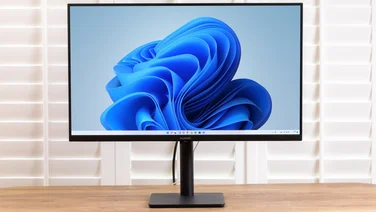
While most monitors look roughly similar, Acer has taken a little time to design the stunning-looking 24in Full HD (1,920×1,080) S243HL. Instead of having ports on the back of the screen, the S243HL’s screen is attached to an L-shaped stand that houses all the ports and controls. There are twin HDMI inputs, as well as an analogue VGA input and a 3.5mm audio input. All of these are at the base of the stand for neater cabling.

This design is striking, and would be ideal for a location where it can be shown off, but it has a few limitations. Like most monitors, there’s no height adjustment or the ability to swivel the screen into portrait mode, but the S243HL also lacks mounting points for a wall bracket, and there are no Kensington lock lugs if you need to secure the display.

Controls for the menu system are set into the front of the stand, and are arranged logically. Image quality settings are minimal, however: you can set brightness, contrast and colour temperature, and the latter is limited to Warm, Cool and User settings. We found the User defaults – red, green and blue set to 80/100 – offered the most natural colours.
There’s also a dynamic contrast option called ACM, hidden under the general settings. We generally prefer to avoid dynamic contrast technology, as it can often lead to distracting shifts in luminosity, but the S243HL’s implementation seemed subtle enough. We noticed an increase in the depth of blacks and better contrast, but without any noticeable shifts in brightness.
An LED backlight provides illumination, but it’s not very even, with obvious dark patches visible in our white-screen test. It’s quite bright, but suffers from a slight yellow cast that was most apparent in its effect on reds and greens. Flesh tones suffered as a result, looking paler and bloodless. Colours in general looked a bit less punchy thanks to the matt screen finish, although this cuts down on unwanted reflections as well.
The S243HL’s image quality is still good overall, and the monitor’s striking design and twin HDMI inputs mean it’s flexible, particularly if you want to use it for a games console or Blu-ray player in addition to a PC. However, the Iiyama ProLite E2773HDS is a 27in screen for only a little more, and the LG IPS235V has a superb IPS panel and costs significantly less.