To help us provide you with free impartial advice, we may earn a commission if you buy through links on our site. Learn more
1
/
3
Our rating
Reviewed price
£132
inc VAT
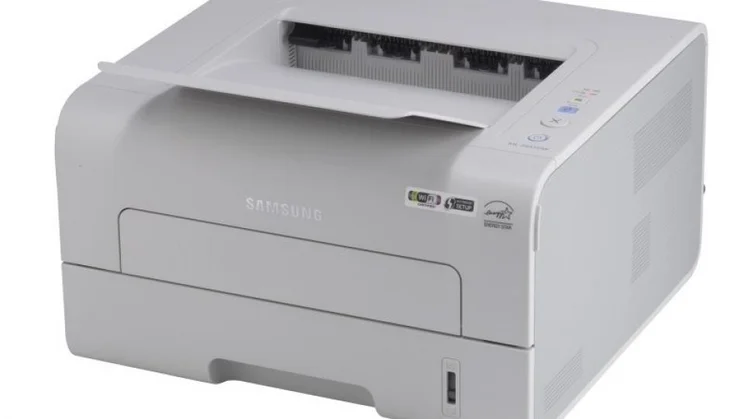
With grey exterior, Samsung’s ML-2955DW couldn’t look more functional, but it’s the features that count. Its 28 pages-per-minute (ppm) top speed is fairly rapid, and it comes with USB, wired Ethernet and 802.11n wireless interfaces. It’s a reasonable specification for the price.
The printer’s squat body has room for a 150-sheet output tray. This is entirely covered by a dust stop that must be flipped up to form part of the output tray when you print. It’s a neat bit of design, but we wish Samsung had extended the same attention to the 250-sheet input tray; when loaded with A4 paper, this tray pokes out of the rear of the printer. No cover or flap is supplied, so dust could accumulate on the paper stack if the printer was used only occasionally. The multi-purpose bypass feed slot is covered by a latched flap, but releasing this flap required enough pressure to move the printer backwards across the desk.
The ML-2955DW’s control panel comprises four buttons, including the ‘Eco’ button we’ve seen on other recent Samsung printers. When activated this causes client computers to print with paper- and toner-saving defaults, although this can be overridden by users if they wish. There’s also a ‘soft’ power button that doesn’t physically disconnect the printer from mains power (see FAQ opposite); the printer used 0.1W when off.
A painless setup process installs Samsung’s print driver, which is one of the best we’ve seen. We particularly like how easy it makes it to select the correct paper or envelope settings, but when printing envelopes it seemed to conflict with Adobe Reader’s orientation options, resulting in text rotated through 90 degrees in our first envelope tests. We solved the problem after a couple of attempts, resulting in perfect, uncrumpled envelope prints.
Print quality elsewhere was uniformly very good. Black text was free of jaggedness and extremely crisp, while graphics and photographs displayed smooth shade progressions without obvious dither patterns. Photos were better than average for a mono laser printer, although they were a little lighter than ideal and betrayed a small amount of horizontal banding.
The printer came acceptably close to Samsung’s claimed speeds in our tests, which include the time taken to prepare and spool a job. When connected via Ethernet the printer delivered 25 copies of a text-only letter in just over a minute, with 24 graphics-rich pages taking just two seconds longer. As we’d expect, printing automatically to both sides of each sheet was slower, with 10 sides of graphics taking exactly a minute to print onto five sheets.
When using Samsung’s 2,500-page consumable, running costs aren’t the cheapest we’ve seen, but they aren’t unreasonable for a mono laser at this price. This is a decent choice for a home or small office, but for heavy users we’d recommend the Samsung ML-3710ND.
Written By
Simon Handby
Simon Handby is a freelance journalist, writer and editor at Hackbash with over two decades of experience in the technology, automotive, and energy sectors. His work has been featured in IT Pro, PC Pro, and he has collaborated with notable clients such as BMW, Porsche and EDF. Simon’s creative and insightful content has earned him recognition, including the award-winning Toyota iQ launch hypermiling campaign.
How we test printers
How do you choose the right printer for you? Helpfully, we’ve tested lots of them – here’s how we put each one through its paces
Andy Shaw
Are home photo printers really worth it?
Modern inkjet printers can output top quality photos, but is it worth investing or should you send your photos to a print service?