To help us provide you with free impartial advice, we may earn a commission if you buy through links on our site. Learn more

- Expert Reviews has tested over 40 projectors since the start of 2023, ranging from the budget FHD options like those on this list to premium native 4K beamers.
- Each projector we review undergoes a range of objective and subjective tests to assess its performance across key areas, including picture quality, audio quality and smart functionality.
- Our favourite cheap projector is currently the Aurzen Eazze D1R, which delivers watchable images, runs quietly, and offers effective autofocus and keystoning.
- Those wanting something more portable should consider the Nebula Capsule 3, which has an in-built battery and isn’t much bigger than a fizzy drink can.
The average TV size in the UK is steadily rising, but if you’re looking for a super-sized home entertainment experience, a cheap projector is the more cost-effective alternative.
Thanks to low-cost imaging chips, lenses and LED light sources from China and other parts of Southeast Asia, there are plenty of viable options around the £500 mark, and, if you’re willing to make a few sacrifices, you can get a decent beamer for as little as £130.
The cheap projector market is awash with models from no-name brands, though, so it pays to be cautious when shopping for one. Some will give you decent picture quality, built-in streaming and listenable sound; others deliver appalling images from a box that’s a nightmare to use.
We’ve tested dozens of projectors over the last five years, including some of the best budget options available, to help you make an informed purchase that won’t leave you with buyer’s remorse. Below, you’ll find our pick of the best cheap projectors on the market. If you need further advice on what to look for and what to avoid, we’ve put together a buying guide that covers everything you need to know about the cheap projector landscape.
How we test projectors
We test all projectors by setting them up from scratch in a darkened room with an 80 – 100in screen. Where a projector has built-in streaming features, we install a range of Android apps, including Netflix, Amazon Prime Video, YouTube and Disney+. Where projectors lack such features, we plug in a 4K Streaming Stick already set up with those apps. We then use the projector to watch a range of test material, including blockbuster movies, popular streaming series, and drama or documentary shows, to see how well the projector handles them. We’ll also use any built-in Chromecast features to cast 1080p or 4K video directly from a tablet or smartphone.
We test any built-in speakers at low, medium and high volume levels, and run the projector on battery power, where available, to see how long the battery lasts. Finally, we use a colorimeter mounted on a tripod, 50cm from the screen, to check the brightness and contrast levels, along with colour accuracy and colour depth.
The best cheap projectors
1. Aurzen Eazze D1R: Best overall
Price when reviewed: £130 | Check price at Amazon
- Impressive picture quality
- Surprisingly quiet operation
- Autofocus and keystoning work well
- No voice search
- Remote lacks a backlight
Tested and reviewed by Jon Bray
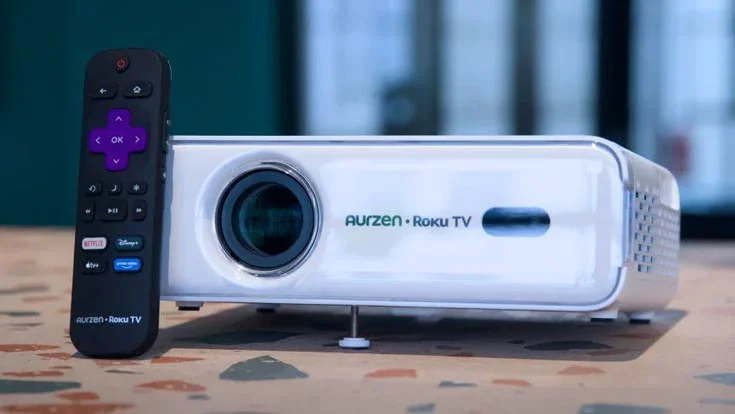
This Roku-powered projector exceeded all of Jon Bray’s expectations and became our new favourite cheap projector in the process. Its autofocus and auto-keystoning make getting a watchable image incredibly easy, the Roku software makes setting up apps a doddle, and support for AirPlay and Miracast means you can broadcast content seamlessly from your phone, tablet or laptop.
The brightness of 323 ISO lumens is too low to properly enjoy the D1R’s talents in bright conditions, so this projector is best used in dim or dark conditions. With the curtains drawn in his testing facility, Jon Bray described images as “crisp, sharp and well-balanced”. And Jon was thoroughly impressed by how quiet the D1R was during operation. He measured its fan noise at just 44dBA from a metre away, which proved inaudible once the 5W speakers kicked in.
Read our Aurzen Eazze D1R review

2. Nebula Capsule 3: Best for travelling and trips away
Price when reviewed: £379 | Check price at Soundcore
- Super-portable design
- Vibrant FHD images
- Google TV streaming
- No angle adjustments
- Limited brightness
Tested and reviewed by Stuart Andrews
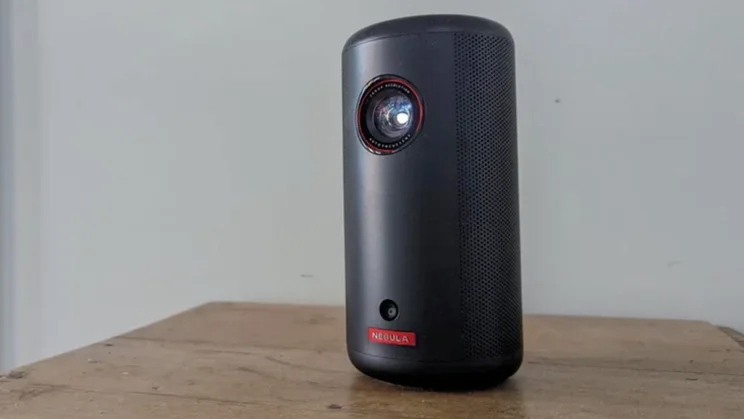
The pint-sized design of this battery-powered projector makes it our number one pick for trips away. It’s amazing to think you can get a 120in image from a beamer this small, but that’s what the Capsule 3 is capable of, and its auto-setup routine always results in a well-aligned and focused picture.
That picture is surprisingly refined, too. sRGB and DCI-P3 colour gamut coverage of 91.4% and 74.8%, respectively, reflect its broad colour palette, and Stuart Andrews really appreciated the level of saturation and handling of darker tones during testing. With a battery life of around two and a half hours in Eco mode (or 80 minutes on full brightness), you’ll likely want to also pack a USB-PD power bank if you’re taking the Capsule 3 away with you, but given how compact the projector is, there’ll still be plenty of room in your bag for all your non-tech essentials!
Read our Nebula Capsule 3 review

3. XGIMI MoGo 4: Best for sound and projection flexibility
Price when reviewed: £509 | Check price at Amazon
- Warm, well-rounded sound
- Compact and flexible design
- Good picture quality
- Limited battery life
- Lacking UK TV catch-up apps
Tested and reviewed by Stuart Andrews
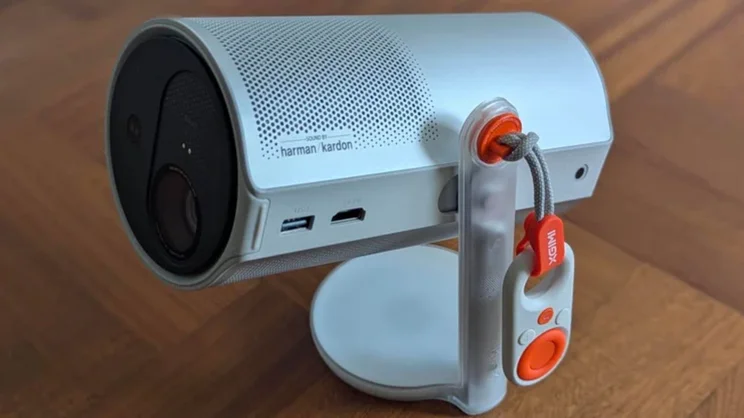
The XGIMI MoGo 4 delivers an impressive visual display for such a compact projector, but sound quality is what makes it stand out. The dual Harman/Kardon speakers each output 6W and deliver Dolby Audio that’s “great for thumping action movie scores and clear and easy to listen to in everyday TV shows and dramas,” according to Stuart Andrews. This audio prowess is particularly welcome when using the MoGo 4 as a Bluetooth speaker.
Google TV provides access to key platforms such as Netflix, Amazon Prime and YouTube, and getting the MoGo 4 up and running couldn’t be simpler. Thanks to its novel rotating design, the MoGo 4 provides wonderful flexibility in where you use it – you can even project onto the ceiling while you’re sleeping if you want!
Read our XGIMI MoGo 4 review

4. Epson CO-FH02: Best for bright rooms
Price when reviewed: £480 | Check price at Argos
- Impressive brightness
- Huge maximum image size
- Useful bundled streaming stick
- Limited connectivity
- Weak audio
Tested and reviewed by Stuart Andrews
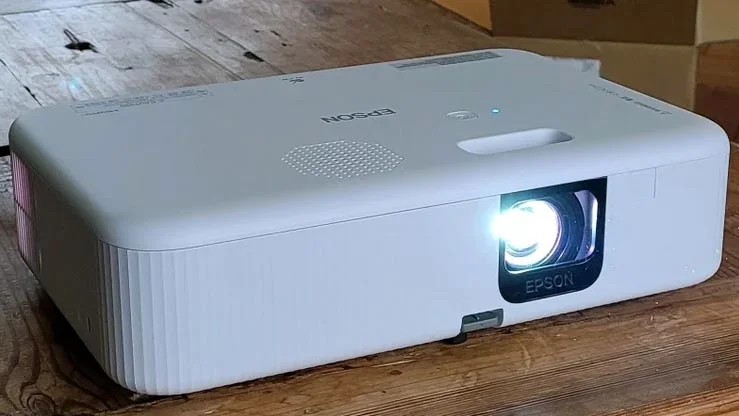
With a stated brightness of 3,000 lumens, this Epson beamer is brighter than any other budget option on this list, which means it’s better equipped to deliver vibrant, detailed pictures in bright ambient environments. Stuart Andrews recorded maximum brightness reflected from the screen at 50cm at 320cd/m2; a figure higher than some projectors he’s tested that cost two or three times as much as the CO-FH02.
The other big draw of the CO-FH02 is that it can project absolutely huge images. Epson says you can go all the way up to 391in, though you’ll have to position the projector over 30ft away from the screen, and performance will drop off substantially. Still, this is the only option with the brightness to pull off such gigantic feats.
Read our Epson CO-FH02 review

5. Samsung Freestyle (2nd Gen): Best for apps and smart platform
Price when reviewed: £349 | Check price at John Lewis
- Comprehensive and intutive smart platform
- Good sound
- Simple to set up
- Rainbow-effect prone
Tested and reviewed by Stephen Withers
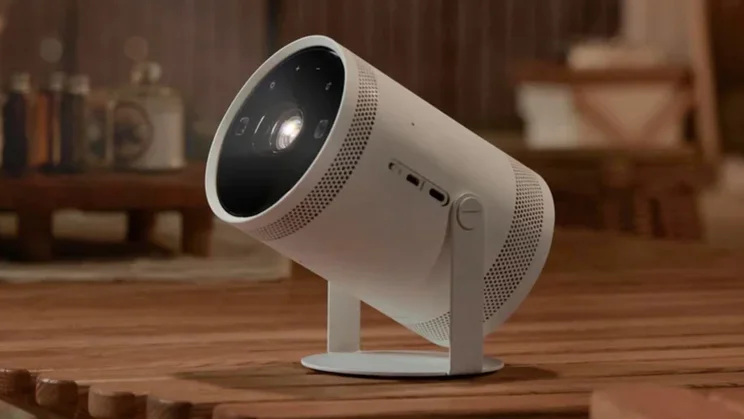
Samsung’s Freestyle 2nd Gen is a few years old now, but still has lots of things going for it, chief among which is its Tizen operating system. Tizen will be familiar to anyone who’s owned a Samsung TV, and provides access to a fantastic range of built-in streaming apps, including favourites like Netflix, Prime Video, Disney+ and Apple TV+, as well as all the UK TV catch-up services. It’s intuitive to navigate and removes any need for a streaming stick.
The Freestyle also offers Samsung-specific features like its Gaming Hub and Smart Edge Blending, the latter of which lets you combine two Freestyles for a larger, brighter picture. If you’ve only got one projector, you can project images up to an enormous 100in, and those pictures proved clean, detailed and accurate during testing. Finally, the Freestyle’s audio surpassed what we expected from a compact beamer. The 360-degree 5W configuration impressed Steve Withers with the way it spread audio around the room without distorting.
Read our Samsung Freestyle 2nd Gen review
How to choose the best cheap projector for you
How important is resolution, and what resolution do I need?
Resolution is one of the key aspects of projector specification and performance, and reflects the number of pixels displayed by a device. The higher the number, the greater the number of pixels, which enables the projection of images with increased detail. It also means that larger images can be projected without looking awful.
We recommend a minimum resolution of 720p (1,280 x 720) for cheap projectors. This equates to roughly 921,000 pixels and provides a strong basis for good image quality. However, it’s worth noting that there’s often a difference between a projector’s native resolution (exactly how many pixels they create) and the resolution stated by manufacturers. This is due to a clever process known as pixel shifting.
What is pixel shifting?
This is a technique used by projectors with lower-resolution chips to create the impression that they are displaying more pixels than they’re capable of natively. By rapidly moving pixels diagonally or horizontally to display multiple overlapping frames, such projectors simulate a higher resolution. So, a native 720p projector can simulate Full HD resolution (1080p), while many 1080p projectors use pixel shifting to simulate a 4K image. The difference between the two images is perceptible to those with keen eyes, but the effect is impressive enough to make it worth looking out for if you want 1080p or 4K images at a lower price.
How many lumens of brightness does a projector need?
The fact that we have an article dedicated to answering the question of how many lumens a projector needs should show you how important a consideration brightness is when buying a cheap projector.
Different manufacturers quote different lumen values (ISO and ANSI are the most common), but the general rule of thumb is that the more lumens, the better. In dark rooms, you can get away with around 100 lumens, but we’d recommend 300 or so if you want a larger screen size. To create a watchable picture in viewing conditions with medium ambient light, either indoors or outside, you’ll need significantly more brightness. Unfortunately, the additional lumens raise the price of projectors significantly; you won’t find any projectors under £500 able to successfully display large images during the day unless you’ve got the curtains drawn.
Does my projector need an in-built battery?
This all depends on what you plan on using the projector for. If you plan to take it camping, then yes, an option with a battery is going to be necessary. If you’re just going to use it at home and will always be near a power outlet, then it’s not essential.
Bear in mind that batteries built into cheap projectors don’t tend to last that long, and how long they last depends on how bright the image being projected is. It’s always worth carrying a decent PD power bank with you if you’re planning on a Netflix binge.
What is throw ratio, and why does it matter?
Throw ratio is the relationship between the distance from the projector to the surface it’s projecting onto and the width of the projected image. A projector with a higher throw ratio than another needs to be placed farther from the screen to achieve the same picture size.
- Long-throw projectors have a throw ratio greater than or equal to 1:1
- Short-throw projectors have a throw ratio less than 1:1 but greater than 0.4 :1
- Ultra-short-throw projectors have a throw ratio of less than 0.4:1
Most cheap projectors are long throw and have a fixed throw ratio of between 1.2:1 and 1.5 and typically require a distance of between 2 and 3 metres to project a 100in image.
What streaming apps can I use on my projector?
The operating system a projector runs dictates app support and app functionality. Some use proprietary operating systems, but many use Android or Google TV. These have a broad selection of apps pre-installed, meaning you can easily access content once you’ve signed in.
However, some cheap projectors don’t support the official versions of streaming apps and lack Widevine L1 digital rights management certification. These devices should be avoided, so always check for certification for the apps you use most before making a purchase.
What connectivity does a projector need?
Budget projectors aren’t generally flush with connection options, but they should all support Wi-Fi, Bluetooth and have an HDMI or mini HDMI input, which is perfect for hooking up a games console, Blu-ray player or streaming stick. Many will also allow you to play video files stored on a USB thumb drive.
If you want to physically connect a speaker to improve the audio quality of your projector, then keep an eye out for a 3.5mm port.
What are autofocus and auto-keystoning, and how will they affect my experience?
These two features have become an increasingly common inclusion on cheap projectors, and that’s a great thing, as they take a lot of hassle out of optimising picture quality.
Autofocus does what it says on the tin, focusing the projected image automatically once it’s locked onto the viewing surface.
Auto-keystoning, meanwhile, adjusts the shape of a distorted projected image into a perfect rectangle. Positioning your projector in the right spot to directly beam onto a wall can be tricky; this feature helps enormously.