
To help us provide you with free impartial advice, we may earn a commission if you buy through links on our site. Learn more



- You can read books from any platform
- Notes app is fantastic
- Highly competitive price
- Screen background is a bit grey
- Colour resolution is low
- Pen attachment is fiddly
The Boox Note Air5 C is a rival to the upcoming Amazon Kindle Scribe Colorsoft – it’s a 10.2in e-ink tablet with a colour display that lets you take notes with a stylus.
But although it’s a similar device on the surface, with specifications that are a close match to Amazon’s large-format e-reader, it is in fact a very different product. That’s because instead of being locked to one store and limited by its OS, the Boox Note Air5 C runs Android, which gives it a huge amount of flexibility.
What do you get for the money?
The Boox Note Air5 C is not cheap, but it’s a lot better value than its main rival. It’ll set you back £500, whereas the Kindle Scribe Colorsoft is going to set you back £630.
It doesn’t give much away when it comes to hardware, either. It comes equipped with a 10.3in colour e-ink display that uses the same Kaleido 3 technology as the Kindle. This has a resolution of 2,480 x 1,860, a colour resolution of 1,240 x 930, and can display up to 4,096 colours.
It has a front light with warm and cool settings so you can keep reading and note-jotting in dim and dark conditions. The stylus, which is used for note-taking and sketching, is included in the box and you can even attach a keyboard to use it as a distraction-free writing device. This wasn’t supplied for my review, alas, but I’ve tried the official Boox keyboard for its Note Air Max device and it was excellent, so it should be reasonably comfortable to work on.
Additionally, there’s a fingerprint scanner for more convenient unlocking, a microSD card slot to expand the 64GB of storage provided as standard, 6GB of RAM and an octa-core processor of random designation. Connectivity is provided via Wi-Fi 5 and Bluetooth 5.1.
What do we like about it?
This is a great hardware specification, but it’s not the most interesting thing about the Note Air5 C. That’s because – unlike most e-ink devices – this one runs full-fat Android 15, allowing you to install pretty much any application you fancy on the tablet and, yes, that includes the Kindle and Libby apps, so you can use it to read books from whichever store you like.
It isn’t stock Android, though, and that’s a good thing. Boox’s own launcher software is specifically designed to look good on e-ink screens. It works well, and when the time comes to use apps that aren’t designed with this type of display in mind, you can use the Boox’s tools to fine-tune the performance and the appearance of the display.
This is called EInkWise and it’s accessed by pulling down the Quick Settings panel. Once you’ve fired it up, you can change the refresh speed of the page, customise the colour mode, and adjust the DPI so faint text looks clearer and more readable.
Performance as an e-reader is excellent, which is just as well, as the demands of the Android can place strains on this type of device. I was able to quite comfortably use it for browsing the sports pages of The Guardian and keeping up with the Ashes on the BBC. And although it can’t replicate the experience of browsing on your phone or a tablet, scrolling up and down through articles was very smooth for an e-reader type device.
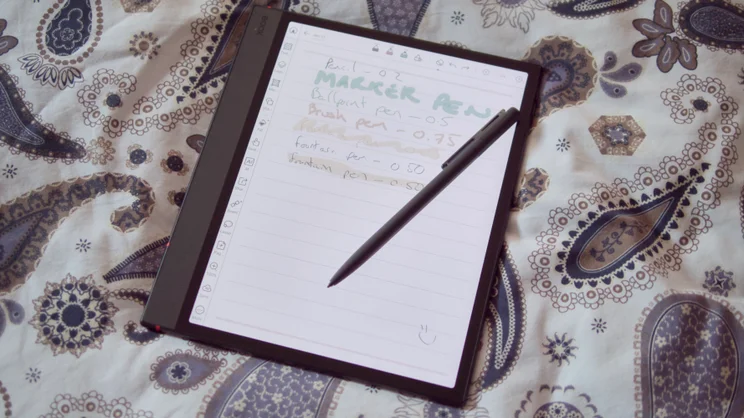
However, the Boox Note Air5 C is, first and foremost, a note-taking e-reader. To this end, it comes with several different apps pre-installed. The one you’ll be using most frequently, if you use this device as intended, is the Notes app – and it’s absolutely great.
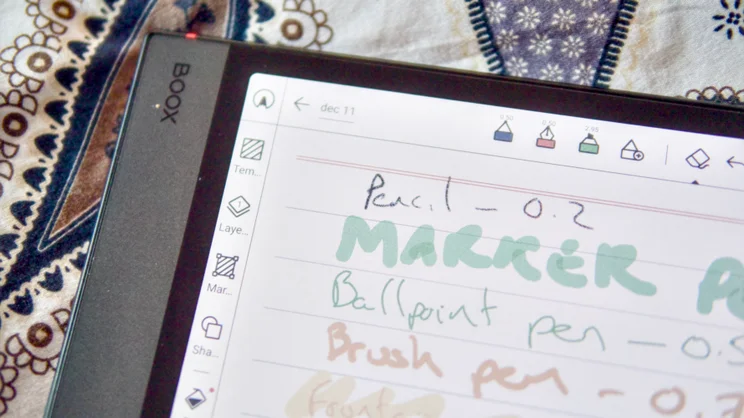
You can choose from five different pen and brush types (ball point, fountain, brush pen, pencil and marker), different nib types and thicknesses and, of course, you can write and highlight in different colours as well. There’s a healthy selection of paper background types, from plain lined paper and graph paper to musical manuscript paper, and you can record audio from here and convert your handwriting to typed text on the fly.
The AI handwriting recognition even allows for search across handwritten notes that haven’t been converted. It didn’t always recognise my unintelligible scrawl, but it was surprisingly accurate when I’d taken the care to actually form my letters properly. Moreover, the Boox Notes app adds the ability to “outline” your notebooks, which effectively means you can divide up notebooks into sections, making them easier to navigate.
And while you can’t directly annotate in any old app – you can only do this with non-DRM files in the Neoreader app – it is possible to use the FreeMark tool to take a screenshot, annotate that and share or store it for later reference.
Most importantly, the experience of writing on the tablet is a responsive one and there’s a good sense of friction between the nib of the pen and the matte surface of the screen. It’s a nice touch having spare tips under the cap, too.
What could be improved?
It’s slightly unfair to criticise the Air5 C for the deficiencies of its display when its main rival uses exactly the same Kaleido 3 technology. However, it would be remiss of me not to acknowledge its weaknesses.
The first of these is that, without the front light engaged, it looks rather grey – much more so than on standard monochrome e-readers. This is due to the way the Kaleido 3 technology works, by using a three colour filter layered over the top of a monochrome e-ink screen. Colour images also look pretty pixelated and coarse because, when colour is engaged, the resolution drops to 1,240 x 930.
The other shortcomings relate to the design of the accessories. My first gripe is with the way the stylus attaches magnetically to the right edge of the tablet. If you attach it in slightly the wrong place, it can overlap the volume down button in the top right corner, and in some circumstances activate it.
That might not sound bad but, by default, this button has a secondary function of adding a page in the Notes app. And if held down for a while, it will add a whole chunk of blank pages to the notebook you’ve just created. Once I’d realised what was going on, I managed to avoid it happening. But this sort of thing shouldn’t happen at all, really.
My other complaints were relatively small. The rubber cap for the stylus is far too easy to lose. In fact, I lost it pretty much within the first week of using it. What’s more, the magnetic retainer clasp supplied with the official case is poorly designed. It isn’t part of the case itself (you can remove it) and the magnets within it are strong enough to disable pen detection in the screen if you fold it back on itself under the edge of the display. I simply removed it once I realised what was going on.
And, though powerful, Onyx really needs to take a look at the complexity of the Note Air5 C’s software. It is packed with features, but navigating your way around the various synchronisation options can be a little confusing.
Should you buy the Boox Note Air5 C?
The Boox Note Air5 C might run Android but it isn’t really a tablet replacement; it’s a note-taking Kindle Scribe rival with bonus features and, viewed in that light, it’s a fantastic thing.
It makes a great e-reader, thanks to its ability to install any Android app, including Kindle. But it also makes an impressively powerful note-taking and annotating device, thanks to its responsive pen and colour e-ink technology, not to mention its brilliant Notes app.
With a price that undercuts the forthcoming Kindle Scribe Colorsoft, the Boox Air5 C is the large format digital note-taker to beat. It’s quirky but quite superb.


