To help us provide you with free impartial advice, we may earn a commission if you buy through links on our site. Learn more
- Best home security camera: At a glance
- Why you can trust us
- The best home security cameras in 2026
- 1. Eufy SoloCam S340: Best home security camera
- 2. Tapo C120: Best indoor security camera
- 3. Blink Mini 2: Best budget all-rounder
- 4. EufyCam S4: Best premium 4K security camera
- 5. Reolink Elite Floodlight: Best home security camera with floodlight
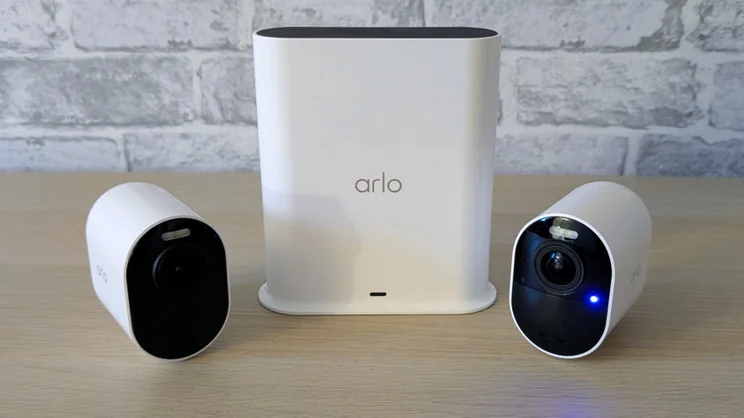
- 6. Arlo Ultra 3: Best security camera for AI features
- Home security cameras: The basics
- How we test home security cameras
- We’ve been testing and reviewing connected security cameras since the early days when they were called IP cameras, before smartphones became popular
- We’ve picked out our favourite modern cameras below, at a range of prices, most of which don’t require you to take out a costly monthly subscription to maintain
- Our favourite all-round security is the Eufy SoloCam S340 for its range of features, image quality and surprisingly low price

Security cameras used to be something only businesses could afford, but thanks to the explosion in affordable, internet-connected technology, that’s no longer the case. Our favourite is the superb Eufy SoloCam S340 for around £100, which packs in a motorised pan, tilt and zoom mechanism, two lenses and a solar panel to keep the battery topped up.
But you don’t have to spend that much; these days, you can purchase a smart home security camera for as little as £35 (even lower during Amazon’s sales) and still keep an eye on your home, pets and children from an app on your phone.
If anything, there’s too much choice and with hundreds of cameras on the market, all with different features and limitations, the choice can be overwhelming. Don’t worry, though, we’re here to answer all of your questions: do you go for a battery-powered or mains-powered camera; one with cloud or local storage? What about AI? You’ll find all the answers below in our buying guide, along with our list of favourite security cameras, selected from products we’ve tested, used and reviewed.
Best home security camera: At a glance
- Best security camera: Eufy SoloCam S340 | Check price at Eufy
- Best indoor security camera: Tapo C120 | Check price at Tapo
- Best budget all-rounder: Blink Mini 2 | Check price at Amazon
Why you can trust us
Here at Expert Reviews we’ve been testing smart home technology for years. In fact, well before the advent of Alexa and “smart” technology. In those days, connected security cameras were called IP cameras, they were mostly aimed at tech-savvy business owners, and they were fiddly to set up.
In the intervening years, our writers have set up hundreds of cameras in our homes – our policy is to test products in the environment they’re intended for – and we’ve spent many hours testing, evaluating, using and writing about them. You can be sure that, by now, we know a good one from a dud and you’ll benefit from that experience on this page.
READ NEXT: Best video doorbells
The best home security cameras in 2026
1. Eufy SoloCam S340: Best home security camera
Price when reviewed: £102 | Check price at Amazon

- Twin cameras and motorised tracking
- Sharp, clear 3K imagery
- Solar charging included
- A little bulky
If you only want one security camera to cover a big space, then the Eufy Solocam S340 fits the bill perfectly. It comes with not one but two lenses – one to capture the widest possible field of view and another with a 3x zoom to focus in more closely on specific areas.
It isn’t the cheapest security camera you can buy, but it is absolutely packed to the gunwales with features. For example, those camera lenses are mounted on a pan, tilt and zoom housing so they can be moved around remotely – they’ll even automatically track movement.
The camera also comes with a rechargeable battery and a solar panel fitted above it, so once you’ve charged it up initially, you should never have to take it out for a top-up. And you can record video footage to local storage, so you don’t need to pay a subscription fee to use it. With excellent image quality and very good performance in our usability testing, this is the ultimate home security camera.
Read our full Eufy SoloCam S340 review for more details
Key specs – Size (WDH): 87 x 87 x 12mm; Field of view: 135 degrees; Video resolution: 2,880 x 1,620 (wide angle), 2,304 x 1,296 (telephoto); Night vision: Yes (mono and colour); Motion detection: Yes (general, human, vehicle); Subscription required: No (8GB eMMC storage built-in)
2. Tapo C120: Best indoor security camera
Price when reviewed: £40 | Check price at Amazon

- Sharp 2K resolution
- Video can be stored locally
- Packed with features
- No support for Apple HomeKit
By Alun Taylor
The Tapo C120 replaces the Yale Indoor Camera as our favourite indoor security camera – and for good reason. It has more features, it’s cheaper, and as part of a broader range of smart security products, it just makes more sense.
The price doesn’t ever go quite as cheap as the Blink Mini 2 during Amazon sales periods, but it captures a higher 2K resolution image, its smart detection features are more advanced – we particularly like the way its audio detection can distinguish between pets barking, children crying, and glass breaking – and it performed brilliantly in every one of our performance tests.
In fact, the Tapo C120 makes a case for itself as the cheapest complete security camera on the market. Its smart, motion-triggered video can be stored locally on a microSD card, avoiding the need to subscribe to cloud services; it has a pair of bright LED spotlights, and it can act as a mini burglar alarm, too, with its built-in siren, which can be set to go off automatically when motion is detected.
As an all-rounder, the Tapo C120 simply can’t be beaten. It may be small and unassuming, but it packs a mighty punch when it comes to value for money.
Read our full Tapo C120 review for more details
Key specs – Size (WDH): 57 x 44 x 67mm; Field of view: 120 degrees; Video resolution: 2,560 x 1,440; Night vision: Yes; Motion detection: Yes; Local storage: Yes; Subscription required: Optional
3. Blink Mini 2: Best budget all-rounder
Price when reviewed: £35 | Check price at Amazon

- Great image quality
- Dust and water resistant
- LED spotlight
- Requires Sync Module 2 to run subscription free
By Jonathan Bray
The Blink Mini 2 might not be the outright best-value indoor security camera you can buy, but in terms of the number of features it crams in for the price, it’s the best we’ve tested. You can use it indoors or outdoors, thanks to an IP65 dust- and water-resistance rating. You can run it with a subscription or without (if you add a Sync Module 2) and you can even use it as a chime unit for the Blink Video doorbell.
It even comes with an LED spotlight, so you can use it as an outdoor security camera. And, finally, image quality is sharp at 1080p – a big improvement over the original Blink Mini in both good light and poor.
With great performance, good usability and flexibility, the Blink Mini 2 represents solid value for money – and it being an Amazon product, it’s highly likely to see heavy discounts during Amazon sales events, such as Prime Day and Black Friday.
Read our full Blink Mini 2 review for more details
Key specs – Size (WDH): 51 x 51 x 40mm; Field of view: 143 degrees; Video resolution: 1,920 x 1,080 at 30fps; Night vision: Yes; Motion detection: Yes; Subscription required: Optional
4. EufyCam S4: Best premium 4K security camera
Price when reviewed: £279 | Check price at Amazon
- Top image quality
- Motion tracking and zoom works well
- 32GB of built in storage
- Pricey
- Setting up motion zones is fiddly
By Jonathan Bray
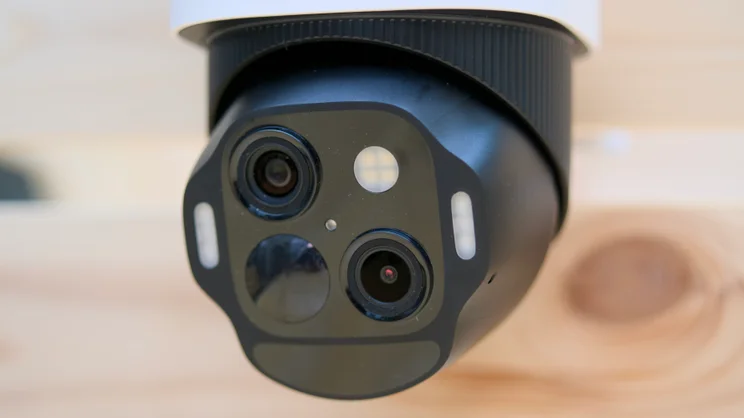
If you only need one security camera to cover the outside of your property, the EufyCam could be it. That’s because it is equipped with not one or two, but three cameras, each able to deliver a different view.
The main camera is a fixed, wide-angle 4K unit, while the two others are mounted on a motorised turret below it, able to track people and zoom in on the action. That’s something we’ve found it does well, although on the odd occasion – perhaps once every two or three months – it has identified animals as people.
To go with the cameras, the S4 has a collection of LED lights to illuminate the scene – and scare off intruders – there’s a built-in 105dB siren to double down on the deterrent, and to cap it all is a 5.5W solar panel to keep the battery topped off, so you never have to charge the battery.
And the laundry list of features goes on: there’s 32GB of local storage built in, so you don’t have to pay a monthly fee to use the camera, plus it’s compatible with Eufy’s HomeBase S380, which adds features like facial recognition to your security setup and has a slot for a 2.5in hard disk for even more storage capacity.
The one caveat is that it is expensive, but given that one EufyCam S4 can do the job of two or more standard outdoor security cameras, that offsets the extra expense.
Read our full EufyCam S4 review for more details
Key specs – Size (WDH): 174 x 184 x 295mm; Field of view: 130° / 121° / 46°; Video resolution: 4K / 2K / 2K at 15fps; Night vision: Yes; Motion detection: Yes; People detection: Yes; Package detection: No; Facial recognition: Yes (with HomeBase S380)
5. Reolink Elite Floodlight: Best home security camera with floodlight
Price when reviewed: £183 | Check price at Amazon
- Super bright lights
- Crisp 180-degree 5K imagery
- Flexible camera mount
- Mains power only
By Alun Taylor
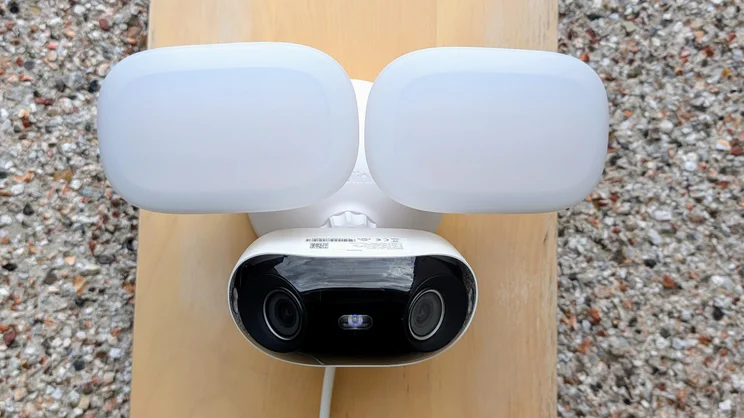
For the ultimate burglar deterrent, a floodlight security camera is what you want, and the Reolink Elite is the best we’ve come across. Its two camera lenses deliver ultra-wide-angle stitched-together 5K images that capture faces and nefarious activity in unrelenting detail. And its motion-triggered 3,000-lumen spots are enough to fill large areas with bright light so you can see what’s going on even on the darkest evenings.
There are plenty of other things we like about this camera, however, aside from its image quality and bright floodlights. It’s IP66 dust and water-sealed, so it should keep working in the strongest of storms. Its mount delivers impressive adjustability, and the camera is equipped with a 105dB siren, just in case you think the intense light isn’t enough to put intruders off.
Most important of all, however, the Elite has a microSD card slot, which means you can run it without having to pay a monthly fee for a cloud video storage. It’s the ultimate outdoor floodlight camera.
Read our full Reolink Elite Floodlight review for more details
Key specs – Size (WDH): 174 x 184 x 295mm; Field of view: 180 x 59 degrees; Video resolution: 5K (5,120 x 1,552) at 20fps; Night vision: Yes; Motion detection: Yes; People detection: Yes; Package detection: No; Facial recognition: No
6. Arlo Ultra 3: Best security camera for AI features
Price when reviewed: £529 | Check price at Amazon
- High-quality 4K video feed
- Hub with microSD slot included
- Cameras are compact and stylish
- Advanced features require a top-tier subscription
- Expensive in the long run
Most security cameras come with some form of smart motion detection, whether that be human, pet or parcel detection, with some able to recognise faces, too. But what if you wanted to set your camera up for a different scenario?
That’s what the Arlo Ultra 3 promises – and delivered in our tests – allowing you to set it up to trigger on things like the garden gate being left open or the bins being left in the wrong place. All you need to do is feed the AI with before and after images, leave it train itself and you’re good to go.
It’s super clever stuff, and the cameras themselves are up there with the best around, too. They capture crisp 4K footage, which enables a much clearer digital zoom than 1080p or 2K cameras tend to deliver. Each camera has a wide 180-degree field of view and is equipped with an LED spotlight for a clear colour view at night. There’s a siren for burglar deterrence and the battery is good for up to six months per charge.
There’s no solar panel provided in the box, but you can add a third-party panel for a small extra cost, and all camera kits come with Arlo’s smart hub, which allows you to skip the subscription if you like and record video clips to microSD card storage. Bear in mind, though, that doing this will disable the best AI features.
For all of these features, there is a high cost to pay, though, with even the cheapest two-camera pack priced at £530 and a monthly fee of £20 to pay to keep the AI features going after that.
However, Arlo has a deal on that gets you half off the camera hardware if you sign up for a £200 top-tier subscription, reducing the up-front cost to £465 and deferring subscription fees for a year. And buying the cameras this way is actually pretty good value.
Read our full Arlo Ultra 3 review for more details
Key specs – Size (WDH): 89 x 52 x 79mm; Field of view: 180 degrees; Video resolution: 3,840 x 2,160 at 15fps; Night vision: Yes; Motion detection: Yes; People detection: Yes; Package detection: Yes; Facial recognition: Yes
Home security cameras: The basics
Home security cameras mostly share the same features. They’re internet-connected devices that allow you to check in on your property from your smartphone.
It’s important to note that these cameras are different from commercial CCTV systems in one key way: most don’t have the option to record video continuously, that you can then scrub back over; instead, they simply record short clips triggered by motion, which is usually detected by an infrared sensor.
Otherwise, home security cameras come in two distinctly different flavours: indoor cameras and outdoor ones:
Indoor cameras
Tend to be cheaper (typically £50 or less), small and light, and they typically rely on mains power.
Outdoor cameras
These are usually more expensive and are commonly battery powered, so you don’t have to run mains cabling to them. They’re also typically more advanced and they usually have some form of weather-proofing.
How we test home security cameras
Home security cameras are becoming increasingly smart and have all sorts of fancy features built in, so it’s more important than ever to test them thoroughly. Every home security camera we review is given a workout in a real-world domestic environment, whether that be indoors or outdoors.

During testing we look at image quality in the following scenarios:
- Low light and night, evaluating how well the night vision illuminates the immediate area around the camera
- Daylight, paying close attention to how well the camera copes with high-contrast scenes, in particular backlighting. The example below shows how a good camera compares with a not-so good camera in tricky conditions:

We also try out the audio connection to see how loud the speakers are and how clearly the microphones pick up audio, and we evaluate how easy the camera is to set up using the various mobile and desktop apps.
We assess how effective the motion detection is, and with so many companies now adding advanced object and audio detection – for instance person, parcel and package detection – this is another aspect we look at while reviewing these cameras to ensure that they actually do what they are supposed to.
Finally, we check how responsive the cameras are. It’s incredibly frustrating if it takes tens of seconds to bring up your camera’s live view, so we time how long it takes for each camera to enter the live view from the app and how long motion events take to generate alerts in the mobile app.
Is video quality important?
Yes. If your camera isn’t capable of recording crisp, detailed video in all types of light conditions you may not be able to make out important details such as number plates or faces. Fortunately, most cameras will capture at 1080p or higher today.What marks out the best cameras, though, is the way video is processed.
The most important feature on this front is HDR. Cameras with HDR take the video signal from the camera and brighten up the dark areas while ensuring the bright areas of the image aren’t blown out and difficult to see. Cameras without HDR tend to struggle to balance areas of bright and dark with the result that it can be difficult to make out crucial details in captured videos.
Night vision is also a key consideration. Most cameras have a night vision mode these days that use infrared LEDs to illuminate the area immediately in front of them so they can effectively see in the dark. One or two LEDs are usually enough to light up a small or medium-sized room but, for larger rooms and outdoor spaces, you may need a camera with multiple LEDs.
You should also consider a floodlight camera for large outdoor areas, which pairs bright white LEDs and cameras for the ultimate intruder deterrent. These often need mains power, though, and are therefore trickier to install.
Beware the hidden costs
The most important thing to consider, however, before everything else, is the ongoing cost. Some manufacturers cut off all but the bare essentials unless you pay them a monthly fee. For example, if you don’t pay monthly, a Ring camera really only provides live view and motion alerts; it won’t record clips at all if you don’t subscribe.
Others aren’t quite as bad, but place features we would consider essential – such as motion zones and security blanking – behind a paywall, while to get advanced AI features like text description you’ll often need to opt for the top-tier subscription plan costing even more.
For that reason, we don’t tend to recommend these types of security camera on this page. Generally, we’re of the opinion that if you pay for a product, you should be able to use its advertised features without being held to ransom.
It’s also worth bearing in mind that even if you’re okay with paying a fee for cloud storage, what starts out being cheap may not continue to be in the future. Ring, for example, hiked its prices by 43% for single cameras a few years back, from £3.50 to £5/mth – a 33% increase. Google and Arlo have increased prices recently, too.
Here’s a quick breakdown of the costs involved for the worst offenders, and some examples of how much a two-camera system would cost from each brand over five years.
| Brand | Single camera | Multi-camera | Other |
|---|---|---|---|
| Ring | £5/mth | £50/yr | £8/mth | £80/yr (unlimited) | AI Pro: £16/mth | £160/yr |
| Nest | Not available | £8/mth | £80/yr (unlimited) | Advanced: £16/mth | £160/yr |
| Arlo | £8/mth | £88/yr | £20/mth | £220/yr (unlimited cameras) | Secure Pro: £25/mth | £270/yr (50% off cameras) |
| Camera model | Total cost over 5 years for two cameras | Total cost over 10 years for two cameras |
|---|---|---|
| Ring outdoor camera | £510 | £910 |
| Nest Outdoor Camera (battery) | £720 | £1,120 |
| Arlo Essential 3 2K | £1,195 | £2,295 |
With this in mind, unless you have a very good reason, we recommend restricting your search to security cameras that can record video clips locally to a microSD card or integrated storage (Eufy, Tapo, Reolink and TP-Link all make cameras with this feature).
While this isn’t as flexible as cloud storage, it gives you the option to keep using a camera if the company hikes prices beyond what you’re willing to pay.
READ NEXT: Best wireless burglar alarms
What other home security camera features should I look out for?
Pan, zoom and tracking
Some cameras have a motor and optics that allow you to move the camera around remotely. It’s a useful feature but not essential. Most home security cameras have a very wide field of view and, if positioned carefully, will be able to provide a view of your entire room.
Smart assistant/speaker integration
Many manufacturers boast of integration with either Alexa or Google Assistant in their specifications, but while some aspects of these features are useful, they’re worth taking with a pinch of salt. In most instances, they refer to the ability to ask the digital assistant to display the feed from your camera on your smart screen speaker, which isn’t all that useful in our experience as you’re rarely sitting right next to it when the doorbell rings.
Object, person and pet detection
This sounds like a gimmick, but being able to filter a long list of motion-triggered video clips by the type of motion detected can be a big time-saver. Some cameras even allow you to link names to faces so that you can be alerted when the camera spots certain people – if you want to know when your kids get home from school, this is an incredibly useful feature.
AI summary, search and custom object/scene detection
The explosion of AI capabilities across the tech industry has come to security cameras in the form of various advanced AI features. Manufacturers are currently offering features such as text summaries of triggered video clips, AI searching of video clips (“find me all instances of the cat lying on the garden table”) and custom AI smart detection. Attractive as these features sound, however, the current trend is to offer advanced AI features only to those taking out the most expensive subscription levels. Our advice? Pass on the AI features unless they are available for a lower-tier monthly fee or subscription-free.