

To help us provide you with free impartial advice, we may earn a commission if you buy through links on our site. Learn more

When Dell first released its XPS 13 way back in 2014, the firm claimed it was the “smallest 13in laptop on the planet”. They weren’t wrong, but there was plenty to live up to when the updated 2015 model came around. Now over a year old, does the late 2015 version of the Dell XPS 13 still hold up?
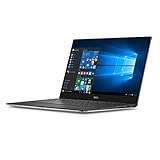
Looking near identical to the version it superseded, the XPS 13 keeps that sleek all-metal chassis of the original, which is fast becoming the pinnacle staple of Dell laptops. At just 9mm at its thinnest point, tapering to a slightly thicker 15mm at the back, the 2015 XPS 13 is still exquisitely slim. Place it on the scales and it’s no heavy beast either, weighing a measly 1.29kg – lighter than the recent MacBook Air, which weighed 1.35kg.
READ NEXT: Check out our list of the best laptops
Of course, it’s worth mentioning at this point that there’s a new XPS 13 in town. The 2016 model which launched in October, features upgraded 7th generation i5 and i7 Kaby Lake processors for roughly the same price. Not only that, there’s also a 2-in-1 model that launched too. That’s not to say the late 2015 XPS 13 is obsolete by any means, and is still a wonderfully capable device.
Your biggest problem is to actually find the 2015 model brand new. In fact, even looking through eBay it can be hard to find it used. Prices will naturally fluctuate, and you’ll still be able to find the laptop for around £1,200.

Dell XPS 13 review: InfinityEdge display
It feels refined and looks stunning to boot, thanks to the virtually borderless “InfinityEdge” display. The bezels have been reduced to mere millimetres in order to squeeze a 13.3in screen into a far smaller chassis. It still remains an amazing feat of engineering, but it helps that the 3,200 x 1,800 touchscreen panel is simply gorgeous. The high resolution makes working on multiple documents a real joy, with Windows 10’s improved scaling options coping admirably with the extra pixels.
With 93.3% coverage of the sRGB colour gamut, the screen is also very accurate – beating last year’s equivalent model. A contrast ratio of 1,052:1 was excellent, giving colours plenty of pop. This means that the XPS 13 is still a reasonable choice for photographers. Very deep 0.17cd/m2 peak blacks help give darker images plenty of definition, with none of the backlight bleed that spoiled last year’s model.

Reflections are a slight issue, due to the glossy coating, but a bit of angle adjustment usually overcame it. The returning dynamic-contrast adjustment is more irritating; this forces the brightness levels to jump around erratically based on what’s onscreen. Finally, the webcam is again placed below the screen. It’s unorthodox, but a side effect of those super-thin bezels.
Dell XPS 13 review: Keyboard and touchpad
A carbon-fibre keyboard surround adds variety to the inside of the laptop, contrasting nicely with the gunmetal-grey exterior. It has a slight grippy quality to it and doesn’t conduct heat through the palm rests when you’re typing, which is always a positive.

The keys themselves are nicely spaced, and don’t feel cramped as you type. They have a good degree of tactility, which leads to better accuracy as you can really feel when a key actuates. We had no problems typing for long periods, and missed keystrokes were an infrequent occurrence. The keys are backlit, so typing in dimly lit conditions isn’t a problem.

The touchpad is great too. It’s large, at least in the context of the XPS 13’s slimmed-down chassis, and is responsive and accurate. Windows 10 multi-touch gestures were all activated without a hitch, making swiping around a joy. You can also use the touchscreen; the hinge held firmly to prods and pokes, so we weren’t concerned the entire laptop would tilt back. Fingerprints do begin to mar the beautiful display, though, so you may want to carry around a microfibre cloth to keep it looking its best.

Dell XPS 13 review: Performance
This version of the XPS 13 has a dual-core, 2.5GHz Intel Core i7-6500U, which can Turbo Boost to 3.1GHz with the right thermal conditions. It’s paired with 8GB of RAM and 256GB of PCI-express SSD storage. Performance was exactly what we’d expect from the low-voltage CPU, managing an overall score of 46 in our application benchmarks. You wouldn’t expect a svelte, ultra-portable laptop to be a processing powerhouse, but the i7-6500U will be able to handle most tasks without issue.
Some light gaming is even possible, with Intel’s HD 520 integrated GPU managing 31.9fps in Dirt Showdown at 1,280 x 720 resolution, High-quality settings and 4x anti-aliasing. You’ll need to tone down the quality settings and resolution to obtain playable frame rates for most games, but it’s a nice option to have.
In our battery test, the XPS 13 lasted 11hrs 30mins, which is an improvement on the older model. This is easily enough for a full working day away from the mains, and the charger isn’t too cumbersome to carry around either.
Dell XPS 13 review: Connections
Two USB 3 ports, an SD card reader and a 3.5mm headset jack would be generous enough for a laptop so thin, but the XPS 13 also has a Thunderbolt 3 port. It uses the USB Type-C connector, but allows for faster 40Gbits/sec transfer rates (as opposed to USB 3.1’s 10Gbits/sec). It replaces the mini-DisplayPort found on the old model, meaning there’s no way to output to an external display without buying an adaptor; Dell sells VGA and HDMI dongles, plus one for wired Ethernet. There’s also a useful battery gauge indicator for checking your remaining charge at a glance.

Dell XPS 13 review: Conclusion
The new XPS 13 might be more of a refresh than a complete overhaul, but the upgraded components and the addition of Thunderbolt 3 bring it right up to date. It remains visually stunning, and that gorgeous display means it’s still one of the most portable laptops around. Windows 10’s display scaling makes working on the high-resolution display a joy, and image quality is improved over last year’s model. The XPS 13 is one of the best ultraportables around, and holds its own against the likes of Apple’s MacBook Air.
Still haven’t found what you’re looking for? Check out our list of the best laptops from 2017


