
To help us provide you with free impartial advice, we may earn a commission if you buy through links on our site. Learn more

- 12GB of vRAM
- Impressive speakers system
- Easy to add extra storage and RAM
- Display could be better
- No RTX 5060 option
The Acer Nitro 16S AI is an example of a type of gaming laptop that used not to be all that common: one that you can use to play AAA games, while at the same time not being so big and heavy and having such abysmal battery life that you can also use it as a laptop for general day-to-day use.
That’s not to say that you can actually game on battery power. A discrete GPU will drain even the largest laptop battery in double-quick time, but the slimline Acer Nitro 16S AI provides yet more evidence that hard-core gaming and general practicality are no longer mutually exclusive when it comes to laptops.
What you need to know
The S in the name Nitro 16S AI stands for Slim, meaning this is a full-sized 16in gaming laptop that’s rather more svelte and a little lighter than the normal Nitro 16 machines, if not the cheaper Nitro V16 models. And the AI part of the name means it comes with a chipset with a neural processor to handle all those local AI tasks we’re constantly being told we need.
Under the hood, the Nitro 16S AI is a thoroughbred gaming laptop. It comes equipped with Nvidia’s latest Blackwell GPUs and AMD Ryzen AI 9 or 7 CPUs.
Price and competition
Configuration tested: AMD Ryzen AI 7 350 CPU, Nvidia RTX 5060 GPU, 32GB RAM, 1TB SSD
According to Acer, there are two different versions of the Acer Nitro 16S officially available in the UK: both come with an Nvidia GeForce RTX 5070 Ti with 12GB of VRAM, and both cost £1,799. One uses the AMD Ryzen AI 9 365 CPU and 16GB of RAM model (NH.U06EK.003), while the other ships with the AMD Ryzen AI 7 350 CPU and 32GB of RAM (NH.QZVEK.001).
I was sent the, presumably cheaper, Ryzen 7 model with the RTX 5060 (8GB VRAM), the AMD Ryzen AI 7 350 CPU and 32GB of RAM but, alas, Acer isn’t bringing this model to the UK.
The Alienware 16X Aurora is an obvious competitor. It’s the same size, and with an RTX 5070 GPU costs around the same amount as the Nitro. The Alienware has an excellent display, but the battery life is poor, and the most vRAM you can have is 8GB rather than 12GB, which is something to keep in mind if, for example, you want to drive an external 4K monitor. The keyboard is a bit vin ordinaire, too.
By some margin, the most successful effort to combine gaming power with everyday portability and usability in the same laptop, the Asus TUF Gaming A14 (2025) is a cracker. Eminently affordable at just £1,299, with the same GPU and CPU as the Nitro 16S I was sent to test – and excellent battery life – the Tuf A14 was among my favourite laptops of 2025.
Design and features
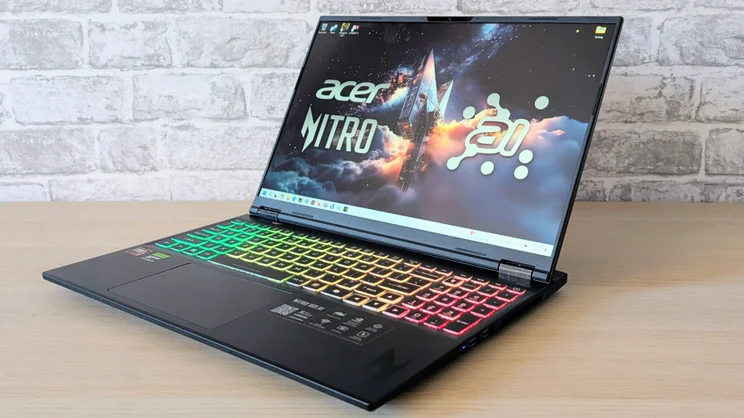
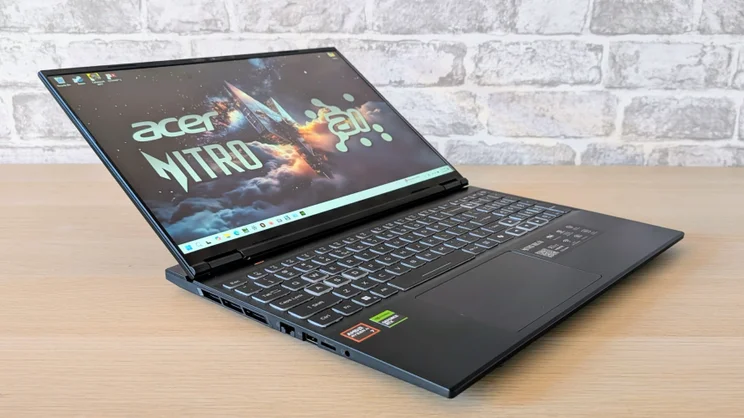
The S in 16S doesn’t mean you’re getting a 16in gaming laptop that’s the same size and shape as the likes of the Asus Zenbook S16, but at 19mm thick and weighing 2.2kg this Nitro is still quite dainty for a full-sized gaming laptop.
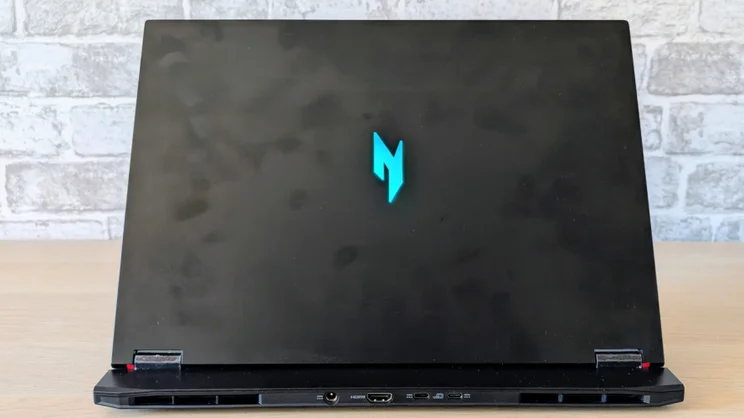
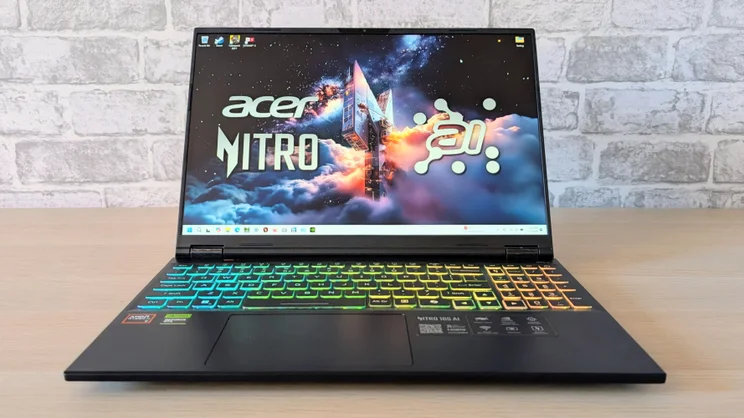
The design and build is typical Acer Nitro: it’s black, angular and built from a mix of metal and solid polycarbonate. But while I can’t see dedicated gamers having issues with the aesthetics, more of an effort to ape the Q-ship styling of Razer’s Blade laptops wouldn’t have gone amiss, given the 16S’s everyman intentions.
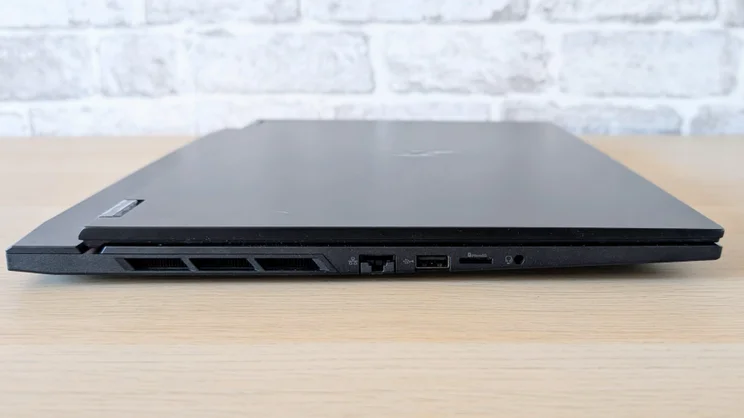
I was happy with the 16S’s selection and positioning of I/O ports, however. On the right side is a pair of 10Gbits/sec USB-A ports, while on the left is a 480Mbits/sec USB-A, a 2.5Gbits/sec Ethernet socket, a microSD card slot and a 3.5mm audio jack.
At the rear, there’s a brace of USB-C ports – one USB-4 40Gbits/sec spec, the other 10Gbits/sec – plus one HDMI 2.1 video output and a barrel input for the 230W power supply. Both USB-C ports are capable of carrying a DisplayPort 1.4 video signal.
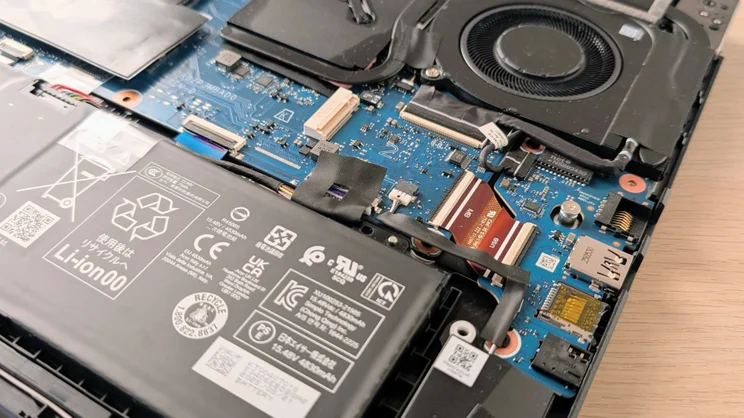
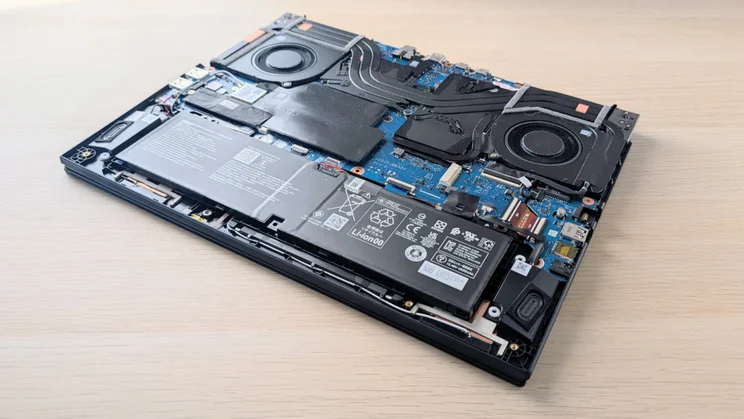
And getting inside the 16S is easy enough, too – once you’ve removed the ten Philips screws that hold the metal baseplate in situ. One screw is hidden beneath a sticker that warns that removing it will void your warranty, but no need to worry about that if all you want to do is add a bit of memory and storage – generally speaking, these things aren’t enforceable under UK law.
Once inside, you’ll find a spare 2280 SSD slot and two SODIMM RAM slots awaiting upgrades, although accessing the latter does require the removal of a rather stubborn adhesive thermal pad.
On that subject, the 1TB Micron SSD in my review machine proved a handy performer, returning sequential read and write speeds of 5,303MB/sec and 3,882 MB/sec, respectively, while wireless communications are handled by a RealTek MT7922 card that supports Wi-Fi 6E and Bluetooth 5.3.
Keyboard, touchpad and webcam
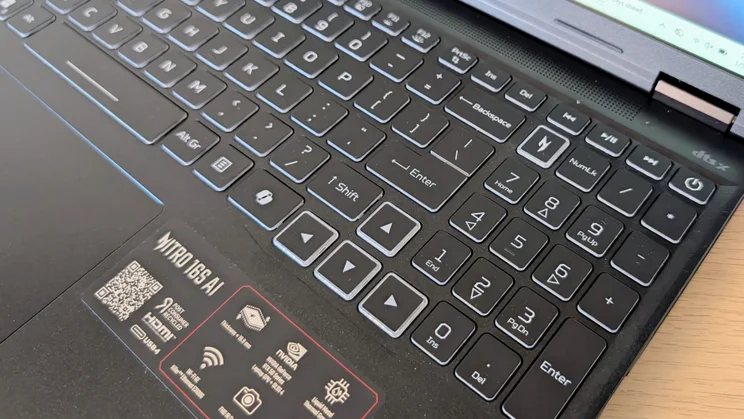
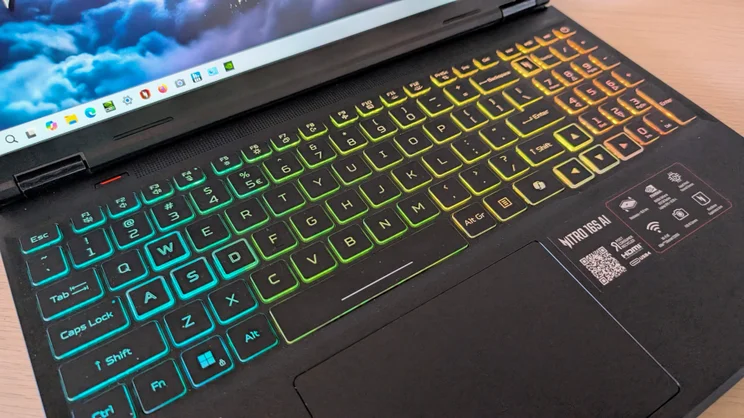
The Nitro 16S AI’s keyboard is a stylish affair. It has a bright three-level four-zone RGB backlight. The WASD and full-sized arrow keys all have translucent sidewalls to distinguish them from their surroundings, and there’s a dedicated key to open the Nitro Sense control panel.
The middle of the keyboard deck is a little flexible for my taste and, as is typical of Acer gaming laptops, there’s no function lock on the keyboard; if you want to fix the Fn keys to their media role you need to do it in the BIOS. But the action of the keys themselves is hard to criticise. It’s crisp and firm, with a perfectly damped end-stop. The keycap graphics are both stylish and clear.
The 1080p webcam won’t win any prizes, but it’s still perfectly bright, sharp and colourful enough to make web calls and not have you look like a ghoul. It also supports all the Windows Studio special effects and filters, and Hello facial recognition security, the last comparatively rare on gaming laptops.
Display and audio quality
The 2,560 x 1,600 IPS display is bright, peaking at 482cd/m2, and can refresh at 180Hz, which is better than the 165Hz offered by the Asus TUF Gaming A14 (2025) but can’t match the Alienware 16X Aurora’s 240Hz.
Motion fidelity was visibly worse than on the Alienware, with more ghosting and smearing. That’s not to say that the Acer is bad per se, just that the display on the Alienware is very good for an IPS panel.
The Acer’s display covers 102% of the sRGB and 72% of the DCI-P3 gamut volumes, which is just about acceptable at this price point. With a Delta E colour variance of 1.76 against the sRGB standard, colours look perfectly natural.
Of course, many gaming laptops will, like mine, spend much of their life hooked up to an external monitor. That’s why, for the same price, I’d take the Acer with a poorer display as it has more vRAM than the Alienware.
The sound system is pretty decent, too. It may only consist of a couple of 2W drivers, but it is still very serviceable, pumping out sound that’s loud, composed and generally very easy on the ear. There’s more than enough bass to give game sound effects a visceral impact.
Performance and battery life
Gaming performance served to underline that in this time of Nvidia’s Blackwell GPUs, benchmarks are becoming slightly irrelevant.
Running Cyberpunk 2077 at Full HD in the High detail preset with no ray tracing, the Nitro 16S managed to hit 102fps, which is a solid performance. Under similar circumstances, the Hit Man 2 Mumbai benchmark ran at 61.5fps, again in Full HD with details and textures set to high.
The Alienware 16X Aurora ran those same two benchmarks at 93fps and 51fps, respectively, suggesting the Acer has a small but consistent advantage. However, if you turn on Nvidia’s DLSS system and set the frame generation to x4 you can run Cyberpunk 2077 at native 2.5K with the Ray Tracing Ultra preset and get 130fps.
Run the same test with all of Nvidia’s frame rate voodoo turned off, and the frame rate drops precipitously to 21fps. The moral of this story is that if you are playing modern games on an Nvidia Blackwell GPU, raw performance is arguably irrelevant.
Curiously, my Nitro 16S came preloaded with Nvidia’s Studio drivers, and I needed to replace those with the latest Game Ready drivers to get the best performance and access all Nvidia’s latest tricks.
The 8-core AMD Krackan Point CPU in the Nitro 16S can’t compete with the 20-core Core Ultra 7 255HX in the Alienware machine. This is clearly demonstrated by the Nitro’s score of 447 in our 4K multimedia benchmark compared to the Alienware’s 695, and 965 in the Cinebench R24 multi-core test compared to the Alienware’s 1,632.
That said, the Nitro 16S clearly has the chops to handle even the most demanding tasks in good order; so it’s very much like comparing a sports car that can hit 120mph with one that can get to 140mph. The first is more than fast enough.
All the gaming tests were run within the 16S with Turbo mode engaged through the Nitro control panel. In this mode, the fans quite often run at full chat, and that makes the 16S rather loud. Dropping down to Performance mode doesn’t hinder performance but makes life rather quieter.
That said, the cooling system is certainly effective: the system happily ran the CPU at 90% and the GPU at 100% utilisation for extended periods of time under maximum stress.
Battery life isn’t what I’d call exceptional at just a hair’s breadth under eight hours from the 76Wh battery, but that’s still almost twice as long as the Alienware 16X Aurora and a decent showing for a hardcore gaming laptop.
In my book, eight hours is also just about long enough to make the Nitro 16S a practical machine for everyday, on-the-go, general use. And one further thing that adds to its appeal is that it comes with Nvidia’s Advanced Optimus GPU switching, which lets you switch seamlessly between the integrated AMD GPU and the discrete Nvidia one without having to worry about rebooting.
Acer Nitro 16S AI review: Verdict
For the asking price, the Acer Nitro 16S AI is a well-balanced gaming laptop. Performance is strong (remember, the model on sale in the UK has a more powerful GPU with 12GB of vRAM than the one I was sent to test), while battery life is decent for a thoroughbred gaming machine.
The option to add a second SSD and more RAM is always welcome, and buyers who want a laptop for general use as well as for gaming will welcome support for Windows AI functions like Recall and the facial recognition webcam.
If I had to pick a hole or two, I’d prefer a screen that covered 100% of the DCI-P3 colour space and had a little less bounce in the keyboard, but I don’t regard either as a deal-breaker.
It’s a shame Acer isn’t selling the entry-level RTX 5060 model in the UK because I suspect it would represent even better value given the frame rates that even the lowliest of the latest Blackwell GPUs can deliver with games supporting DLSS 4, but if you splash out on either of the RTX 5070Ti models you will not be disappointed.
Acer Nitro 16S AI Specifications
| Processor | AMD Ryzen AI 7 350 |
| RAM | 32GB |
| Additional memory slots | Yes |
| Max. memory | 64GB |
| Graphics adapter | Nvidia GeForce RTX 5060 (115W) |
| Graphics memory | 8GB |
| Storage | 1TB |
| Screen size (in) | 16 |
| Screen resolution | 2,560 x 1,600 |
| Pixel density (PPI) | 189 |
| Screen type | IPS 180Hz |
| Touchscreen | No |
| Memory card slot | Yes, MicroSD |
| 3.5mm audio jack | Yes |
| Graphics outputs | 2 x USB-C DP Alt Mode, 1 x HDMI 2.1 |
| Other ports | USB-C 4.0 x 1, USB-C 3.2 Gen2 x 1, USB-A 3.2 Gen x 2, RJ-45 x 1 |
| Web Cam | 1080p |
| Speakers | Stereo |
| Wi-Fi | Wi-Fi 6E |
| Bluetooth | Bluetooth 5.3 |
| NFC | No |
| Dimensions, mm (WDH) | 356 x 274 x 19 |
| Weight (kg) – with keyboard where applicable | 2.18 |
| Battery size (Wh) | 76 |
| Operating system | Windows 11 Home |


