
To help us provide you with free impartial advice, we may earn a commission if you buy through links on our site. Learn more
- Microsoft Surface Pro 8 review: What you need to know
- Microsoft Surface Pro 8 review: Price and competition
- Microsoft Surface Pro 8 review: Design and build quality
- Microsoft Surface Pro 8 review: Keyboard, touchpad and webcam
- Microsoft Surface Pro 8 review: Display and audio
- Microsoft Surface Pro 8 review: Performance and battery life
- Microsoft Surface Pro 8 review: Verdict


- Beautiful design
- Excellent display and speakers
- USB 4.0 and Thunderbolt 4 USB-C ports
- No entry-level Core i3 model
- USB-A port has vanished
- Keyboard and pen are expensive options
The Microsoft Surface Pro 8 is the long-awaited update to the Surface Pro 7, a laptop that, when we reviewed it in December 2019, we summed up as “badly in need of an overhaul”. It was a thoroughly deserved summation because the Pro 7 was little more than a reheat of the Pro 6 and the Pro 6 wasn’t all that different from the Pro 3, which first saw the light of day in 2014.
It’s a testament to the fundamental quality of the basic design that, internal updates aside, the Surface Pro soldiered on for seven years in much the same form without becoming the subject of derision.

Microsoft Surface Pro 8 review: What you need to know
Thankfully, for the eighth generation, Microsoft has opted for a far more comprehensive update so this time it’s not just the silicon that is new but also important other bits of the package, ranging from the display to the connectors to the basic shape.
Of course, that’s not to say that Microsoft has thrown the baby out with the bathwater. All the traditional Surface Pro strengths are still present and correct, including the productivity-friendly 3:2 aspect-ratio display, excellent Alcantara-covered Surface Pro Signature keyboard and clever infinitely adjustable kickstand.
READ NEXT: The best laptops you can buy
Microsoft Surface Pro 8 review: Price and competition
The Pro 8 lineup starts at £999 for a Core i5 model with 8GB of RAM and a 128GB SSD. For £1,099 you get an extra 128GB of storage and Intel EVO certification. Another £200 and you can have either 16GB of RAM or a 512GB SSD, although oddly not both.
The Core i7 models start at £1,499 with 16GB of RAM and a 256GB SSD, increasing to £1,779 for the 512GB model, £2,059 for the 1TB model and, finally, £2,459 for the 32GB RAM, 1TB SSD model. All Core i7 models carry EVO certification.
If you want the Surface Pro Signature keyboard, that will be another £160; the Surface Slim Pen 2 will set you back another £120, or you can buy the keyboard and pen in a bundle and save £20. Our review package comprised the entry-level Core i7 tablet with the keyboard and pen, a package that costs £1,759.
If that all looks a little too pricey then, at the time of writing, Microsoft is selling the Surface Pro 7 for just £639 but that’s for the discontinued Core i3 model with 4GB of RAM and a 128GB SSD – the only model left in stock. That looks good value as long as you don’t plan on running any overly demanding applications.
The Microsoft Surface Pro X is also a cheaper option. Built around the Microsoft SQ ARM chipset, prices start at £829 for the 128GB SSD and 8GB RAM model. Of course, the ARM processor means you will be running a lot of legacy Windows applications under emulation and you won’t be running 64-bit software at all, although the battery life is pretty good.
Samsung’s Galaxy Book Pro 360 5G is a convertible laptop rather than a tablet but it’s so incredibly light at only just over 1kg for both the 13.3in and 15.6in machines that it can easily compete with tablets when it comes to portability. The Core i7 15.6in model is £1,299 and that includes a pen. Being a Samsung you also get a sumptuous OLED display and a pretty impressive sound system for your money.
If your workflow suits iPadOS, Apple’s iPad Pro is almost the default choice if you want a powerful tablet for work as much as play. Starting at £960 (not including the keyboard or pen), the 12.9in 128GB Pro packs a stunning Mini-LED display and epic battery life.
Finally, it’s also worth considering the Samsung Galaxy Tab S7 Plus. Significantly cheaper than the competition, it comes with a 12.4in OLED display, makes a worthy laptop replacement and, like the iPad runs an operating system that has been designed from the ground up for touch. Right now you can get the 5G version with 128GB of storage for £879 which is excellent value. Again, you’ll need to budget extra for the keyboard.
READ NEXT: The best laptops for students
Microsoft Surface Pro 8 review: Design and build quality
Although the Microsoft Surface Pro 8 has had a significant physical update, if I said it was all-new, I’d be lying. It’s very similar to the Surface Pro X.
Both look identical at first glance and have the same surface area (287 x 208mm). The only differences are that the Pro 8 is slightly thicker at 9.3mm versus the Pro X’s 7.3mm and it’s slightly heavier, too: 892g versus 774g. The Pro 8 and X even share the small rear hatch that you can pop open with a SIM tray tool to access the 2230 M.2 SSD. On the subject of storage, the Pro 8 doesn’t have a memory card slot of any sort, which I think is an oversight on Microsoft’s part.
The basic layout is the same as the Surface Pro X, with a 3.5mm audio jack and volume rocker on the left, two USB Type-C ports, the power button and the bespoke Surface Connect port on the right, all set into the gently rounded edges that first appeared on the Pro X.
The USB-C ports now not only support Thunderbolt 4 but also the latest USB 4.0 specification, with maximum potential data transfer speeds of 40Gbits/sec. The Pro 7’s USB-A port has been consigned to the rubbish heap. Wireless communications are handled by the ubiquitous Intel AX201 Wi-Fi 6 card and, of course, you also get Bluetooth 5.1.
While only two USB ports may be seen as rather restrictive, keep in mind that the bundled 65W charger uses the Surface Connect port to charge so you don’t lose one of the USB ports when you need to plug into the mains. Usefully, the power supply also has a USB-A port so you can charge two devices at the same time. That’s a considerate touch.
Another change from the Pro 7 is the removal of the magnetic dock that allowed you stick the pen to the left side of the tablet body. Instead, as with the Pro X, there’s a charging bay situated in the keyboard cover, just above the top row of function keys. This is a much better design: not only does it keep the pen out of sight when the keyboard is “folded up” against the bottom edge of the tablet, but it keeps the pen secure when the keyboard is folded against the screen in your bag.
As with previous Surface Pro devices, the 8 has a built-in kickstand that you can adjust to sit at whatever angle you want. A classic example of “if it ain’t broke, don’t fix it”, it’s a beautifully elegant and functional answer to the question “how do you prop up a tablet” and works as well today as it did when it first saw the light of day back in 2012. Whoever came up with this design for Microsoft earned their pay cheque, but the usual caveat applies for something being promoted as a laptop replacement: it’s not the easiest thing to use on your lap.
Build quality elsewhere is great too – it’s as solid as a rock, just like all its forebears – and a new graphite colour has replaced black as the alternative to platinum. I must say I like it a lot, especially when paired with the ice blue or platinum keyboard.
Microsoft Surface Pro 8 review: Keyboard, touchpad and webcam
Enough has been written about Microsoft’s much-lauded Surface Pro Signature keyboard, so suffice to say it’s one of the best detachable keyboards on the market.
It’s surprisingly stiff for something so light and thin, the key action is very well judged and the presence of a backlight is a real bonus. The plastic trackpad may not be the biggest at a mere 100 x 56mm, but it works well. A part of the design that continues to impress me is how firmly the magnets lock the keyboard and tablet together and then repeat the trick as you fold the top of the keyboard against the bottom of the tablet to add a few degrees of tilt to the keyboard deck.
Microsoft’s Surface machines have always had good webcams and the 1080p affair in the Pro 8 is no exception. It delivers a crisp, colourful video feed even in low light and supports Windows Hello facial recognition log-in. There’s also a 10MP camera at the rear, which doesn’t do a bad job, but that doesn’t make it any less irrelevant.
READ NEXT: Our pick of the best stands for your laptop
Microsoft Surface Pro 8 review: Display and audio
The Surface Pro 8’s 3:2 display is a major upgrade. At 13in across the diagonal, it’s bigger than the Surface Pro 7’s 12.3in panel, it has a higher maximum refresh rate at 120Hz and the resolution has jumped from 2,736 x 1,824 to 2,880 x 1,920, although thanks to the increased size, the pixel density remains 267dpi.
Maximum brightness is good rather than great at 335cd/m² (the Pro 7’s panel was 400cd/m²) but it is handily colourful with a total colour volume that’s 106.9% of the sRGB gamut.
It’s a very accurate display too, with an out-of-the-box Delta E colour variance of only 1.24, and the contrast ratio is equally impressive at 934:1. Some users will always prefer the sumptuous black level of an OLED display but I can’t find any serious reasons to criticise the Surface Pro 8’s IPS panel.
The accompanying 2W stereo speakers are equally competent. Not only are they surprisingly loud, but there’s plenty of bass too. Microsoft’s ability to get such high-quality sound from what, by definition, must be pretty small drivers continues to impress.
Microsoft Surface Pro 8 review: Performance and battery life
The 11th generation octa-core Core i7-1185G7 processor in our review model gives the Surface Pro 8 a useful turn of speed. In our 4K media benchmark, it scored 134 points, almost double the score of the 10th generation Core i7-powered Surface Pro 7, which scored 68 points.

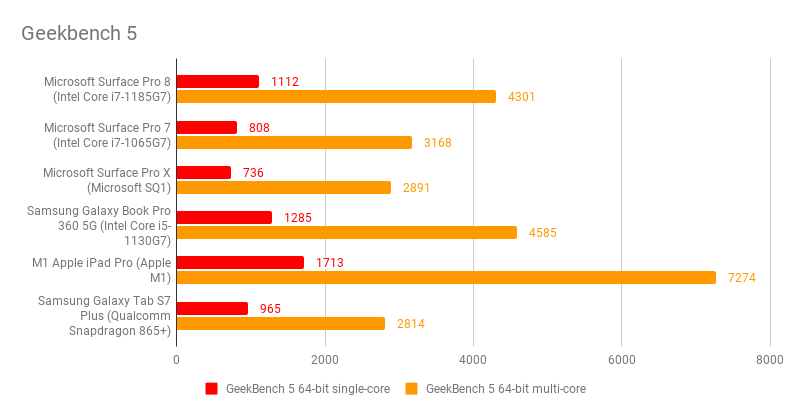
The Geekbench 5 CPU test told a similar tale with the Pro 8 easily outstripping both the Pro 7 and Pro X Surface tablets and the chipset even has performance enough to allow a little light gaming, the Metro Redux benchmark returning an average frame rate of 57fps at 1,920 x 1,080 (although only 22.3fps at the native resolution of 2,880 x 1,920). The GFXbench Car Chase benchmark also shows good performance at 1080p.

Elsewhere, however, performance is slightly less impressive. The Kioxia-made 256GB SSD inside the Pro 8 runs on the PCI-E 3 specification rather than PCI-E 4 so speeds are mediocre, with sequential read and write rates of 1,946MB/sec and 685MB/sec.

And battery life isn’t all that impressive, either. The Surface Pro 8 ran for 7hrs 16mins in our video rundown battery test, four minutes shy of the Surface Pro 7, which kept going for 7hrs 20mins. That’s despite the Surface Pro 8 having a bigger battery (51.5Wh versus 43.2Wh). That’s enough to see you through a full day of work, but the iPad Pro and Galaxy Tab S7 Plus, not to mention countless regular laptops, can do much better.

Microsoft Surface Pro 8 review: Verdict
Having said all that, the Surface Pro 8 is a very hard act to beat for sheer versatility. Used solo, it’s an excellent tablet, but when combined with the Surface Pro Signature keyboard it’s a thoroughly competent and powerful laptop replacement, while the Surface Slim Pen 2 turns it into a handy graphics tool.
Some will bemoan the absence of an affordable Core i3 entry model but, if you only have room for one Windows device in your life and expect to be carrying it around with you a lot, then the new Surface Pro 8 has to be top of the list of devices to look at.


