
To help us provide you with free impartial advice, we may earn a commission if you buy through links on our site. Learn more
- Solid build and adjustable stand
- Good image quality
- 120Hz refresh rate
- Colour accuracy could be better
- Motion blur in dark scenes
The MSI MP242PMG isn’t new and it isn’t cutting-edge. But what it most definitely is, is a brilliant value monitor for the home office.
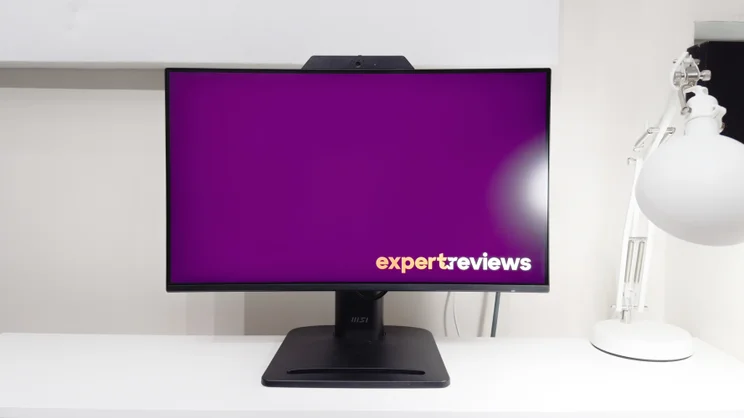
It’s a basic 24in Full HD screen with some useful features, and despite the low price it’s unusually well-built and very sensibly designed.
What do you get for the money?
With a matte IPS panel mounted to a fully adjustable stand, the MP242PMG is your archetypal budget office monitor. It offers a little more than similarly priced rivals, however. It adds a basic Full HD webcam, an integrated microphone and a basic two-port USB 2.0 hub. And yes, as usual, you get a pair of terrible integrated speakers thrown in for free.

The Full HD panel is nippier and more versatile than some office-focused rivals. The 120Hz refresh rate promises to reduce flicker for everyday work. And the 4ms GtG and 1ms MPRT response time hint at decent motion clarity for gaming, too.
With prices hovering between £80 and £100, it’s arguably one of the best value office monitors currently on the market – and the specifications mean that it won’t be out of its depth with a little post-work entertainment, either.
What’s build and connectivity like?
The first surprise here is how solid the MP242PMG feels. The acres of black plastic aren’t likely to set the pulse racing, but both the panel and stand feel really well put together. Granted, you don’t get the quick release stand adopted by pricier panels, but once you’ve screwed the adjustable stand into place on the panel’s VESA mount it all feels super sturdy.
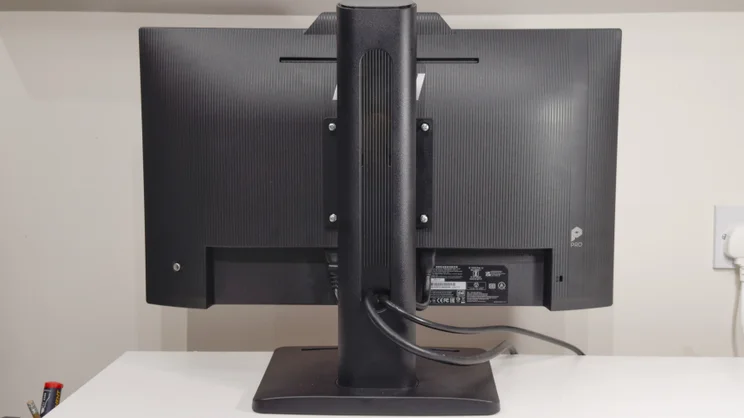
That stand provides 130mm of height adjustment, plenty of tilt and swivel, and pivots around into a portrait mode in both directions. It’s impressively stable, too, and easy to adjust one-handed. I’ve encountered worse stands on far pricier monitors. In fact, I’m especially pleased to see some proper cable management: a sizable oval cut out in the stand routes all the cables neatly out of sight and, unlike rival designs with little plastic clips, it’s never going to fatigue over time and snap.
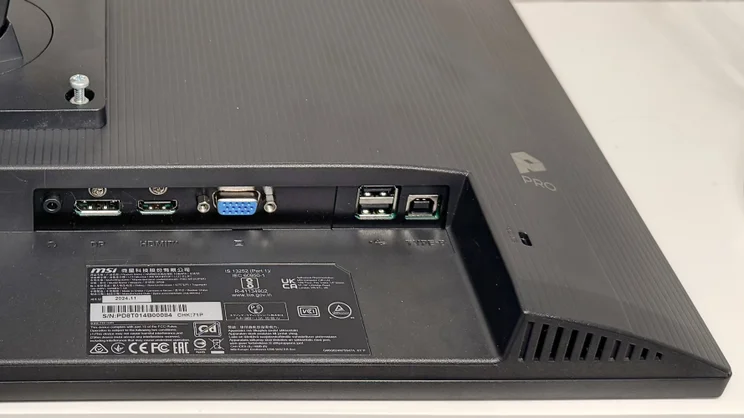
Put all the connectivity to use and you’ll be glad of it, too. There are HDMI and DisplayPort inputs alongside VGA, which is something of a rarity for today’s monitors, and handy for connecting it to vintage computers and laptops. A single USB-B input hooks up to your PC and this activates the two-port USB 2.0 hub, allowing you to connect to the Full HD webcam and microphone. Both of the USB ports are at the rear and downward-facing, though, so they’re best reserved for peripherals you’re going to leave plugged in.
Usability and features
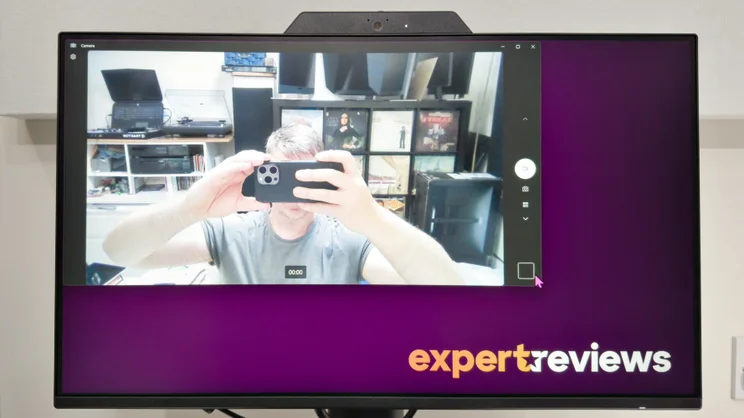
The Full HD webcam and microphone are adequate rather than impressive, but they may prove useful. The former comes with a privacy shutter, which is a nice touch, and the image is clear and colourful under bright lighting. It does get very grainy and dull in low light, however, so make sure to keep the office lights on during video calls.
The microphone doesn’t have active noise cancelling, so it’ll struggle in a noisy office, but it produces perfectly acceptable audio quality in a quiet home office.
By far the most mediocre aspect of the MSI MP242PMG’s audiovisual performance is its speakers, which are typically coarse and tinny. My advice is to take advantage of the 3.5mm audio output at the rear of the monitor and connect a pair of headphones or a separate set of speakers.
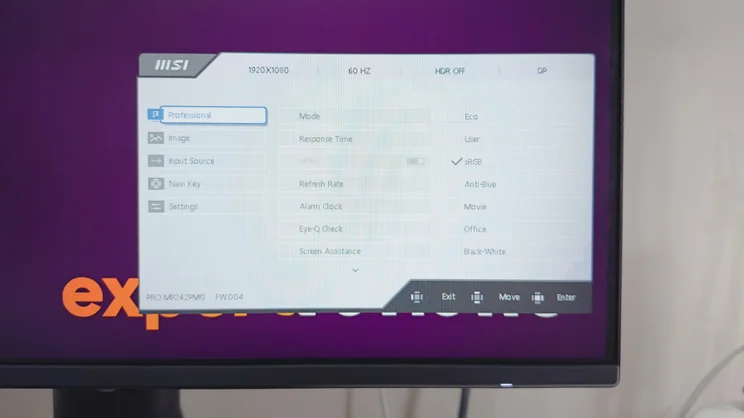
MSI has done a good job with the MP242PMG’s on-screen display and controls, though. Where some budget monitors resort to awkward side-by-side buttons, the clickable four-way joystick here is far more intuitive. Push it in any direction and it brings up quick adjustments for a specific setting; these can be customised in the menus, too. Click the joystick in, and the main menu springs up to give access to all of the monitor’s features.
The main menu itself is easy to understand. Everything is laid out clearly, so it’s easy to adjust the monitor’s array of features and picture modes. And it’s great to find some genuinely useful modes among these.
The Black and White mode is pleasant for working on documents, especially with the brightness dialled right down, and the Anti Blue mode mimics the night modes found on most mobile devices, transforming the monitor’s bright whites into a softer, more orangey glow that’s easier on the eye.
How good is image quality?
Switch to the MSI’s more accurate sRGB or User picture modes, and the image quality is very respectable for a budget panel. In fact, it goes brighter than many budget monitors I’ve reviewed, with a maximum brightness of 440cd/m2 and a better-than-average contrast ratio of 1,617:1. For gaming or watching movies in bright rooms, that’s something of a boon. It’s still not bright enough to make the HDR mode worthwhile, however. I’d recommend sticking with SDR.
The sRGB mode is quite colour accurate for a budget monitor. The average Delta E of 1.32 is low, and this is only marred by a very warm 5,887k white point. The effect of this is that whites have a reddish tint, much more so than the ideal 6,500k white point. The panel’s gamma tracking is also rather erratic, and this means some colours look lighter in tone than they should, both in dark and lighter tones. Unless you’re viewing the MSI side by side with a more accurate monitor, however, you’re unlikely to notice. In isolation, the MSI’s image quality is perfectly pleasant to look at.
The monitor’s User mode isn’t quite as accurate on paper, but I found the more neutral 6,445k white point preferable for most of my usage. It, too, suffers from the same over-brightened tones as the sRGB mode – and colour accuracy actually ends up slightly less accurate, with some slightly over-vibrant colours resulting in an average Delta E of 2.07 – but it’s more than good enough for day-to-day use.
I used the monitor for a week for work, watching YouTube videos and the occasional Netflix show, and never found the colour reproduction stood out as being particularly wrong or inaccurate.
Gaming isn’t the MP242PMG’s forté, but if you’re coming from an older panel with a 60Hz refresh rate you may be pleasantly surprised. The 120Hz refresh rate here gives a very clear upgrade in smoothness, and if you nudge up the panel’s overdrive settings one step up from the default level, its motion clarity is adequate for enjoyable gaming sessions.
Push the overdrive up to the maximum Fastest setting, however, and ugly bright fringing around moving objects swiftly begins to stifle the enjoyment. And especially so with VRR enabled – the lack of adaptive overdrive means that higher overdrive settings cause very intrusive fringing when the framerate drops well below the chosen refresh rate. In my testing, I preferred to leave VRR disabled.
Also, despite the stated 4ms GtG and 1ms MPRT response time, the IPS panel doesn’t perform brilliantly in darker scenes. Move from a bright outdoors scene into a dimly lit interior and you’ll notice that motion suffers quite badly with a slightly blurred, smeary look.
| Test | Result (measured) |
|---|---|
| Max brightness | 44cd/m2 |
| Max contrast | 1,617:1 |
| sRGB mode colour accuracy (lower is better) | 1.32 Delta E |
| sRGB mode white point | 5,887k |
| User mode colour accuracy | 2.07 |
| User mode white point | 6,445k |
This also impacts on the usability of the panel’s backlight strobing mode. Turning on MPRT mode darkens the overall image quite significantly, and while this produces a subtle improvement in clarity in very bright scenes, it only serves to highlight the panel’s issues in darker scenes. My advice? Unless the game environment is predominantly bright, leave MPRT off.
As ever, the only other major downside to the MP242PMG is the Full HD resolution. It’s acceptable for everyday productivity, but text is by no means sharp. If you want a crisper image that’s easier on the eye, there’s much to be said for spending around 20% to 30% more on a large 27in monitor with a QHD resolution. Put the pair side by side and the difference will be pronounced.
Should you buy the MSI Pro MP242PMG?
You can always find quibbles with budget monitors, but it’s hard to grumble when one is as well-rounded as the MSI Pro MP242PMG. It’s robustly built, the design is resolutely sensible throughout and the image quality, while not class-leading, is more than good enough.
At this end of the market, though, it is essential to shop around. Even small discounts can transform a monitor from good to great value, and you may find larger, higher-resolution models dropping to a price you can’t refuse.
That said, with recent street prices hovering around £100, I’m hard-pressed to find many rivals that tick all the boxes the MP242PMG does. If you can find it at that price, it’s great value. If you can find it cheaper – and bear in mind that I’m seeing it on sale for £87 at the time of writing – it’s potentially a bona-fide bargain.
MSI Pro MP242PMG specifications
| Display | 23.8in IPS panel |
| Panel resolution | 1,920 × 1,080 (Full HD) |
| Refresh rate | 120 Hz |
| Panel response time | 1 ms (MPRT) / 4 ms (GtG) |
| Adaptive Sync Support | Yes (Adaptive-Sync) |
| HDR Support | Yes |
| Ports | HDMI 1.4b × 1, DisplayPort 1.2a × 1, D-Sub (VGA) × 1, USB 2.0 Type-B (Upstream) × 1, USB 2.0 Type-A (Downstream) × 2, 3.5mm headphone out × 1 |
| Other features | Built-in 1080p FHD webcam with microphone and privacy shutter, 2 x 2W speakers |
| Stand | Height 130mm, Tilt –5° to +20°, Swivel -45° to 45°, Pivot -90° to 90° |
| Dimensions (with stand) | 540.0 × 227.0 × 412.0 mm (WDH) |
| Weight (with stand) | 5.5kg |


