To help us provide you with free impartial advice, we may earn a commission if you buy through links on our site. Learn more
- Excellent day and night image quality
- Warm, bright floodlight
- AI video clip search
- Subscription is necessary to access your recordings
- Advanced AI features also subscription-dependent
- Fussy 5GHz Wi-Fi support
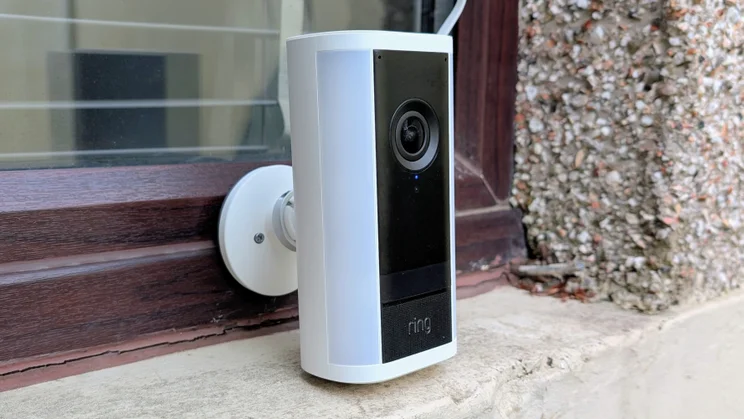
Ring’s latest Spotlight Cam Pro Plug-In is a rather curious beast. Like most Ring security cameras, its image quality, usability and performance are right up there with the best around, and it combines this with twin LED lights and a siren designed to put off intruders before they even think about breaking in. It’s among the best in breed, from a hardware perspective.
And yet, this is a security camera we think you should very hard about before buying. That’s mainly because, like all Ring cameras, you have to pay a monthly subscription to make the most of all its features, but also due to the competition being so strong in this price bracket.
For the £220 that Ring is asking for the Spotlight Cam Pro Plug-in, you can pick up a Reolink Elite or a Reolink TrackFlex, get similar image quality and features, a brighter floodlight – and not have to keep paying every month.

What do you get for your money?
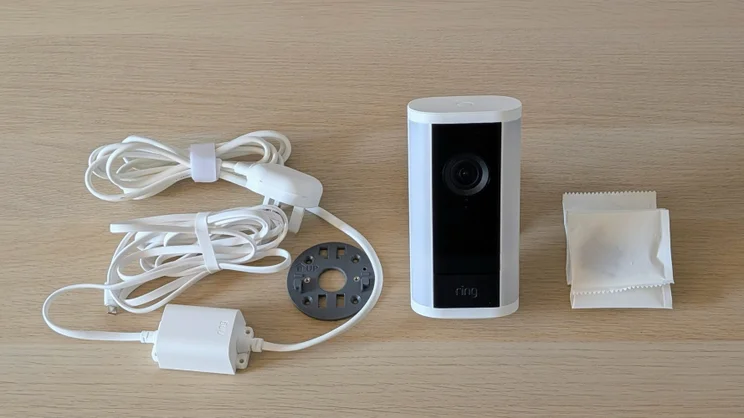
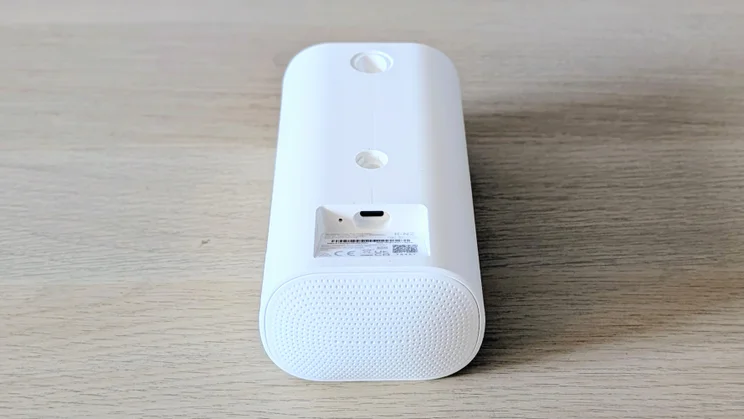
The Ring Spotlight Cam Pro is a mains power-only camera. Power is fed into the camera via a weatherproof USB-C port. That is connected by a cable to a small external power supply, which in turn is connected to a UK mains plus by another cable.
The total length of the power cables is 5.45m, so there’s plenty of slack to get it into position.
While the USB-C plug means you don’t need to faff about splicing the camera into a mains supply as you do with the likes of the Reolink TrackFlex, you still need to work out how to get the power cable from inside to outside if you don’t already have an external socket.
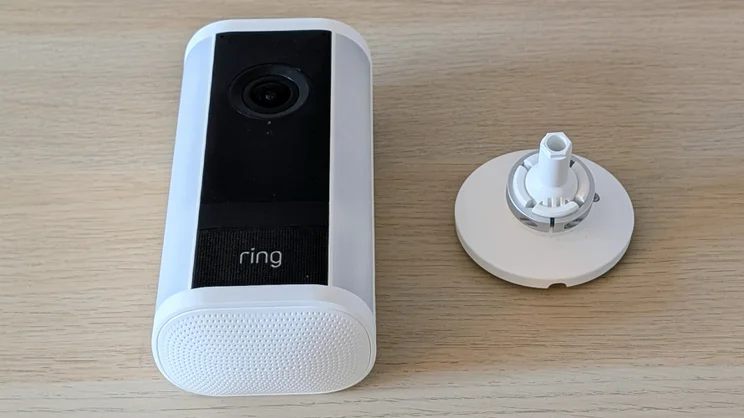
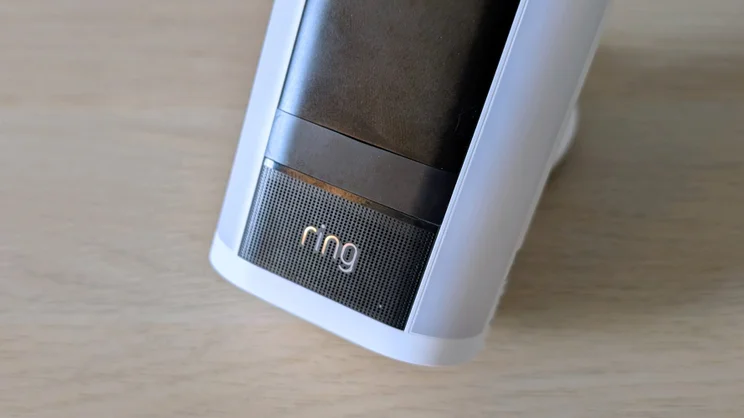
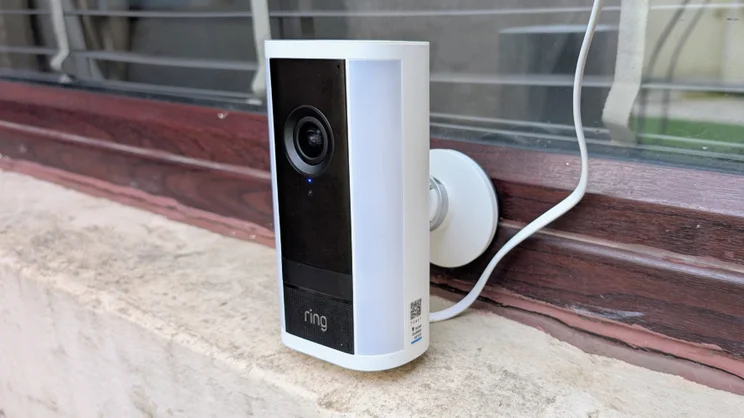
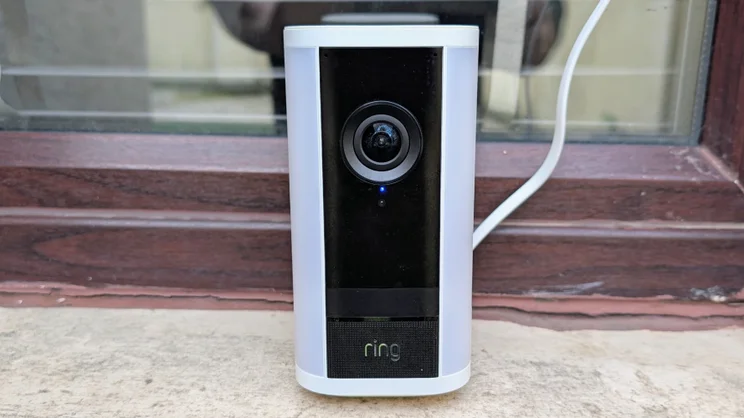
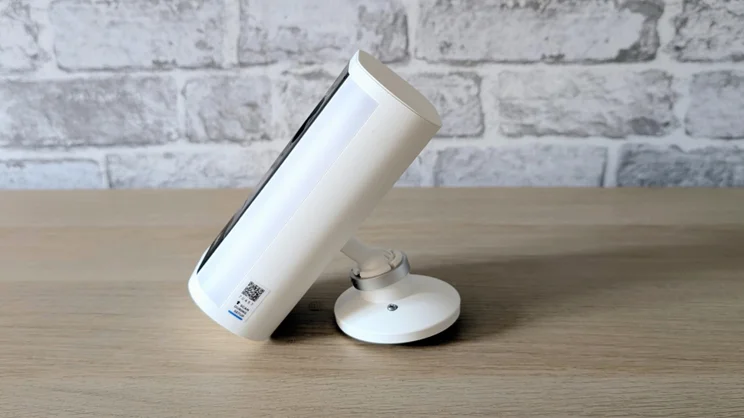
Physically, the Spotlight Cam Pro is a solid unit that measures up at 152 x 76 x 52mm and weighs 800g. Available in black and white, it’s an elegant cylindrical design with the speaker housing in the bottom and the camera fascia flanked by two vertical floodlights.
Ring doesn’t give traditional IP ratings for its cameras, simply saying that the unit is “weatherproof”. Given that it survived being blasted by my pressure washer at close range, it’s safe to say it’s at least equivalent to IP65 against water ingress.
Do you need a subscription?
Oh, yes. First off, without a subscription, you can’t store, share or download any recordings made by the camera. And there is no option to store recordings locally on either a memory card or a hub, either. And that’s not all you lose without a sub. All the advanced AI features are dependent on a subscription, and the more you pay, the more you get.
The basic Ring subscription costs £4.99 a month or £50 a year. For that, you get support for one camera, 180 days of storage, person, package and vehicle alerts, extended live views and doorbell calls, which means the camera launches a phone call when it sees somebody approaching your door.
If you have more than one camera, the cost increases to £7.99 per month or £80 a year. If you want all the features, including video descriptions and the facility to bundle similar events into one alert, video search and facial recognition, you’ll need the Ring Pro package for £16 per month or £160 per year.
Even that doesn’t get you everything. If you want 24/7 continuous video recording, that will be £3 per month per camera. That means that if you have one camera but want all the features, your cost for your first year will be £416, dropping to £196 a year thereafter.
It’s worth mentioning here that the camera can be set to take a snapshot every 15, 30, 60 or 180 seconds, which for many users will negate the need for 24/7 recording.
Rings offers a 30-day trial of Ring Pro which is great, but if you don’t renew you are going to be shocked by the amount of functionality that’s missing when day 31 dawns.
How easy is it to set up?
Initial setup is typical for domestic security cameras. First, you download the Ring app, then you set up an account (and connect it to an existing Amazon account) then scan the QR code on the base of the camera. Neither of my phones could capture the code, which I put down to the stickers’ less-than-stellar printing quality, so I had to resort to picking the model from a list and then typing in the digits below the code.
Then it’s just a question of adding your Wi-Fi password, and you’re good to go. Ring says the new camera supports 2.4GHz and 5GHz Wi-Fi, but as we’ll see below, it isn’t quite that simple.
At the rear of the unit are two hexagonal sockets to attach the ball and socket mount to; one is set at 90 degrees the other at 45 degrees. And there’s a downward angled USB-C socket. Ring supplies various screws, cable clips and wall plugs, but you will need a small screwdriver to tighten up the various parts of the wall mount.
The camera mount clicks onto a flat bracket, which can then be secured by two screws. That makes it very hard to steal. Overall, the Ring mount is one of the more thoroughly thought-out and well-engineered of its type.
Is the companion app any good?
Ring’s app is easy to navigate and does a good job of putting the important controls, like those for the light, siren and messages, up front and easy to access.
The only slight niggle is the way the settings are split between a side menu accessible from the main landing screen and another menu accessible from a gear icon on the timeline review page. This can make it difficult to find the setting you want as sometimes you have to browse through two lists of options.
The app does a great job of making subsidiary features easy to access, however. For instance, the birds-eye view, which plots the position of potential intruders on a satellite image, appears in the corner of the video feed; while snapshots (the camera can be set to capture periodic still images from the camera feed) appear in the main video activity timeline between video recordings.
When I first opened the app, I was disappointed not to see a manual record button, and then the shoe dropped: the app automatically records the video feed when you launch a live view. That’s a clever idea and means that anything you see live on-screen is stored for later perusal.
The option to have a small live feed screen floating on your phone’s display is a useful touch, too. It lets you access other apps while still keeping an eye on the camera feed.
How we test security cameras
In any security-related situation, how fast you can react to events is key, and that’s why we test the responsiveness of each camera we review. To do this, we run a raft of tests with the aim of measuring the speed of the camera system’s response to various triggers.
For example, we test how long it takes for an alert to be generated on the screen of the camera’s mobile app after motion is detected. We also time how long it takes to bring up the live feed from any alert, and how long it takes to bring up the live feed from the main screen of the app.
How does the Ring Spotlight Cam Pro Plug-In perform?
Image quality and night vision
Here, the new Ring Spotlight is an excellent performer. The video feed is bright and colourful, especially in HDR mode, and thanks to the wide viewing angles of 140 degrees horizontal, 85 degrees vertical, there’s plenty to be seen. Video footage is crisp and smooth with a resolution of 3,840 x 2,160 (dubbed Retinal by Ring) and a 25fps frame rate.
Low-light performance is equally good. The night-time colour video footage is some of the best I’ve ever encountered on a domestic security camera. If there’s absolutely no ambient light, the IR feed is just as good, sharp, and with excellent levels of contrast.
As is typical of cameras in this class, there’s no optical zoom, but the 10x digital zoom does a good job of suppressing noise and artefacts so you can zoom in close without sacrificing much in the way of image quality.
Floodlights, audio and siren
The two spotlight strips are rated at 600 lumens and are set to a temperature of 3000 Kelvin, which is towards the warmer end of the spectrum. That means the light is bright enough and warm enough to work as a porch light, and you can set the lights to turn on and off at preset times.
Ring rates the loudspeaker output at 85dBA, but it sounded rather louder to my ears – quite the equal to the 105dBA-rated siren on the Reolink TrackFlex. According to my sound meter, the Ring hit 101dBA to the Reolink’s 106dBA.
As you’d expect from a security camera, you can set the system to flip on the lights or fire up the siren – or both, or neither – when motion is detected. If you want a halfway measure between silence and a piercing siren, the system can be set to say “Hi. You are now being recorded” whenever it detects motion.
The two-way audio feed is very good, too, with conversations coming out loud and clear both ways, and wind noise around the camera is well damped. There is also a wide selection of pre-recorded messages that you can manually send to the camera if you don’t want to speak directly through the camera yourself.
Most of the messages are in a stilted English or midwestern American accent. The selections in the Irish and Scottish “Voice of the Nation” menus are best avoided unless you intend to deliberately offend people from those nations.
AI features
All security camera makers are now loading their devices with AI features in an effort to give them a clear functional advantage over the competition. Ring’s offering on this front includes a feature called “clip description”, which is currently unique to Ring. It provides a written explanation of what’s happened in a clip, instead of making you watch the video.
Once I’d set myself up as a known person, the first alert I received read “Alun is walking on artificial turf”. Which indeed I was. The system’s ability to discern astroturf from grass was impressive, if arguably pointless.
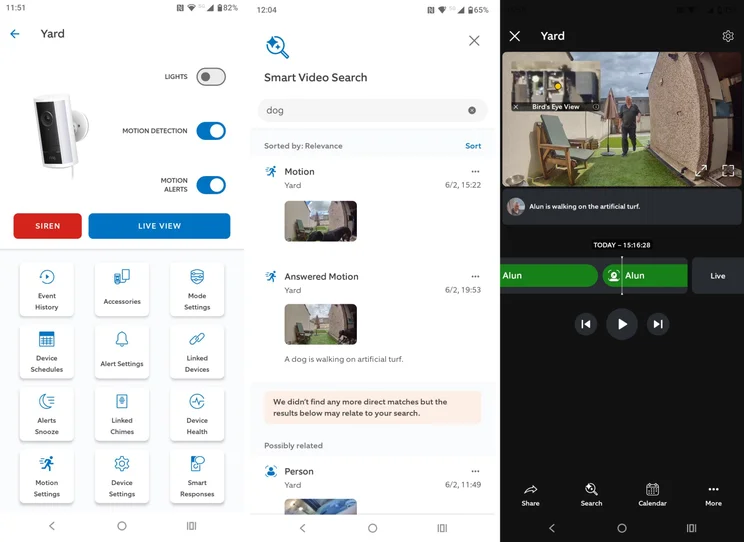
The smart video search is more useful. Type in a search term in plain English, like “black dog” or “blue van”, and all the videos that feature those things will pop up. Of course, some of Reolink’s cameras also support this feature and don’t charge for it.
Another AI feature allows you to group together alerts for repeated actions, or ask it to learn what it deems usual and only alert you when something unusual occurs.
Using these features you can, in theory, prevent the system notifying you when you’re mowing the lawn, or walking out the back door to water the plants, while occasional events such as someone approaching your back door in the middle of the night will trigger an alert. In practice, I didn’t see it working – it was still triggering when the dog walked past, despite this being a fairly regular event – leading me to suspect that the timing and type of event would have to be quite specific for this to actually learn and ignore “usual” events.
Speed and responsiveness
The days of domestic security cameras taking ages to send alerts, notice movement or launch live feeds on demand seem to be well and truly behind us.
In our standard tests, the new Ring Spotlight proved every bit as quick as the latest cameras I’ve tested from the likes of Eufy, Tapo and Reolink. There’s the odd half-second difference here and there, but generally speaking, this new Ring, like most modern security cameras, does what you want, when you want with negligible delay.
The time it took for the camera to issue the “Hi. You are now being recorded” warning was impressively fast, bordering on the instantaneous.
| Time to launch live stream from app (Wi-Fi, secs) | Time to launch live stream from alert (Wi-Fi, secs) | Time to alert on motion (Wi-Fi, secs) | Time to launch live stream from app (cellular, secs) | Time to launch live stream from alert (cellular, secs) | Time to alert on motion (cellular, secs) | Total | |
|---|---|---|---|---|---|---|---|
| Arlo Ultra 3 4K Security Camera | 4.0 | 1.9 | 1.4 | 2.0 | 2.1 | 1.5 | 12.8 |
| EufyCam S4 | 1.9 | 0 | 6.1 | 1.4 | 0 | 6.5 | 15.8 |
| Reolink Elite | 2.5 | 2.3 | 0.9 | 2.9 | 2.7 | 1.0 | 12.4 |
| Reolink TrackFlex | 2.4 | 2.2 | 1.0 | 2.9 | 2.6 | 1.1 | 12.2 |
| Ring Spotlight Cam Pro Plug-in (2nd Gen) | 2.0 | 2.5 | 1.0 | 2.8 | 2.7 | 1.3 | 12.3 |
Are there any problems worth mentioning?
According to Ring, its new camera supports both 2.4GHz and 5GHz Wi-Fi, but my review unit point-blank refused to see the 5GHz signals from my 5GHz-only TP-Link extender, though it did see the 5GHz signal from my Sky Hub.
The reason, as I discovered, is that Ring products won’t connect to a 5GHz Wi-Fi signal using channels 36-64, which means you may need to manually select new channels (Ring suggests 100-165) in your router setup utility if you want to use that particular band.
I’ve tested cameras from both Arlo and Tapo, which will quite happily connect to a 5GHz signal on any channel, which suggests Ring is being a bit lazy when it comes to market-specific fettling.
Also, being a Ring product and Ring being owned by Amazon, the Spotlight Cam Pro will only integrate with Alexa. Users of any other type of IoT or smart home setup should look elsewhere.
Should you buy the Ring Spotlight Cam Pro Plug-in?
I like the new Ring Spotlight Pro a lot. Video quality is excellent; it’s chock-full of functionality, most of it useful, and all the AI features work well. The two warm floodlights are handy too if you want a camera that can double as a porch light.
The problem is that unless you are happy to cough up £16 a month for the Pro subscription, you will feel like the owner of an economy specification car with blanking plates in place of the switches that do things on the more expensive models. That’s a hard pill to swallow, given the initial price for the hardware.
The requirement for a subscription is not unique to Ring. Arlo demands much the same, but it would be easier to stomach if AI features came with the entry-level package and if the likes of Eufy, Tapo and Reolink didn’t offer many of the same features for free. As it stands, then, I’d advise you look at a camera or camera system from one of those manufacturers before considering Ring.