
To help us provide you with free impartial advice, we may earn a commission if you buy through links on our site. Learn more
- Impressively long battery life
- Good quality touch-capable IPS screen
- Wide selection of I/O ports
- Weak graphics performance
- Limited post-purchase upgrade options
- All USB ports limited to 10Gbits/sec
When Qualcomm unveiled its second-generation Snapdragon X2 processors earlier this year, it did so with the top-end Elite models. We’ve already tested those in the Asus Zenbook A14 and Zenbook A16 and came away mightily impressed.
Now the lesser Plus models in the X2 range have arrived on the scene, and the first one to land at Expert Reviews is wrapped up in Lenovo’s latest IdeaPad: the rather inelegantly named Slim 5x Gen 11.
What you need to know
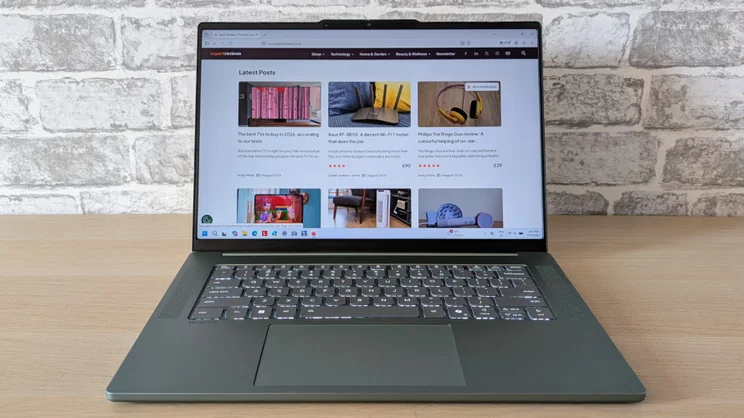
Lenovo’s new IdeaPad Slim 5x Gen 11 is a general-purpose, mass-market laptop with a 15.3in screen and a price just a little north of £1,000. That’s not traditionally a recipe for the most exciting of laptops: in terms of both price and size and specification it’s a do-it-all affair aimed at buyers who want basic functional competence without breaking the bank.
However, we are now living in something of a golden era for affordable laptops; witness the brouhaha surrounding the launch of Apple’s ultra-cheap MacBook Neo, and the Slim 5x Gen 11 is very much a child of its time.
Despite being essentially a work-a-day laptop, this new release delivers quality, performance and battery life beyond what you’d expect for the money, and being a Lenovo machine you can make some important spec changes at the point of purchase, including the amount of RAM, type of display and storage capacity. Never have boring laptops been so interesting.
Price and competition
Configuration tested: 6-core Qualcomm Snapdragon X2 Plus X2P-42-100 Processor, 32GB RAM, 1TB SSD, 15.3in 1,920 x 1,200 120Hz touchscreen IPS display. Price: £1,369
The base model of the Lenovo Slim 5x Gen 11 will set you back £1,080, but you can double the memory and storage to 16GB and 512GB for £260 and £30 respectively, which accounts for the difference between that and the price of the machine I was sent to test.
The international specification sheet also mentions 256GB and smaller battery options, but there’s no sign that such models will make it to Blighty.
If you’d prefer a machine running on Intel’s new Panther Lake silicon, look no further than Honor’s excellent MagicBook 16, a stylish and well-made all-metal machine with a solid keyboard and long battery life. Honor has recently been selling it for just £699, which makes it ever easier to forgive the drab IPS display and humdrum webcam.
Apple has recently updated its evergreen MacBook Air with the new M5 chipset. The performance boost is significant, but the absence of any other changes of note, especially in terms of battery life, once an Air strength, left a slight sense of disappointment. It’s still a fine laptop, but now, for the first time, in danger of being sidelined by cheaper competition.
If you want to experience the very best the new X2 Snapdragon chipset has to offer, you’ll need to spend two grand and go for Asus’s fine Zenbook A16. Performance from the top-end X2 Elite chipset is impressive, as is the 2.8K OLED screen and the superlight just-over-1kg weight. It’s expensive, but worth every penny.
Design and features
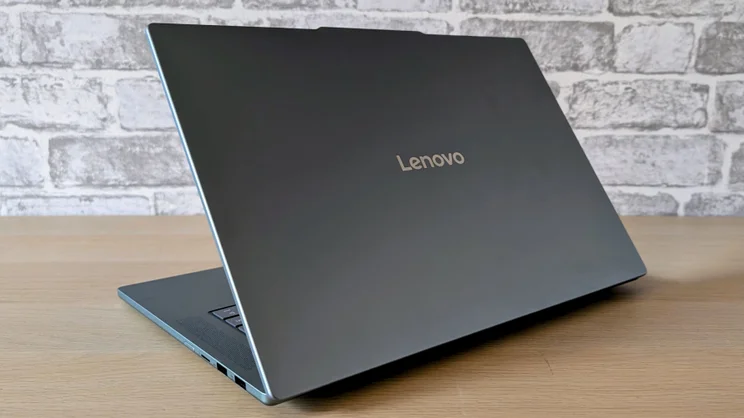
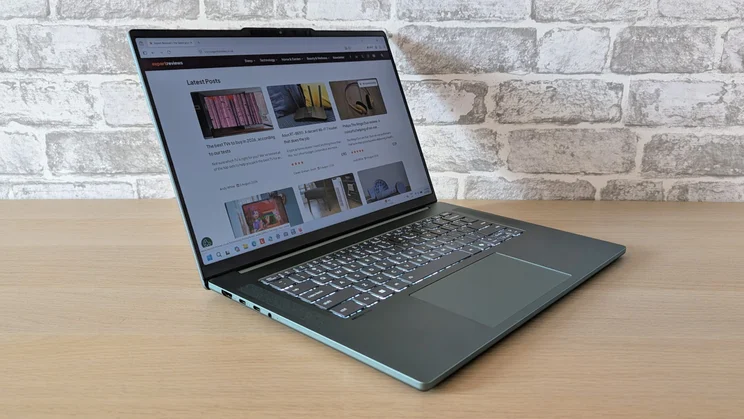
At this sort of price you sometimes have to make do with a plastic body shell, but the exterior of the Slim 5x is made entirely of aluminium. That lends the whole enchilada a feeling of solidity and quality that’s by no means a given for a £1,000 laptop.
That solidity isn’t just skin deep either, as Lenovo boasts that the Slim 5x has passed 21 of the MIL-STD-810H military-grade robustness tests. The Slim 5x weighs 1.41kg and is 15.6mm thick, which is 100g lighter than a 15.3in MacBook Air but 4mm thicker.
Lenovo’s mass-market laptops are typically rather staid designs and the new Slim 5x is no exception. It’s handsome enough but at the same time rather generic. The only branding is the large chrome Lenovo logo on the lid. Incidentally, that lid folds all the way back through 180 degrees.
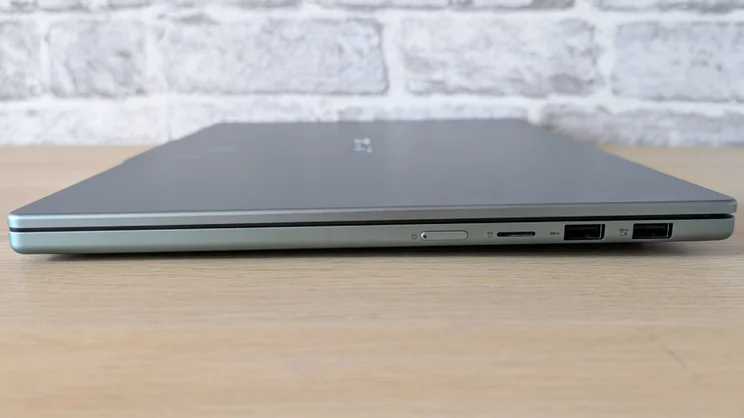
Another typical Lenovo feature is the narrow side-mounted on/off button. Personally, I found it rather too small and too hard to locate by feel alone, but doubtless increased familiarity would address that.
My test machine came in a rather fetching green colourway called ‘Breeze moss’. Other options include ‘Cloud grey’ and ‘Sand rose’. Colourways to one side, the anodised finish did a good job of concealing greasy fingerprints.
Connectivity, wireless and repairability
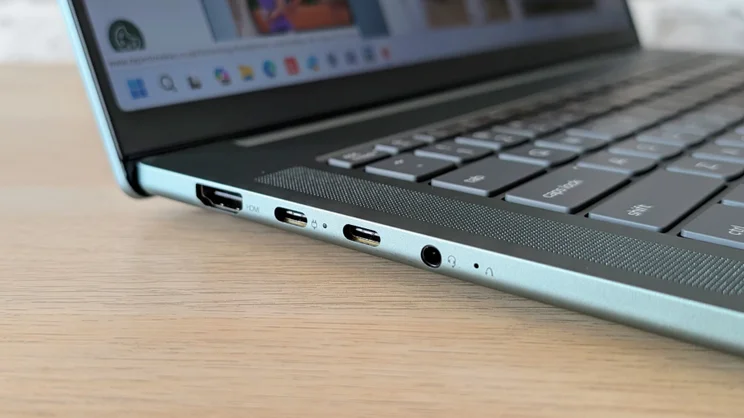
Lenovo hasn’t rewritten the rulebook when it comes to physical ports, but two 10Gbits/sec USB-A and two 10Gbits/sec USB-C ports, an HDMI 2.1 video output, a 3.5mm audio jack and a microSD card is still a strong selection. Would USB-C 4 ports have been preferable? Of course, but on a machine costing just over £1,000, the absence hardly comes as a shock.
Both the USB-C ports support DisplayPort video, and both can play nicely with a 45W or 65W charger. I’d rather the USB-C ports were arranged one on each side so you could choose which side to charge through, but that’s a small niggle. As far as wireless connectivity is concerned, the WLAN card supports Wi-Fi 7 and Bluetooth 5.4, the former not always a sure thing at this price.
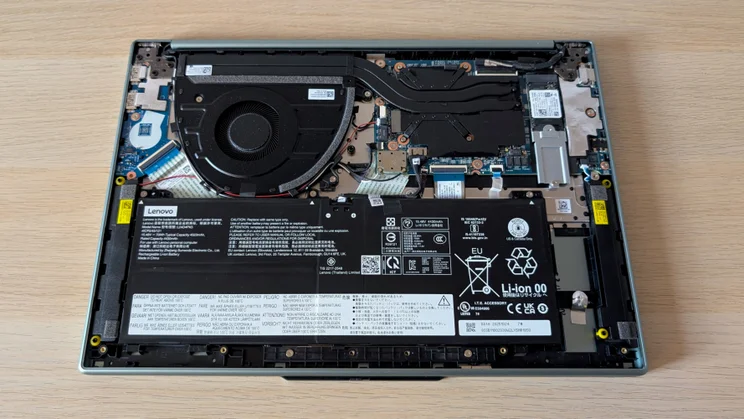
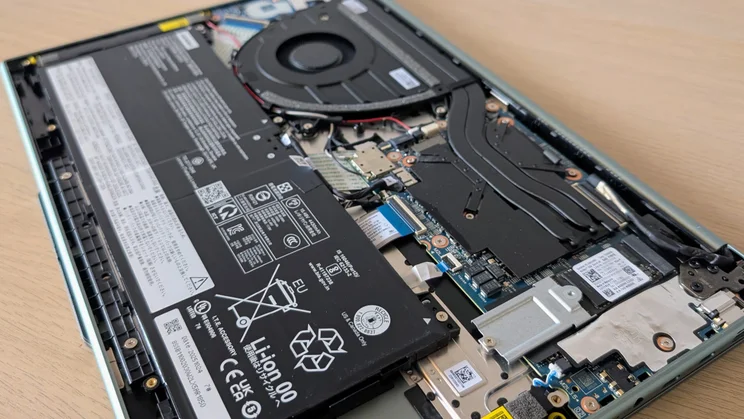
Getting inside the Slim 5x is easy enough, but you can’t add more RAM or swap out the Wi-Fi card, and there’s only the one 2280 SSD bay, which is already occupied with the existing SSD, so upgrades will be tricky. The battery is easy enough to remove, though, should you ever need to replace it, and the fans are easily accessible for cleaning.
Keyboard, touchpad and webcam
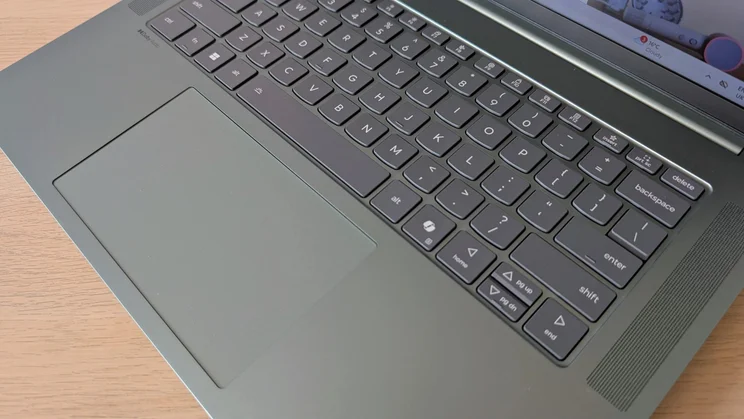
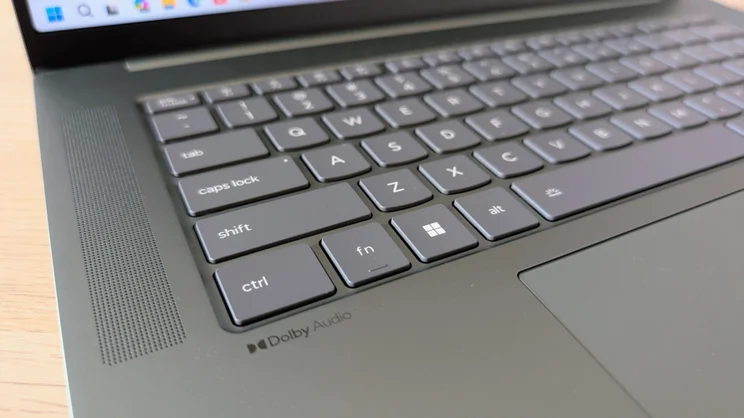
The shape of the keys, with their curved bottoms, gives away Lenovo’s heritage at first glance, but that’s no bad thing as Lenovo is something of a byword for top quality laptop keyboards.
The keyboard deck is rigid, with some flex only evident if you press down excessively hard in the middle, the typing action is light yet positive, and the keycap graphics are models of clarity.
Other than the half-height up/down arrow keys, which look incongruous given the vast Serengeti-like acreage below them, there’s nothing to worry about vis-à-vis the layout, and there’s a low/high/auto white backlight to help when the going gets dim.
The 80 x 135mm glass-covered touchpad is good, too: it’s large enough to accommodate even the most flamboyant gestures and has a light, crisp, if rather loud, click-action.
And the 1080p webcam is a good example of the breed. Images are bright and colourful, and there’s a manual shutter to cover the lens when you want to guarantee your privacy. It also has support for Windows Hello facial recognition, which in the absence of a fingerprint scanner is all the biometric security you get.
Display and audio quality
My review machine came fitted with the 120Hz, 1,920 x 1,200 IPS touchscreen and it proved perfectly adequate. It’s worth clarifying that although you can have the superior (on paper at least) 165Hz, 2,560 x 1,600 OLED alternative for the same price, it lacks support for touch.
Pointing a colorimeter at the screen revealed it to have a maximum brightness level of 400cd/m2, a contrast ratio of 1,860:1, a maximum colour volume equivalent to 106.9% of sRGB (equivalent to 75% of DCI-P3), and an average Delta E colour accuracy error of 1.5 versus sRGB. That’s a solid set of numbers for the display on any £1,000 laptop.
Subjectively, the Slim 5x’s screen delivers a satisfying viewing experience with punchy colours and deep black level response. It can’t support HDR content, but it’s still a big step forward from the IPS panel fitted to the, admittedly cheaper, Honor MagicBook 16 and the 120Hz refresh rate pays obvious dividends when scrolling through text files or navigating spreadsheets.
The two 2W speakers that fire up through the grilles that flank the keyboard are not the loudest around, measuring just 73.8dBA against a pink noise source at a 1m distance, but the sound they make is full and detailed with rich low-end underpinnings.
Performance
The difference between the Snapdragon X2 Plus X2P-42-100 processor in the new Lenovo and the X2 Elite Extreme X2E-94-100 in the Asus Zenbook A16 is considerable. The former has only six “prime” cores and a maximum clock frequency of 4GHz, while the latter is an 18-core affair made up of 12 prime cores and 6 much faster 4.7GHz performance cores.
The integrated Adreno GPU is also considerably less potent, with a maximum frequency of 0.9GHz rather than 1.85GHz and a bandwidth of 152GB/sec rather than the 228GB/sec on the X2 Elite Extreme.
Base CPU performance is, however, better than the Intel Core Ultra 5 Processor 325 inside the Honor MagicBook 16, with Geekbench 6 scores of 3,173 in single-core and 12,815 in multi-core vs 2,517 and 10,539. For everyday productivity tasks, the Slim 5x is more than up to the job; it always felt slick and fast, no matter how many apps I left open.
Graphics performance is another matter. In the 3DMark Night Raid test, the Slim 5x scored 22,698 to the Honor MagicBook 16’s 30,482 and the quad Xe-core integrated GPU in the Honor is no great shakes itself.
What that means in the real world is that to get a reliable 30fps or more frame rate, even in a game as undemanding as the 2016 Doom reboot, I was forced to drop the resolution down to 1,366 x 768.
The weak GPU is the main reason the Slim 5x returned a rather mediocre score of 207 in our Handbrake-based 4K multimedia benchmark, 69 points less than the MagicBook 16. Even the 2023 M3 MacBook Air managed to score 24 points more.
The good news is that, while the Slim 5x may not be the most powerful laptop around, it can deliver its full performance without drama. Even when running under maximum stress, the CPU and GPU stayed at 100% utilisation, and the fan noise never rose above a whisper. In anything other than a completely silent space, you could be forgiven for thinking the new Lenovo is passively cooled like the MacBook Air.
My review machine came with a 1TB Sandisk SSD, which turned in good average sequential read and write speeds of 4,739MB/sec and 2,895MB/sec respectively.
Battery life
Impressive battery life is a key feature of the latest Snapdragon X2 chipsets, and the base model in this new Lenovo only serves to reinforce how good a job Qualcomm has done. In our standard video rundown test, a full charge of the 70Wh battery inside the Slim 5x delivered a result of 27hrs 50mins.
That may be only nine minutes longer than the equally impressive Honor MagicBook 16, but it’s a whopping 12hrs 50mins better than the M5 MacBook Air, the equivalent of a direct flight from Manchester to Hong Kong.
If anyone had suggested as little as two years ago that you’d be able to buy a Windows laptop for around £1,000 with close to 30-hour battery life with nigh on twice the stamina of a MacBook Air, they’d have been regarded as quite, quite mad.
Lenovo IdeaPad Slim 5x Gen 11: Verdict
Taking graphics performance out of the equation, there’s absolutely nothing to criticise the IdeaPad Slim 5x Gen 11 over. CPU performance is good for a machine running on entry-level silicon, battery life is superb, build quality is top-notch and I rate both the touchscreen display and sound system highly.
Does the rather flaccid graphics performance knock any of the shine off? I’d argue not. The Slim 5x has no gaming or workstation pretensions, so it’s unfair to kick it too hard over its mediocre graphics performance.
Ultimately, for a machine costing only a little over £1,000, the Slim 5x is a very nicely rounded package.
Lenovo IdeaPad Slim 5x Gen 11 Specifications
| Processor | Qualcomm Snapdragon X2 Plus X2P-42-100 |
| RAM | 32GB |
| Additional memory slots | No |
| Max. memory | 32GB |
| Graphics adapter | Qualcomm Adreno GPU |
| Graphics memory | Shared |
| Storage | 1TB |
| Screen size (in) | 15.3 |
| Screen resolution | 1920 x 1200 |
| Pixel density (PPI) | 148 |
| Screen type | 120Hz |
| Touchscreen | Yes |
| Pointing devices | Touchpad |
| Optical drive | No |
| Memory card slot | Yes |
| 3.5mm audio jack | Yes |
| Graphics outputs | HDMI 2.1, USB-C DP AltMode x2 |
| Other ports | USB-C 3.2 Gen 2 x 2, USB-A 3.2 Gen 2 x 2 |
| Web Cam | 1080p |
| Speakers | Stereo |
| Wi-Fi | Wi-Fi 7 |
| Bluetooth | Bluetooth 5.4 |
| NFC | No |
| Dimensions, mm (WDH) | 339.3 x 236 x 15.6mm |
| Weight (kg) – with keyboard where applicable | 1.4 |
| Battery size (Wh) | 70 |
| Operating system | Windows 11 Home |


