
To help us provide you with free impartial advice, we may earn a commission if you buy through links on our site. Learn more
- Good value
- Impressive performance levels
- Huge touchpad
- Speaker quality could be better
- Lopsided port layout
- Battery life nothing special
It’s that time of the year when all the major laptop manufacturers start re-launching their core models with the latest 2026 chippery. Whether you want something with an Intel, AMD, Qualcomm or Apple processor, you’re about to be spoiled for choice.
Samsung was first out of the gate with a Panther Lake update of its Galaxy Book series in the form of the Galaxy Book6 Pro 16, while Asus has announced a Snapdragon X2 Elite Extreme update of its Zenbook A16 and an AMD Ryzen AI 400 update of its Zenbook S16.
Dell, meanwhile, will soon be punting a Panther Lake XPS16 while Apple has stuffed the new M5 processor into its evergreen MacBook Air.
Acer has also been quick out of the blocks with a Panther Lake update of its Swift 16 AI machine, which, if history is any indication, may prove to be the cheapest 16-inch 2.8K OLED laptop of the lot.
What you need to know
Acer’s new Swift 16 AI is the very quintessence of a modern, multi-purpose 16in laptop. It’s powerful enough to dispatch even the most demanding productivity tasks with ease. At the same time, the latest, and by some margin, greatest Intel integrated GPU gives it a sort of gaming performance that would have been unthinkable in a laptop without a discrete GPU, even 18 months ago.
Add to that a high-quality 2.8K OLED touchscreen, a capacious 1TB SSD and 32GB of RAM, and you have a laptop perfect for use as a media machine and that should never need upgrading. It’s also thin and light enough to be easily carried around and has a long enough battery life to free you from having to regularly recharge it.
Price and competition
Configuration tested: 16in 120Hz OLED touchscreen, 16-core Intel Core Ultra X7 358H, 12-core Intel Arc B390 GPU, 32GB RAM, 1TB SSD. Price: £1,499
According to Acer, the new Swift 16 AI will be available with a choice of Intel processors: the Core Ultra X7 358 and the X9 388. So far, I’ve seen no indication that the latter is actually coming to the UK, and given that it will command a £100 premium for nothing more than a pretty small increase in clock speed, I don’t think that’s a great loss.
It’s safe to assume, then, that the model I’m testing here with the X7 processor, 1TB SSD and 32GB of fixed, non-expandable RAM is the only one we’re getting. Acer’s documentation has it priced at £1,799, but it’s selling for £200 less.
Direct competition comes from Samsung’s new Galaxy Book6 Pro 16, which has a very similar core specification, including the same Intel chipset. It’s rather more expensive than the Acer but it does feature a display that our Head of Reviews described as the “best ever encountered on any laptop”.
Apple’s MacBook Air has recently received a performance boost courtesy of the new M5 processor, and assuming you want a matching 1TB SSD, it costs the same as the Swift 16. You have to make do with a smaller 15.3in screen, but the doyen of thin-and-light laptops is still a very desirable option.
If you can forgo the latest silicon and are happy with a 14.6in screen, you should consider our Laptop of the Year for 2025 – the Honor MagicBook Pro 14, which is a lot of laptop for a low price. The Arc 140T can’t match the Swift’s B390 for power, but for £999 you’re still getting a Core Ultra 9 285H CPU, 32GB RAM and a 1TB SSD, plus a top-notch 3K OLED display.
Another machine due for replacement, but still a strong choice at a great price, is the Asus Zenbook S16. It pairs a refined design with one of the best OLED screens around and a still-potent AMD chipset, and can be picked for under £1,400, which is quite the bargain.
Design and features
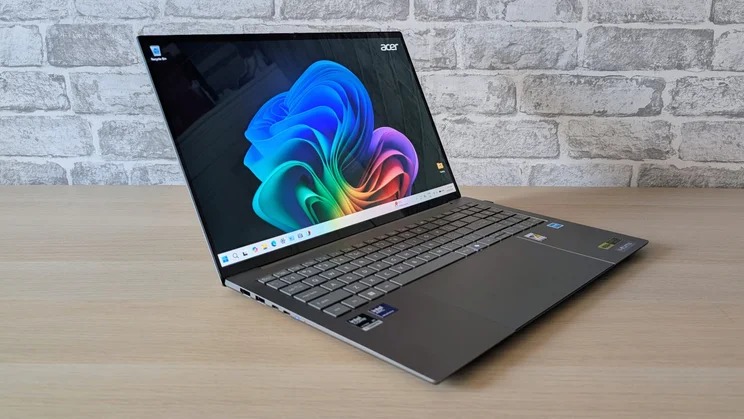
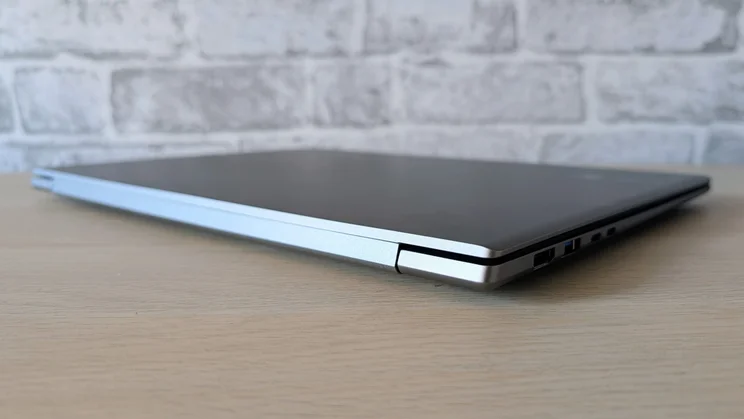
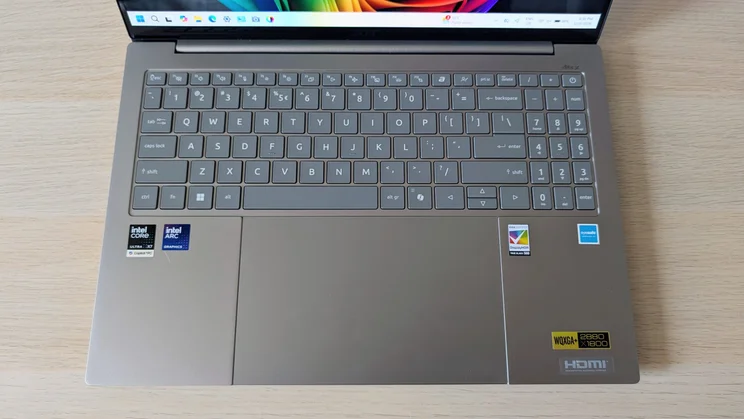
Thanks to its sleek and chiselled profile, subtly gold-hued finish and smart pinstriping on the lid, this new Swift 16 is by some margin the prettiest laptop Acer has released of late. It’s not Zenbook S16-pretty, but it more than holds its own alongside the MacBook Air 15 and Galaxy Book6 Pro in the aesthetic stakes.
It’s a very solid-feeling machine too, with a sleek aluminium chassis and body and a lid that closes with a reassuring clunk as the magnets take hold, just like the Galaxy Book6 Pro.
At 1.55Kg the Swift is light for a 16-inch laptop. The latest MacBook Air 15 is barely any lighter, and the Galaxy Book6 is 60g heavier. At 355.2 x 345.4 x 14.85mm, it’s par for the course size-wise.
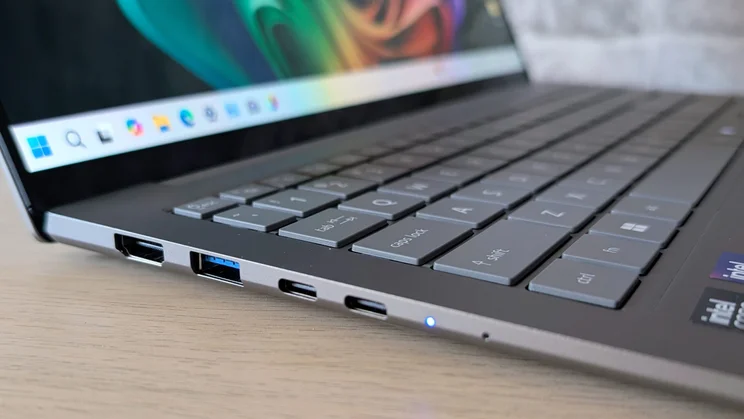
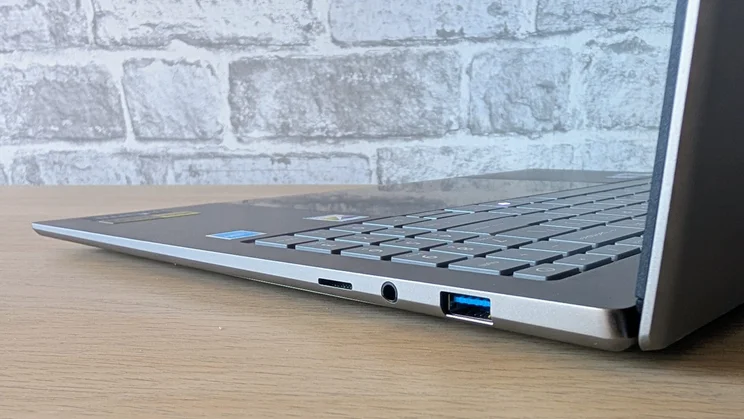
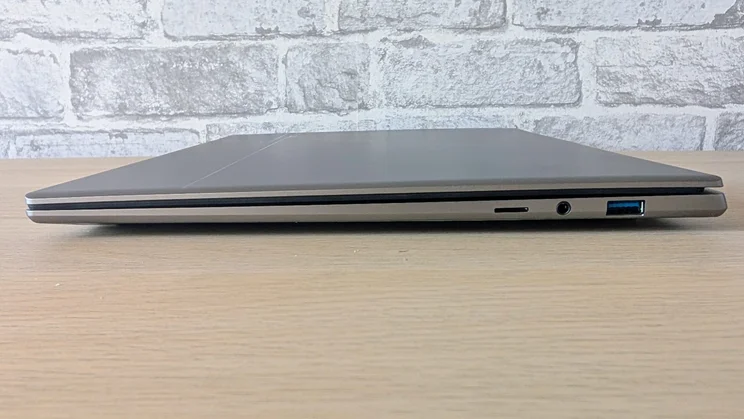
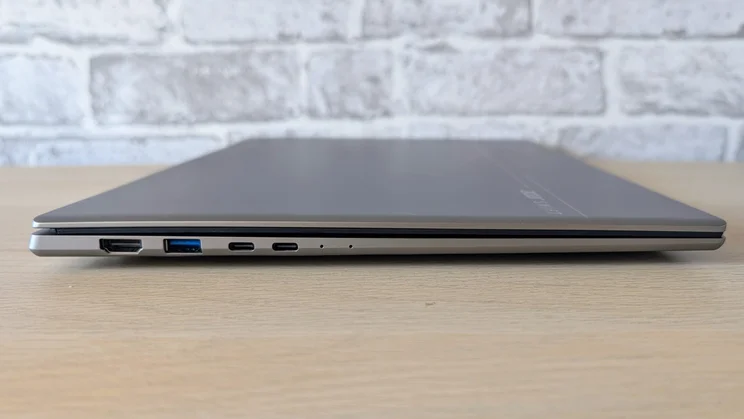
I’m not about to argue with the number and standard of the Swift 16’s I/O ports: two Thunderbolt 4 ports, two 10Gbps USB-As, an HDMI 2.1 video output, a 3.5mm audio jack and a MicroSD memory card slot will do very nicely, but the layout is lop-sided and thus suboptimal.
Both the Type-C ports, one of the Type-As and the HDMI output are all on the left side, which means you can’t choose which side to attach the 100W rat-and-tail power brick to. The Type-C ports are rather close together, too.
Wireless communications are bang up to date thanks to a Killer BE1775s card that supports Wi-Fi 7 and Bluetooth 5.4.
The 1TB Western Digital SSD in my review unit recorded sequential read and write speeds of 4,874MB/s and 2,521MB/s respectively. That’s perfectly acceptable for a laptop in this category and only a little slower than the Samsung Galaxy Book6 Pro.
One last “feature” is one I wish were absent. The Swift 16 is loaded with bloatware. There are no fewer than 15 apps and links from Acer in the Windows Start menu, as well as random games and an inevitable McAfee security package.
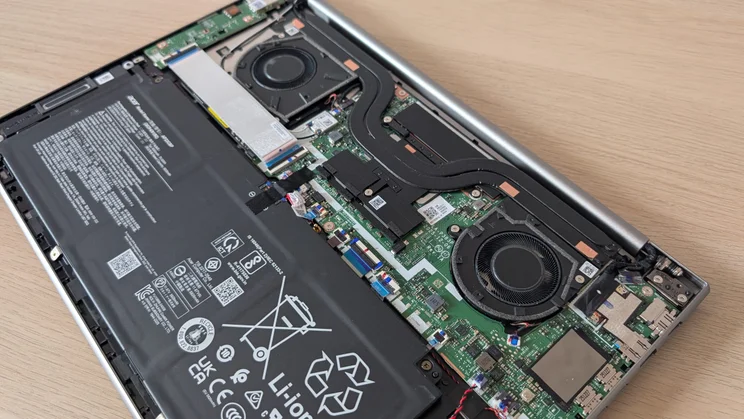
Getting inside the Swift 16 is easy enough if you have a Torx T6H screwdriver to hand, but once in, you’ll find that everything is fixed in place apart from the M.2 2280 SSD. And there’s only space for one of those.
Keyboard, touchpad and webcam
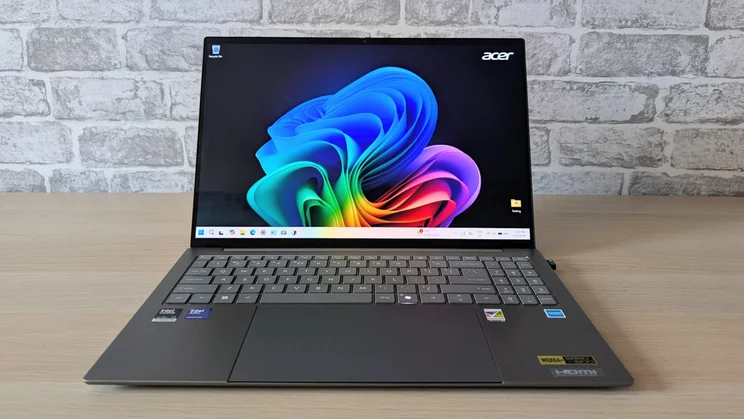
Compared to the Samsung Galaxy Book6 Pro, the M5 MacBook Air, Dell’s forthcoming XPS16, and Asus’ Zenbook A/S16 duo, the Swift 16’s keyboard has one obvious advantage in the form of a numeric keypad.
Despite having to find room for that keypad, Acer has still been able to squeeze in two out of four full-sized arrow keys, something beyond the designers at Apple or Samsung, and not compromise the layout in any other way.
The keys themselves are made from a soft rubberised material and feel warm and pleasant to the touch. The typing action is light, quiet and consistent with a well-damped end stop. The keycap graphics are a model of clarity, and the two-stage backlight works perfectly.
My only small complaint is that there is a little too much give in the deck when you press down hard. It’s not enough to get annoying, but it makes me think Acer has gone just a little too far in ditching internal bracing in the name of reducing the weight.
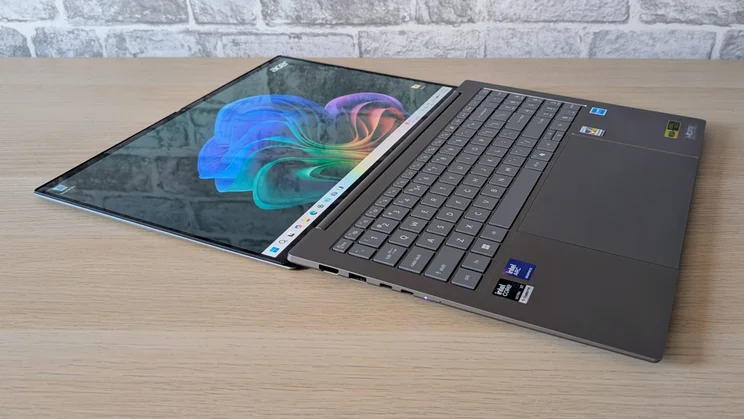
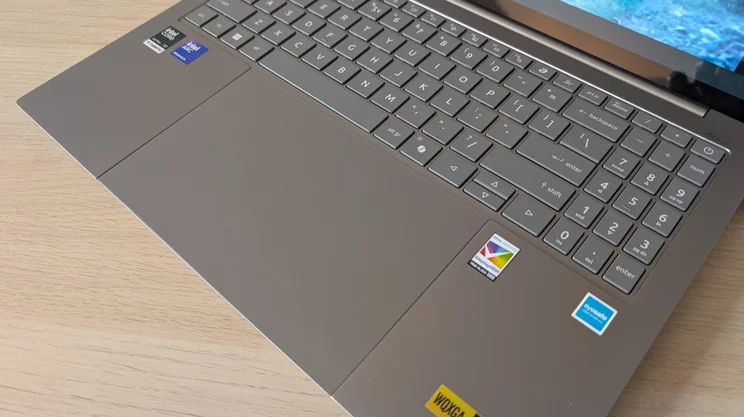
The vast touchpad is the Aspire 16’s principal claim to fame: apparently, it’s the largest haptic touchpad ever fitted to a laptop. Gazing across its Serengeti-like 175 x 110mm expanse, that’s not a claim I’m going to dispute.
The touchpad will also work with an MPP 2.5 stylus (not supplied), so you’ve basically got a built-in graphics tablet for sketching, scribbling, and doodling.
I was initially concerned that the expansive touchpad would leave me with nowhere to rest my hands when typing, but this proved not to be an issue as the touchpad was very adept at ignoring inadvertent touches from the base of my hands.
Thanks to its Gorilla Glass covering, the touchpad feels very pleasant under both finger and stylus, and the haptic inputs are perfectly calibrated. It’s quiet too, easily passing my “can you use it in a library without getting disapproving looks” test.
The 1080p webcam is nothing special. The images it generates are reasonably sharp and colourful, but look rather overprocessed. You do at least get a manual privacy shutter and support for Windows Hello IR facial recognition.
Display and audio quality
Visually, the 2,880 x 1,800 120Hz OLED touch-enabled display impresses, with videos and images looking suitably sumptuous. The screen’s high-gloss finish is a little too reflective in some circumstances, but that’s a small gripe.
According to my colourimeter, the display brightness peaks at 400cd/m² in SDR mode and 610cd/m² in HDR mode. That’s more than enough to earn it the VESA HDR TrueBlack 500 sticker on the palm rest.
There’s plenty of colour in evidence, too, with 163% of the sRGB gamut volume accounted for, along with 115.5% of the DCI-P3 gamut and 112.3% of the Adobe RGB.
Unlike some of the direct competition from the likes of Samsung and Asus, the Acer doesn’t have a control panel to lock the display to different colour profiles. This prevents it from reporting Delta E variances as low as those of the Samsung Galaxy Book6 Pro and the Asus Zenbook S16.
That said, a Delta E of 1.72 against the DCI-P3 profile is nothing to be ashamed of and should satisfy all but the most rabidly demanding users.
Acer has a habit of dropping the ball when it comes to sound quality, and again, while the Aspire 16 AI isn’t bad, it’s not up to the standard of the best of the rest, like the Samsung and Asus machines mentioned above.
There’s volume aplenty, 75dBA from a pink noise source at 1m, and impressive amounts of detail and separation, but the low-end is rather too forward and harsh on the ear, which can make listening to music a little tiresome.
Of course, one reason the Acer Swift’s audio performance is less than stellar is that the wide keyboard means the speakers have to fire downwards, which is never an ideal solution.
Performance and battery life
In our Handbrake-based 4K multi-media benchmark, the new Swift scored an impressive 486 points, putting it ahead of the two other machines that we’ve tested that use Intel’s new X7 358H processor, the Galaxy Book6 Pro 16 and the Asus Zenbook Duo. It also beats the new M5-powered MacBook Air.
It is also comfortably ahead of last year’s Asus Zenbook S16 with its AMD Ryzen AI 9 HX370 CPU, a laptop we rated and continue to rate very highly.
The great leap forward with Panther Lake is, of course, with graphic performance. All you really need to know is that the Arc B380 iGPU can run Cyberpunk 2077 at FullHD in the Ray Tracing Low preset, with XeSS upscaling, at 50fps. For a laptop without a discrete GPU, that’s outstanding.
Unless you want to play the latest Triple-A games at 2.8K with all the lighting bells and whistles, something like the Acer Swift may be all the gaming laptop you need.
In a more workaday test, the SPECviewperf 3dsmax 3D modelling benchmark ran at 36fps. That compares to around 24fps from an Arc 140V iGPU and around 11fps from an Iris Xe iGPU.
In our standard battery test, the Swift 16 ran for 15 hours and 14 minutes. That’s over three hours short of the Galaxy Book6 Pro, though it has a larger-capacity battery at 78Wh, compared with the Acer machine’s 70Wh.
That said, the Acer has the new M5 MacBook Air 15 beaten by a quarter of an hour. It’s indicative of how things have changed with the battery life of x86 Windows laptops that a machine can be considered somewhat mediocre yet still outperform a MacBook.
Acer Swift 16 AI review: Verdict
The Panther Lake Swift 16 AI is Acer’s most convincing product for some time. As a balance between style, quality, performance and value, it’s pretty much perfect, and that’s why it deserves a Best Buy award.
I still wish Acer spent a little more time on its sound systems, which continue to let it down, and there really is way too much bloat on this device. That second point is all the more ironic given that the Swift 16 lacks the one Acer control panel I’d like to see – one to adjust the display colour profile.
Those are both relatively minor complaints, though. The speaker system I can live with, the display is accurate enough for 95% of uses, and most of the bloat can be easily uninstalled. What’s left is a very fine laptop indeed for the price.


