
To help us provide you with free impartial advice, we may earn a commission if you buy through links on our site. Learn more
- Excellent performance for the price
- Good keyboard
- Two SSD and two SODIMM slots
- Drab display
- No 40Gbits/sec USB-C port
- Short battery life
Medion has not yet entirely shed the stigma of the Aldi centre-aisle in the UK, but that’s more a reflection on the lag in the British public’s perception of the brand rather than on the quality of what it makes.
You see, Medion has been majority-owned by Lenovo since 2011 and was bought outright in late 2024. In late 2025, Lenovo divested itself of most of Medion, but kept the laptop business, though rather confusingly the newly separate Medion GmbH entity is responsible for sales and marketing.
The exact ownership structure of the Medion brand aside, when you see the words Medion and Erazer on a laptop, you should think “Ah, the budget arm of Lenovo” rather than “Who?”
What you need to know
When Nvidia launched its Blackwell-series GPUs early last year, Medion was quick out of the blocks with a series of machines running on all the new GPUs from the then entry-level RTX 5060 to the high-performance RTX 5090. While most were cheaper than the similarly specced competition, they were hardly budget machines.
As the price of those GPUs has fallen, Medion has launched new Blackwell machines into the cheaper part of the market. The latest is the Erazer Scout 15 P1, a laptop with a high-TGP RTX 5060 GPU, but a low price of between £1,000 and £1,200.
Of course, Nvidia GPUs are still not cheap, so to hit that price point, economies have had to be made. As with most affordable gaming machines, the display and speaker system are hardly top-rank, and the battery has a smaller capacity than most people will think ideal for a gaming machine.
Price and competition
Configuration tested: 14-core Intel Core 7 250H, Nvidia RTX 5060 GPU, 16GB RAM, 8GB vRAM, 1TB SSD, 15.6in 144Hz Full HD display. Price: £949
There are several different versions of the Erazer Deputy 15 P1 in UK retail channels. They share many of the same components, but some of them use older Intel CPUs. The model I have on my desk is the latest, featuring the Intel Core i7 250H CPU. It has an RRP of £1,299, but at the time of writing, one UK retailer is selling it for £949.
That’s a keen price for a laptop with any kind of RTX 50-series GPU inside and the only other laptop we’ve seen come close is the 2024 Asus TUF Gaming A14. The RTX 5050 model can currently be picked up for £1,099, and I’d suggest getting one quickly before the 2026 AMD Ryzen AI Max+ 392 model replaces it, because that will lack support for Nvidia’s DLSS tech.
Elsewhere, the competition is decidedly more expensive. We liked the RTX 5070 Ti-powered Acer Nitro 16S AI, but it starts at £1,799, and the Alienware 16X Aurora (Nvidia RTX 5060 GPU, Intel Core Ultra 7 255HX, 32GB RAM, 1TB), which was £1,549, is no longer available in that ‘cheap’ spec and is now even more expensive at £2,399 (RTX 5060, Intel Core Ultra 9 285HX, 32GB RAM 1TB SSD).
Design and features
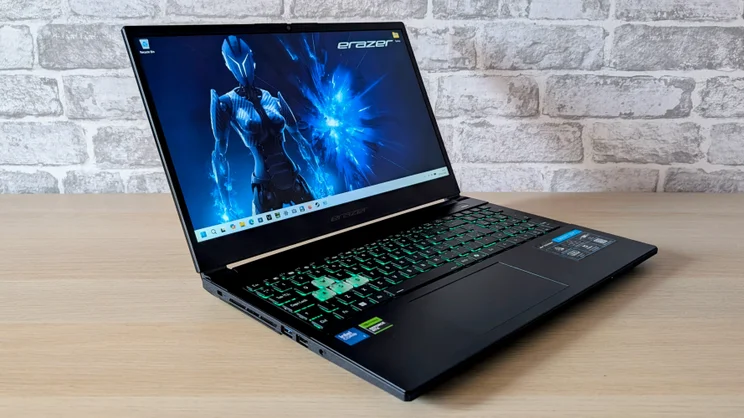
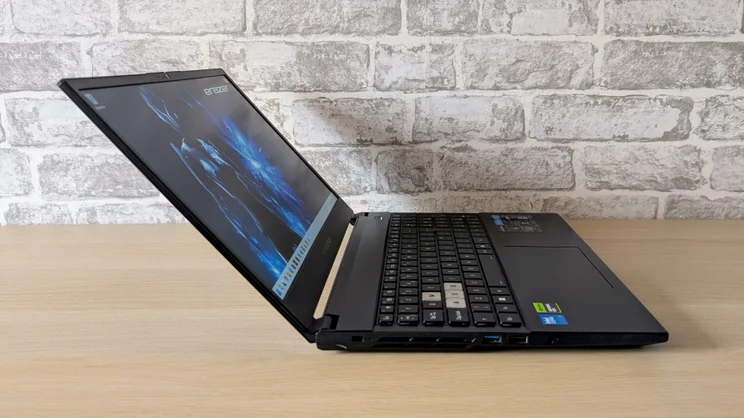
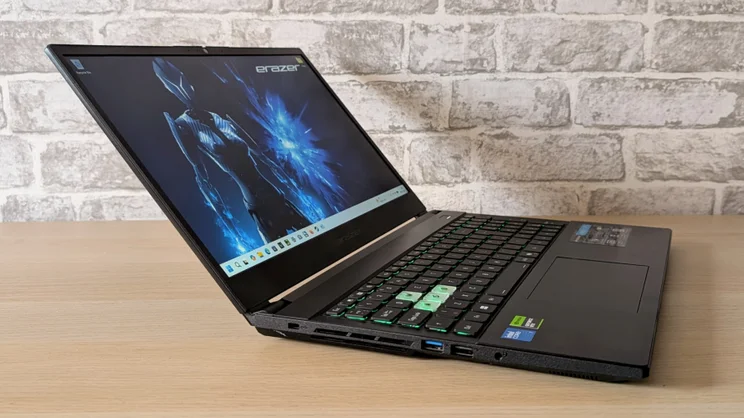
Like most cheap gaming laptops, the P1 is an all-black, all-plastic affair. It’s smart enough, though in an angular, rather anonymous way, and it’s impressively well-made.
The lid is surprisingly stiff, given the absence of a metal cover or laminated glass screen, and the body feels very sturdy. More impressively, the keyboard deck is very solid with very little sag in evidence, even under severe pressure.
At 2.42kg, the P1 isn’t unduly heavy, and at 360 x 240 x 29mm (WDH), it is compact enough to be easily slipped into a backpack. The power brick is smaller and lighter than many 180W units I’ve encountered.
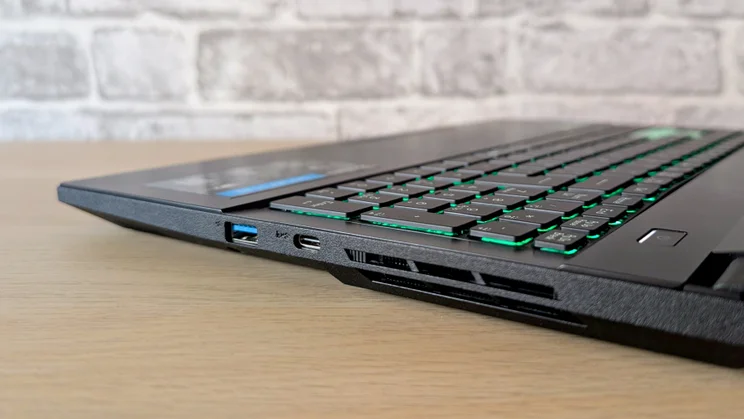
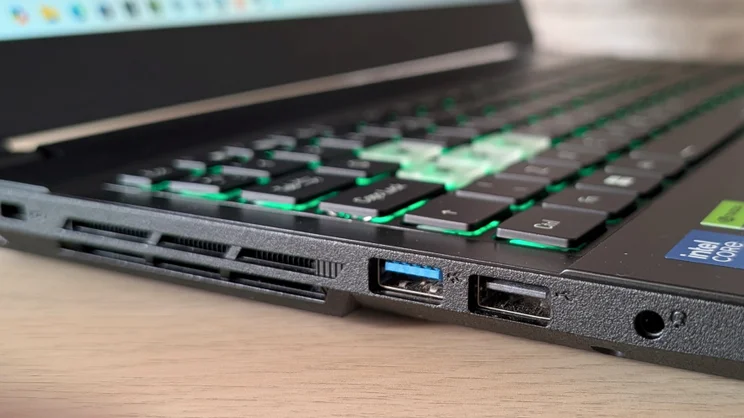
The range of ports is a little esoteric, but also usefully comprehensive. On the left side are one USB-A 3.2 Gen 1 and one USB-A 2.0 port, plus a 3.5mm audio jack, and a Kensington lock slot.
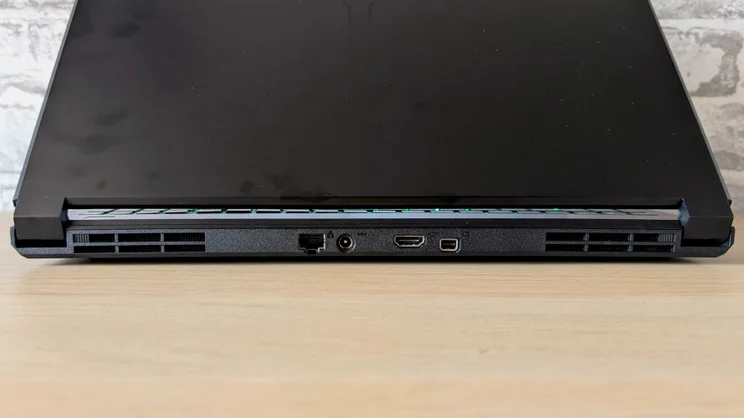
On the right is a second USB-A 3.2 Gen 1 port and one USB-C 3.2 Gen 2 (10Gbits/sec). And at the rear, there’s a DC-in jack for the 180W power supply, HDMI 2.1 and Mini DisplayPort 1.4 video outputs and a Gigabit Ethernet port. I’d have liked a second USB-C port and ideally USB 4 spec, but at least the USB-C you do get outputs a video signal, so you can run three external monitors at once.
Wireless communications are not state-of-the-art, but the Intel AX211 card does at least support 6GHz Wi-Fi 6E and Bluetooth 5.3, which is fine at this price.
Access and upgrades
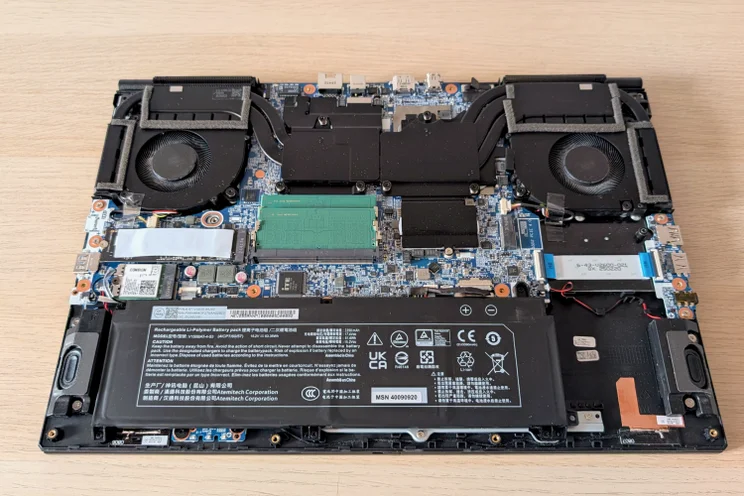
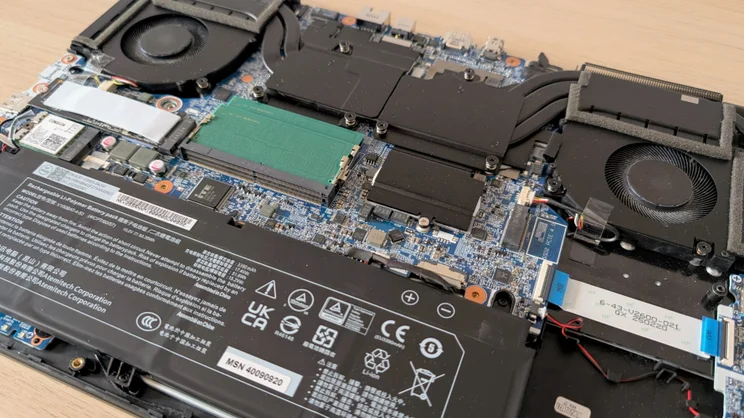
Removing the base from the P1 is easy once you’ve removed the dozen Philips screws. Inside, you’ll find two SODIMM mounts (each occupied by an 8GB stick in our review machine) and a pair of PCIe 4 M.2 2280 SSD mounts, one of which is occupied. That means you can bump the specification up to 64GB of RAM and as much extra storage as you can afford – once you run out of storage space.
Medion deserves credit for delivering Windows 11 Home in a pretty standard form. Apart from Medion’s own control panel, the only unnecessary bloat is an easily removable McAfee trial.
The Medion control panel lets you manage performance levels, fan speed, key bindings and the one-zone keyboard lighting system. You can also disable the webcam (if the physical shutter isn’t enough) and the touchpad. It strikes a good balance between having a comprehensive range of features and being easy to master.
You can switch between Windows hybrid graphics and discrete GPU-only mode in the BIOS, but you can also cut the power to the Nvidia GPU via the “Quiet” power setting in the Medion Control Centre. That gives you a broad range of control over the graphics settings, which is uncommon in budget gaming laptops.
Keyboard, touchpad and webcam
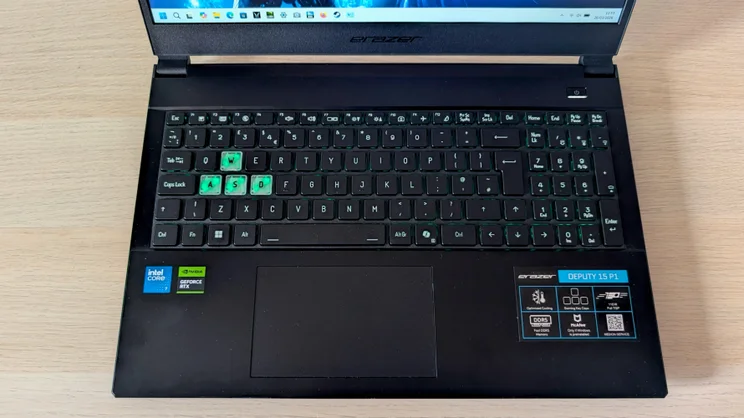
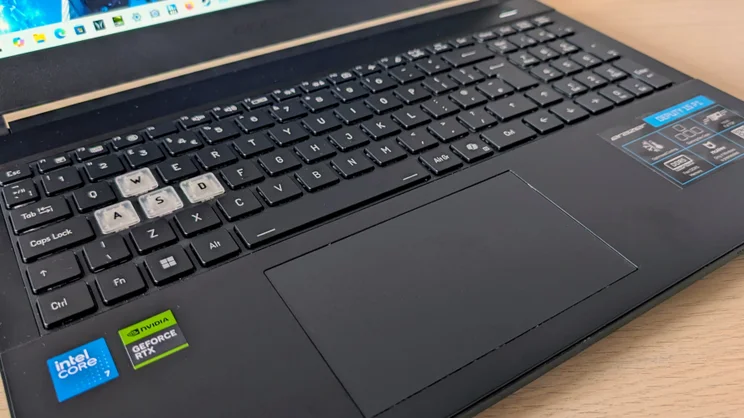
For a £1,000 laptop, the keyboard is excellent. As mentioned, the deck is very solid, so you can hammer away at it in gaming extremis. The keys are well-spaced and have a clean action with a firm end-stop. All four cursor keys are full-sized, which is always a boon on a gaming laptop.
Gaming enhancements are limited to the translucent WASD keys and a one-zone RGB backlight with 15 colour options. If you want to set up your own keyboard and mouse macros, you can do that too..
The 120 x 72mm plastic touchpad is offset slightly to the left, but that didn’t cause me any issues. The surface is smooth and reactive, and the click action is very clean and positive.
The 720p webcam is, on the other hand, as basic as it gets. Images are colourless and rather grainy, and there’s no support for any of Windows Studio Effects or Hello IR facial recognition. There is a manual privacy shutter, though.
Display and audio quality
The display often proves to be the Achilles’ heel of budget gaming laptops, and so it goes with the Deputy P1. The matte-finish Full HD IPS panel has a pretty mediocre maximum brightness level of 338cd/m2 and narrow colour gamut coverage of just 61% of the sRGB space, so images do look a little dull.
Motion fidelity is rather poor for a 144Hz panel, too, with more motion blur and ghosting than I’d hoped for, but the contrast ratio is strong at 1,649:1, so at least it doesn’t look too washed out.
The stereo speakers are also a little on the average side. There’s volume aplenty and no distortion, but there’s also not much in the way of bass, so music can sound rather harsh at higher volumes. Still, there’s ample detail, and stereo separation isn’t bad, so you get some idea of directionality when gaming.
Performance and battery life
The 14-core Intel Core 7 250H CPU inside the Deputy P1 was launched at the end of 2024, but don’t let that fool you into thinking you’re getting Intel’s latest work. Essentially, it is a warmed-over Core i7-13700H with a new, higher maximum boost speed of 5.4GHz.
That said, it’s still a potent CPU with six performance cores, and when allied with a 115W TGP Nvidia RTX 5060 GPU, the laptop as a whole delivers impressive levels of performance.
In our 4K multi-media benchmark, the P1 scored 506 points, which puts it comfortably ahead of the more expensive AMD Ryzen AI 7 350-powered Acer Nitro 16s AI on 447.
Over the years, we’ve tested very few laptops that have scored higher than 500 points, and those have tended to be more expensive, fire-breathing gaming machines such as the Alienware 16X Aurora, which runs on a 20-core Core Ultra 7 255HX, or the Core i9-13980HX-based Asus ROG Strix Scar 16. For the price, then, the P1 really is an exceptionally strong general performer.
The new Medion doesn’t trip up when it comes to gaming performance, either. In the Cyberpunk 2077 benchmark, at High detail settings and Full HD resolution – without ray tracing or any frame rate boosting enabled – the P1 delivered an average 93.5fps, while the Hitman 2 test ran at an average of 63fps. Those are both very healthy scores.
Turning back to Cyberpunk 2077, if you enable the game’s ray-tracing Ultimate preset, switch DLSS to Balanced and set Multi Frame Generation to x3, you get 137fps, which is close to the fastest frame rate the display can handle. For this sort of money, you can’t get better.
And I was quite surprised at how well-mannered the cooling system was when under heavy stress. While the Deputy P1 certainly couldn’t be described as quiet, the fans don’t generate the unholy howl some cheap gaming laptops do. I’d describe it as unexpectedly civilised.
The 1TB SSD in our review unit – a Phison unit – wasn’t anything out of the ordinary, though, returning class-average sequential read speeds of 4,938MB/sec and a slow 2,323MB/sec for writes.
And battery life is poor, but given the system performance levels and the small capacity 52Wh battery, that’s to be expected. With the Nvidia GPU taken completely out of the equation, the P1 ran for 4hrs 50mins in our VLC video rundown test. That’s not terrible for a gaming laptop, but it’s a good way short of the likes of the Asus TUF A14. And with the P1 in Nvidia GPU-only mode that run time dropped to just 1:52.
Medion Erazer Deputy P1 review: Verdict
For the current £949 asking price, the new Erazer Deputy P1 is a genuine bargain. Both the system-wide and gaming-specific performance levels are impressive, and the ease with which you can add more memory and storage means you can grow the system as money allows.
It’s also a well-made machine with a decent range of ports, 6GHz Wi-Fi and a rather fine keyboard – and don’t forget there’s also a MUX switch, albeit one buried in the BIOS.
There are some negative points, as there always are with budget gaming machines, but given how much you get for your money with the Deputy P1 it’s easy to forgive such foibles. In short, if you have around a grand to spend on a gaming laptop and only one of the latest generation of mobile GPUs will do, I can’t currently think of a better way to spend it.


