
To help us provide you with free impartial advice, we may earn a commission if you buy through links on our site. Learn more
- Strong all-round performance
- Excellent sound system
- Handy hatch to access the RAM and SSD modules
- Strong all-round performance
- Excellent sound system
- Handy hatch to access the RAM and SSD modules
One could argue for a year and a day where the Goldilocks Zone between cost and performance in a gaming laptop is, but surely something costing around £2,000 with an Nvidia RTX 5070Ti GPU has to be in with a strong shout.
Why the RTX 5070 Ti? Because it’s arguably the Blackwell GPU that offers the best combination of value and performance, thanks to it having 45% more CUDA cores and a wider 256-bit interface than the RTX 5070.
The RTX 5070 Ti-equipped MSI Raider 16 HX machines ship with 12GB rather than 16GB of vRAM, but even with the same vRAM, the 5070 Ti enjoys a significant advantage over the 5070 when it comes to gaming at 2.5K or 4K resolutions.
That’s something worth keeping in mind if you plan on hooking your gaming laptop up to an external 4K monitor like the excellent Asus ROG Strix XG27UCS, which can now be picked up for less than £300.

What you need to know
In the search for the cheapest really good gaming laptop, MSI’s new Raider 16 HX ticks a lot of boxes. Alongside the RTX 5070Ti GPU, you get a potent and modern CPU in the form of Intel’s 18-core Core Ultra 7 251HX, which was launched earlier this year.
Combine that with a display that is both fast and bright, a good 4-speaker sound system, a keyboard that’s clearly been designed by someone who knows a thing or two about gaming, and a price tag around £2,000, and the Raider 16 HX starts to look like a very appealing package.
You only get 16GB of main system RAM for your money, but given the current issues with the price of memory and storage, that should come as no surprise. Some expected Nvidia refinements are absent, and the battery life is poor, but the former isn’t that big a deal and the latter is expected.
Price and competition
Configuration tested: 18-core Intel Core Ultra 7 251HX Processor, Nvidia RTX 5070 Ti GPU (12GB), 16GB RAM, 1TB SSD, 16in 2,560 x 1,600 240Hz IPS display. Price: £2,179
You can have your Raider 16 HX with either an 18-core Intel Core 7 251HX or a 20-core 255HX CPU, but other than that, all UK models are the same. Some retail listings make mention of an OLED display, but MSI has confirmed that those listings are erroneous and should be corrected soon.
Prices vary quite a bit from retailer to retailer and from model to model. At the time of writing, Amazon is selling the 255HX model for £1,749, down from £2,099, while Box is selling the 251HX model I was sent to test for £2,179. My advice is to shop around.
By some margin, the most usable gaming laptop on the market is the Asus TUF Gaming A14. The latest Nvidia GeForce RTX 5060, AMD Ryzen AI 9 465 model can currently be picked up for £1,699, which is solid value for a thoroughbred gaming laptop that’s also compact, light and possesses half-decent battery life.
Often available for just a smidge uner £1,000, Medion’s Erazer Deputy 15 P1 is a surprisingly competent package given the low price. Like the Asus TUF A14, it is built around the Nvidia RTX 5060 GPU. The screen is rather drab, and the sound system could be better, but for the price you are getting strong performance and good build quality.
Samsung’s Galaxy Book Ultra 16 is less a gaming laptop than a workstation, designed to compete against the likes of the Razer Blade 16 and Apple MacBook Pro. That said, gaming performance from its 90W RTX 5070 GPU is good, and the 120Hz 2.8K OLED touchscreen is superb. It is not cheap at £3,649, but worth every penny.
Finally, there’s the Acer Nitro 16S AI, which has the same RTX 5070 Ti inside as the MSI Raider, but is cheaper at £1,749. The display is neither as fast nor as colourful as the Raider’s, but it’s lighter and thinner, and the battery life is decent for a bona fide gaming laptop.
Design and features
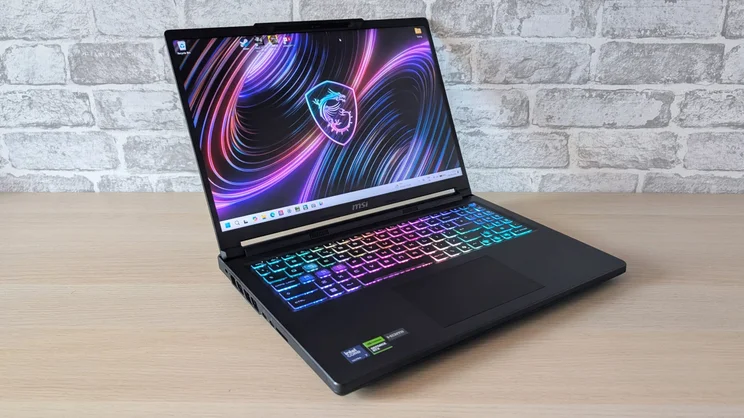
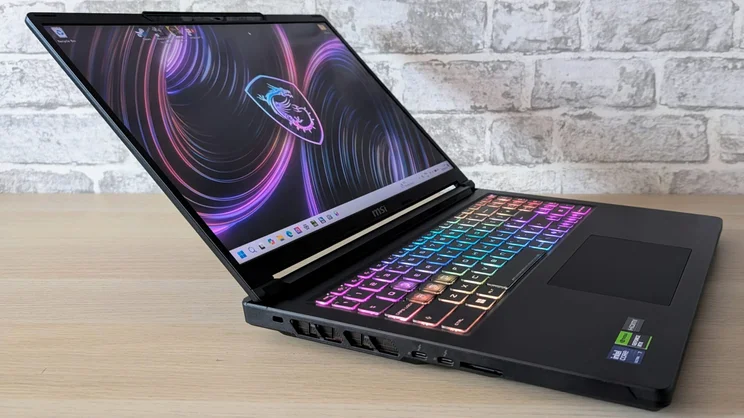
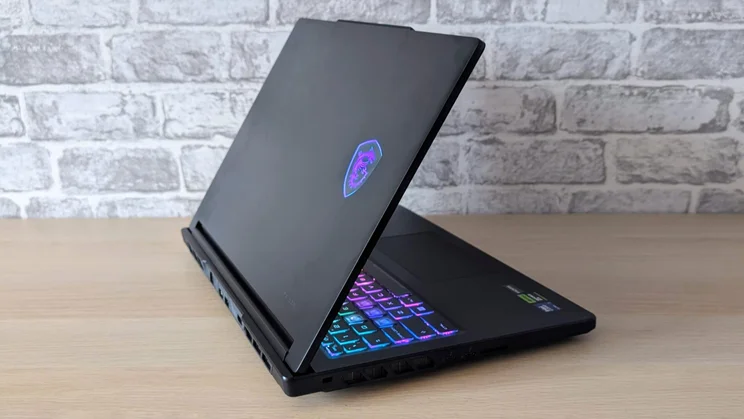
Physically, the Raider is a big black slab of a laptop, and like most gaming machines, it’s rather heavy and bulky, at 2.45kg and 26mm thick when closed.
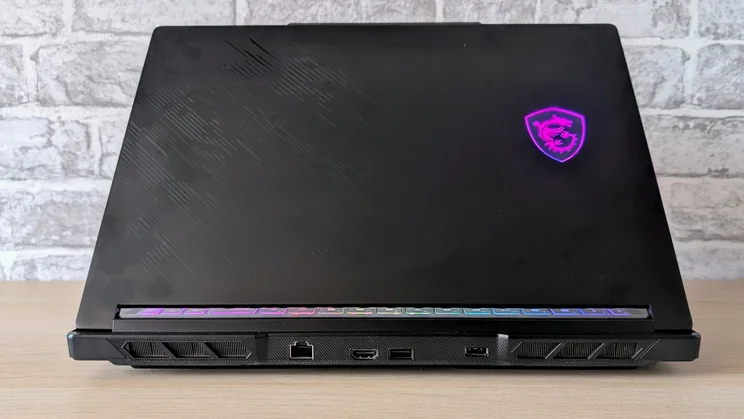
Bult from a combination of metal (the lid) and plastic (everything else), the Raider feels solid and well-built. The paint finish could be better at hiding fingerprints,. though. I regularly found myself polishing away at the deck on either side of the touchpad to get rid of unsightly smudges.
External decoration is limited to an illuminated MSI shield logo on the lid, which can only be disabled by turning off the keyboard backlight, alongside a black-on-black etching of the MSI dragon logo.
Looking down the feature list for the Raider, I was a little surprised to find that it doesn’t come with Nvidia’s Advanced Optimus auto-MUX switch or G-Sync. This means that to optimise gaming performance by linking the Nvidia GPU directly to the display, you need to reboot Windows via the traditional MUX switch in the MSI control panel.
Having to reboot to switch between dGPU and Windows hybrid graphics mode is hardly a deal breaker, but given that the Raider needed to be in dGPU mode to reliably maintain its maximum 240Hz refresh rate, it’s worth keeping in mind.
Ports, sockets and repairability
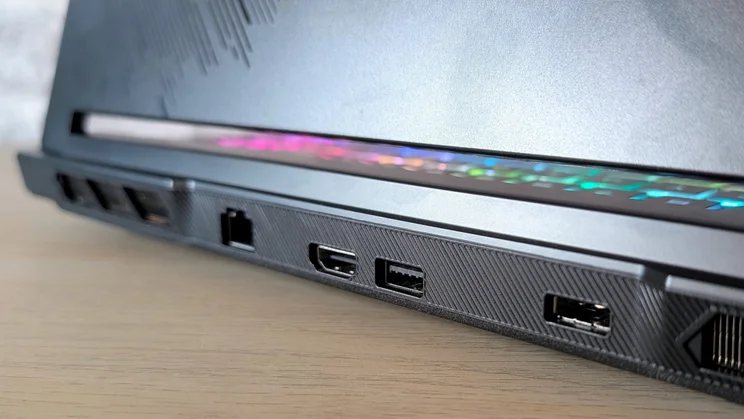
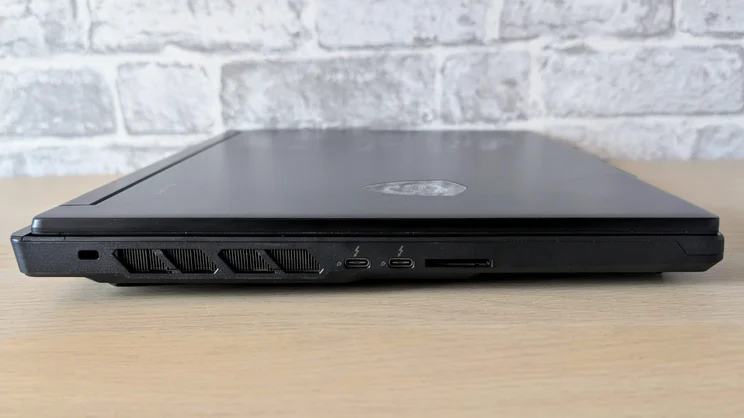
The Raider has a good selection of I/O ports. On the left side you’ll find two Thunderbolt 4 ports and an SD card reader, while on the right there are two 10Gbits/sec USB-A ports and a 3.5mm combo audio jack.
At the rear is a third 10Gbits/sec USB-A port, an HDMI 2.1 video output, a 2.5Gb RJ-45 Ethernet jack and a barrel style DC input for the 280W power brick.
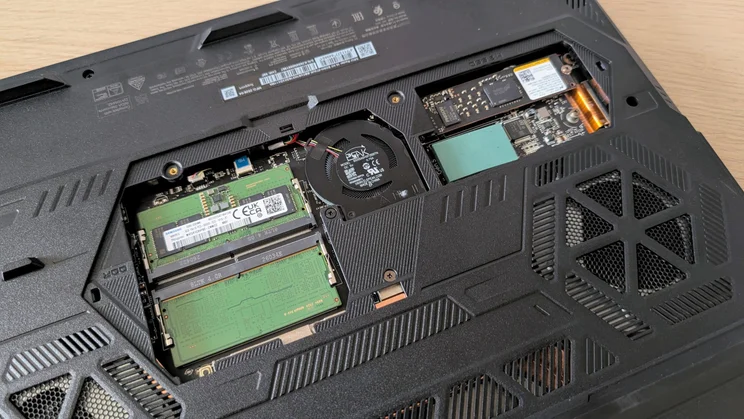
Removing the base panel from the Raider is easy, but there’s also a handy sub-panel in the centre that’s even easier to remove and gives access to the two 2280 SSD bays (one PCIe5, one PCIe4) and the two SODIMM mounts.
Unless you feel the need to swap the battery or the WLAN card or blow dust out of the two main cooling fans, you’ll never need to remove the main base panel. Incidentally, the WLAN card is a Killer BE1750x supporting Wi-Fi 7 and Bluetooth 5.4.
Keyboard, touchpad and webcam
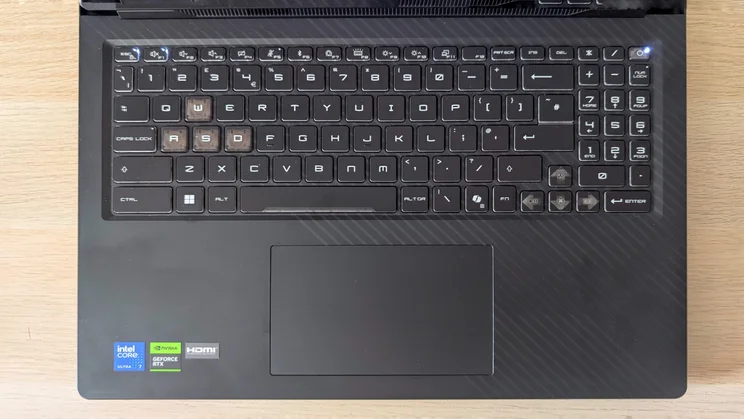
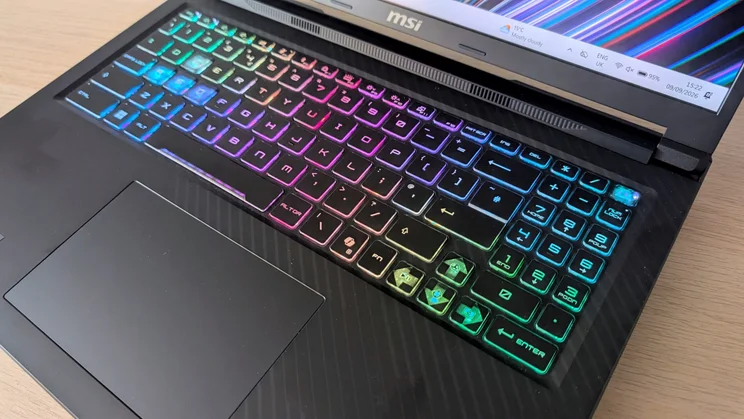
The keyboard design is typical MSI, which means it’s stylised but not the point of absurdity. Of particular interest to gamers will be the translucent WASD and full-sized arrow keycaps, which make them stand out no matter which lighting scheme you are using.
Rather than true per-key lighting, the “Mystic Light” system divides the keyboard into 24 zones which can be set to throb, spin, ripple, wave or dance in various styles and colours via the MSI Centre software. You can also set it to a single static colour if that’s more your style.
The problem with the zonal system is that I couldn’t set it up so that just the WASD and arrow keys were lit, which is my preferred arrangement.
Physically, the keyboard is a pretty standard chiclet affair, built on a base that, while not rock solid, doesn’t exhibit too much flex. The keys themselves have 1.5mm of travel and well-damped end-stops.
The numeric keypad is made up of two-thirds-scale keys, but that didn’t have a negative impact either in terms of speed or accuracy when it came to data input.
Given the amount of free space below the keyboard, the Mylar-covered touchpad could have been made much larger than 130 x 85mm, but it works well, and the corner click-action is both crisp and quiet.
Thankfully, the webcam isn’t the usual low-quality afterthought it often is on gaming laptops. Video captured at 1080p was crisp, bright and colourful and largely untroubled by changes in the level of ambient light or the sudden introduction of a bright light source.
The camera supports the usual raft of Windows Studio special effects, and it has an IR sensor, so you get Windows Hello facial recognition biometric security. There’s also a manual privacy shutter you can slide across the lens.
Display and audio quality
The 240Hz IPS display is a solid effort. Peak brightness registered at 448cd/m2 on my colorimeter, and there’s plenty of colour sloshing about. The display is capable or reproducing 139.4% of the sRGB gamut, which is equivalent to 98.8% of DCI-P3.
The MSI True Colour control panel lets you swap colour profiles between Gamer (or native), Anti-Blue, sRGB, AdobeRGB, Display P3, Office and Movie, and it’s pretty accurate. Indeed, measured against the sRGB, AdobeRGB and DCI-P3 profiles, the screen registered Delta-E variances of 1.37, 2.4 and 1.49, respectively which is more than acceptable for a gaming laptop.
The screen itself has a matte, anti-reflective finish that did a good job of keeping reflections at bay. And motion fidelity is better than average, with little ghosting or smearing apparent in the various Blur Busters web tests or during actual gaming.
As for sound quality, that’s decent, as well. The speaker system consists of two 2W full-range drivers and a pair of 2W woofers, and the sound they produce is of an unusually high quality. Not only is there enough volume to fill a medium-sized room, but the sound is rich, spacious and deeply resonant.
Performance
For graphics performance, Nvidia’s RTX 5070 Ti is the perfect compromise between the Blackwell GPUs below it, such as the RTX 5060 and 5070, which are noticeably less capable in gaming above 1080p, and the RTX 5080 and 5090 above, which add significantly to a laptop’s cost.
With a TGP of 140W, the RTX 5070 Ti can handle the most demanding games, including those that, due to their age, don’t support the latest iterations of Nvidia’s DLSS and Frame Generation voodoo like Metro: Exodus and Hitman 2.
To give you an idea of the raw gaming power the Raider can summon, Black Myth: Wukong, a game with a deserved reputation as a machine breaker, ran at 41fps at 2.5K with the detail and Ray Tracing lighting effects all turned up to the maximum. With Frame Generation toggled on, that number jumped to 72fps.
A less demanding, though still hardly milksop, title in the form of Cyberpunk 2077 ran at 65fps at 2.5K with the Ray Tracing Ultra preset selected and DLSS enabled. With Frame Generation enabled and set to x4, I found it was possible to push the frame rate to 193fps.
On a more workaday note, the Raider ran the SPECviewperf 3dsmax 3D modelling benchmark at 181fps; by some margin, that’s the fastest I’ve seen this test run on a laptop.
In the 18-core Intel Core Ultra 7 251HX CPU, the 5070 Ti has the perfect partner in crime. Between the two of them, our trusty 4K multimedia benchmark scored 726 points, which is the second-highest score ever from a laptop, beaten only by the mighty M5 Pro-powered MacBook Pro’s 832.
And considering all of this performance, the Raider is still still reasonably civilised. You can hear the fans when it’s running hard, but the noise is nowhere near as deafening or distracting as it can be from some other hardcore gaming laptops.
When looping the Black Myth: Wukong benchmark in the highest ‘Apex’ performance mode, the fan noise settled at 54.9dBA. Not silent, but not loud enough to require the use of sign language or semaphore to communicate across the office.
With only 30 TOPS of NPU capacity from the Intel chipset, the Raider isn’t Copilot+ compliant, which means that while you do get Live Captions and Studio Effects, you have to do without Recall or Generative Fill in Paint; that’s no deal breaker.
And performance from the Raider’s 1TB Micron SSD was good but by no means exceptional, with sequential read and write speeds of 5,439MB/sec and 2,571MB/sec respectively.
Battery life
Despite having a rather large 92Wh capacity battery, the best you can hope for from the Raider away from the mains is six hours. In our standard video rundown test, which involves looping a video in VLC with the screen brightness at 170cd/m2, the Raider kept going for only 5hrs 38mins.
Set the Raider to a task that involves it using the full CPU capacity and the Nvidia GPU, and you can easily drain the battery in under an hour. Playing Days Gone drained the battery in a mere 47 minutes.
MSI Raider 16 HX: Verdict
There’s no denying that the MSI Raider 16 HX delivers some serious levels of gaming performance at a not too exorbitant price. But perhaps more unexpectedly, it does so in a surprisingly civilised manner and without scrimping on the quality of the display or the sound system.
The absence of Advanced Optimus and G-Sync doesn’t count too heavily against it. And neither do other minor shortcomings such as the lack of per-key RGB lighting.
In short, if you are looking at spending around two grand on a gaming laptop, the MSI Raider 16 HX is certainly one of the options that should be right at the top of your list.


