To help us provide you with free impartial advice, we may earn a commission if you buy through links on our site. Learn more


We do enjoy chuckling at films were someone clicks an Enhance button to transform fuzzy CCTV footage into a pristine image. Reality seems to be catching up, though. In the past few months we’ve seen reports of a camera (www.lytro.com) that lets you move the focus point after the picture has been taken. Meanwhile, Adobe has shown a preview (http://tinyurl.com/adobedeblur) of a forthcoming Photoshop filter that removes motion blur from photos.
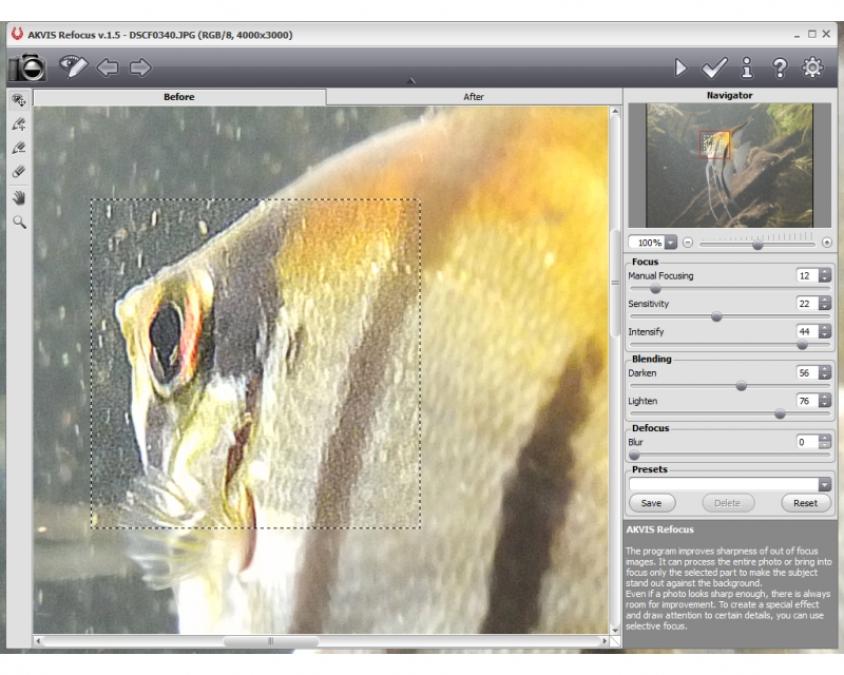
Now there’s Akvis Refocus. It’s a simple utility that, according to the website, “Improves the sharpness of out of focus images”. It’s a bold claim, but the underlying principles are well established. It appears to be a variation on the unsharp mask effect, which – at the risk of over-simplification – boosts the contrast of pixels relative to their near neighbours. This makes soft edges appear sharper, and also accentuates subtle details. Unsharp mask is often applied in cameras’ JPEG processing engines, and it’s also available in photo-editing and raw-processing software. However, it’s normally designed to make sharp details even sharper, and not necessarily to rescue out-of-focus images.
Refocus runs as a stand-alone application or as a plug-in for Photoshop CS and Elements, Paint Shop Pro and various other image editors. Its controls are a little more involved than in normal unsharp mask filters. The Manual Focusing control seems to do what an unsharp mask’s Radius control normally does, with higher values rescuing increasingly blurry areas of the photo but at the expense of ignoring subtler details and producing chunkier halo artefacts. Sensitivity and Intensity both affect the amount of contrast boost, and there seemed to be little difference between them – boosting one or the other had a broadly similar effect. The Darken and Lighten parameters determine to what extent the boosted contrast darkens or lightens the image, and proved to be useful for fine-tuning the effect.

Ultimately, though, the results we obtained from Refocus weren’t significantly better than from the Unsharp Mask and Adjust Sharpness effects in Photoshop Elements. The challenge of all three effects is to sharpen details while avoiding halos and exaggerated noise. Refocus’s greater range of controls let us fine-tune the effect more precisely but its algorithm didn’t appear wildly different to Adobe’s. Photoshop Elements was much quicker, too, processing a 12-megapixel photo virtually instantly whereas Refocus took up to two minutes.
Refocus also includes selective focus controls, which blur areas of the frame. This simulates the depth-of-field effect available from big-sensor cameras, which is used to blur the background to accentuate the main subject. Refocus lets the user define which parts of the photo should be sharp or blurred using pen strokes, and the software interpolates between these areas. However, it does so by fading between a sharp and a blurred version of the photo, whereas a progressively stronger blur would be more realistic. It’s also disappointing that a Gaussian blur is used, as it doesn’t produce the distinctive bokeh effect of an out-of-focus lens. The fact that this blur isn’t shown in the preview doesn’t help, either.
The effect was still quite pleasing, but similar results are available from Adobe Photoshop Elements 10’s Depth Of Field effect. In fact, Photoshop Elements’ version works a little better, thanks to the integration of its Quick Selection Tool for tracing the contours of subjects automatically.

If Refocus was a built-in feature in a consumer image-editing application, we’d be impressed but wouldn’t get overly excited about it. With a price that’s almost as much as Photoshop Elements, there’s simply not enough here to justify the expense.
| Details | |
|---|---|
| Price | £40 |
| Details | http://akvis.com |
| Rating | ** |





