

To help us provide you with free impartial advice, we may earn a commission if you buy through links on our site. Learn more
- How we test PC speakers
- The best PC speakers to buy
- 1. Creative T60: Best overall
- 2. Ruark MR1 Mk3: Best premium option
- 3. Creative Pebble V3: Best under £30
- 4. SteelSeries Arena 3: Best for gaming
- 5. Creative Pebble X Plus: Best for RGB lighting
- 6. Logitech Z313 2.1: Best under £50
- 7. Razer Leviathan V2: Best PC soundbar and subwoofer
- How to choose the best PC speakers for you
- We’ve tested over 30 speakers designed for PC or laptop use over the past four years, ranging from basic 2.0 satellites to soundbar and subwoofer combos.
- During testing, we assess their audio performance across all inputs using a wide range of source material, including music, movies and video games.
- Our favourites overall are the Creative T60, which are great value, have a good set of features, and work brilliantly in a casual home office setup.
- If you want a more luxurious option, Ruark’s MR1 Mk3 offer sensational sound quality in a wonderfully well-made and eye-catching package.

PC speakers are an essential piece of kit if you want an engaging, immersive audio experience at your desk. Often referred to as desktop speakers, PC speakers deliver much better sound quality than the built-in speakers found in monitors and laptops. They’re simple to set up too, with easy cabling and no need for external amplifiers.
Whether you’re looking for a cheap, compact audio solution or seeking an audiophile experience for your games, music and videos, we’ve tested dozens of the best PC speakers available – and below you’ll find our favourite options at a range of price points.
How we test PC speakers
We test the audio quality of every set of PC speakers that make it onto this list, using a variety of sources across all connection types. In most cases that means both 3.5mm analogue and USB connections; if Bluetooth or Wi-Fi connections are supported, then we’ll also test how the speaker sounds when streaming wirelessly.
We listen to audio from services such as Netflix, Prime Video, YouTube and Spotify, and engage high-resolution and Dolby Atmos options where available. Speakers are tested at multiple volume levels to assess the consistency of their performance, and we push speakers to their limits to expose any distortion that might occur at higher volumes.

We also explore how easy it is to get the speakers up and running, taking into account speaker size, shape and the position of its connection ports, and consider any extras such as remote controls or bundled software.
The best PC speakers to buy
1. Creative T60: Best overall
Price when reviewed: £65 | Check price at Amazon

- Go very loud
- Impressive audio quality
- Great selection of features
- No subwoofer support
Tested and reviewed by Alun Taylor
Creative’s T60 desktop speakers are among the cheapest PC speakers you can buy that offer truly decent sound quality rather than producing a noise that’s barely better than your laptop speakers. Their value, features and sound quality make them our go-to recommendation overall.
Listen to them with your eyes closed and you’d swear you were listening to speakers costing three times as much and with drivers considerably larger than the 2.75in full-range modules that nestle inside each unit. The sheer loudness is impressive; I recorded peak sound levels of 91dBA at a 1m distance, although some distortion does rear its ugly head when you crank the volume right up.
Thanks to a USB socket, you can use the T60 with Creative’s SmartComms Kit software, which offers automatic noise cancellation and auto-mute when you connect your microphone or headset via the 3.5mm input jacks. All in all, these are superb desktop speakers and are especially great in a home office communications setup.
Read our Creative T60 review
Key specs – Speaker configuration: 2.0; Driver size: 2 x 2.75in; Power output (RMS): 30W; Frequency response: 50-20,000Hz; Audio inputs: 3.5mm jack, USB (Type-C); Bluetooth: 5.0 (SBC); Outputs: Headphones; Remote control: No; Dimensions (WDH): 157 x 92 x 199mm (per speaker)

2. Ruark MR1 Mk3: Best premium option
Price when reviewed: £399 | Check price at John Lewis
Reviewed and tested by Steve May
- Stunning design
- Top-notch sound
- Plenty of connectivity options
- Bass lacks depth
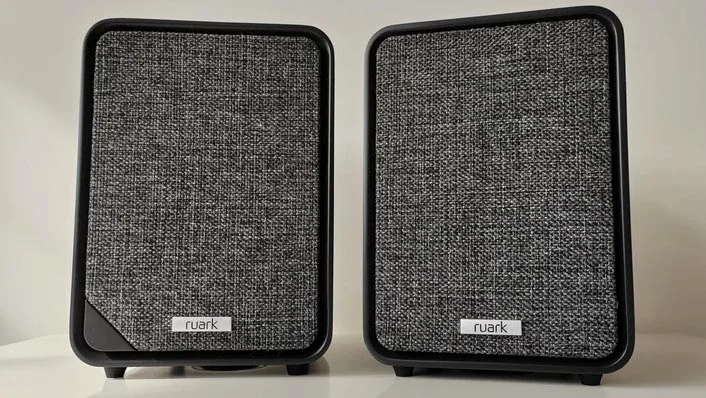
If you’re looking to push the boat out on a pair of desktop speakers that look and sound fantastic, the latest iteration of Ruark’s MR1 is the way to go. The cabinets are beautifully designed, feature intuitive controls, including Ruark’s RotoDial, and are well-furnished with connection options. In addition to Bluetooth 5.1, you’ve got AUX/optical, USB-C and phono-stage inputs; plug-and-play turntable support is a rare but very welcome inclusion.
Sound quality stood out during testing. Audio was remarkably refined and controlled, yet still extremely dynamic. Vocals were warm, clean and crisp, and the speakers created a cohesive, convincing soundstage throughout Steve May’s time with them.
Combining hi-fi sensibilities with modern convenience, the MR1 Mk3 are a joy for music lovers willing to spend big on desktop speakers.
Read our Ruark MR1 Mk3 review
Key specs – Speaker configuration: 2.0; Driver size: 2 x 20mm tweeters, 2 x 85mm woofers; Power output (RMS): Not stated; Frequency response: 40-22,000Hz; Audio inputs: 3.5mm jack, optical, USB-C, turntable; Bluetooth: Bluetooth 5.1 (SBC, AAC, aptX Adaptive); Outputs: Optional subwoofer; Remote control: Yes; Dimensions (WDH): 135 x 165 x 202mm (per speaker)

3. Creative Pebble V3: Best under £30
Price when reviewed: £30 | Check price at Amazon

- Space efficient
- Bluetooth connectivity
- Good mid-range and treble
- Lightweight bass
Reviewed and tested by Andy White
Creative’s Pebble V3 speakers are the first in its affordable Pebble range to feature Bluetooth connectivity and are an excellent choice when cash and desk space are limited.
The USB-powered spherical satellites are compact enough to fit into just about any desktop setup, and in our tests we found audio quality to be very good for the price. Dialogue is communicated particularly well, although those wanting impactful bass reproduction will be better served by a 2.1 speaker setup like the Pebble Plus.
Simple to use, space-efficient and packing up to 8W RMS of power, the Pebble V3 speakers are a superb compact, low-cost way to improve your laptop or desktop PC’s audio performance.
Read our Creative Pebble V3 review
Key specs – Speaker configuration: 2.0; Driver size: 2 x 2.25in; Power output (RMS): 8W total; Frequency response: 100-17,000Hz; Audio inputs: 3.5mm jack, USB-C; Bluetooth: 5.0 (SBC); Outputs: None; Remote control: No; Dimensions (WDH): 123 x 120 x 118mm (per speaker)

4. SteelSeries Arena 3: Best for gaming
Price when reviewed: £130 | Check price at Argos

- Loud and detailed
- Superb low-end performance
- Adjustable positioning
- No USB connectivity
Tested and reviewed by Alun Taylor
The SteelSeries Arena 3 is our number-one pick for gamers thanks to its sound quality, volume and convenience. The system consists of two pear-shaped monitors sitting on 40mm stands that can be adjusted by 25 degrees.
For a 2.0 system, the Arena 3 produces an impressive amount of bass. It can’t generate the table-shaking vibes of a good sub, but there’s still plenty of low-end to be heard, and the soundscape is very focused. The system also does a good job of projecting sound forward, which results in a highly immersive gaming experience. There’s plenty of volume available too; in testing, the system averaged 89dBA against a pink noise source, and no matter how hard or high you push it, there’s no distortion.
Read our SteelSeries Arena 3 review
Key specs – Speaker configuration: 2.0; Driver size: 2 x 4in; Power output (RMS): 60W; Frequency response: 48-20,000Hz; Audio inputs: 3.5mm jack x 2; Bluetooth: 4.2 (SBC); Outputs: 3.5mm, headphones; Remote Control: No; Dimensions (WDH): 138 x 110 x 200mm (per speaker)
5. Creative Pebble X Plus: Best for RGB lighting
Price when reviewed: £135 | Check price at Amazon

- Lots of connectivity options
- Attractive RGB lighting
- Excellent sonic performance
- Software is Windows only
Tested and reviewed by Alun Taylor
Thanks to a wide range of connectivity options, the X Plus stand out as the most versatile desktop speaker pair we’ve tested. It’s equipped with Bluetooth, AUX and USB-C inputs, and its RGB light show adds welcome visual interest.
The audio experience is great, too. The diminutive sub is small enough to fit under monitors and delivers thumping bass, while the satellites have tripod screws on the bottom so you can set them at ear level. If you like your sound really in-your-face, and want a combination of looks, size, convenience and performance, the Pebble X Plus is very difficult to beat.
Read our Creative Pebble X Plus review
Key specs – Speaker configuration: 2.1; Driver size: 2 x 2.75in tweeters, 1 x 3.5in woofer; Power output (RMS): 30W; Frequency response: 45-20,000Hz; Audio inputs: 3.5mm jack, USB (Type-C); Bluetooth: 5.0 (SBC); Outputs: Headphones; Remote control: No; Dimensions (WDH): 139.5 x 145 x 136 mm (per speaker), 156.4 x 156 x 158.5mm (subwoofer)

6. Logitech Z313 2.1: Best under £50
Price when reviewed: £48 | Check price at Amazon

- Weighty bass
- No distortion at high volumes
- Well-made
- Lacking detail and delicacy
Tested by Expert Review staff
This cheap 2.1-channel system packs a real low-end punch and is nicely constructed, despite being eminently affordable. The subwoofer houses all the components, so you need to position it within easy reach of your sources. However, the connection cables Logitech supplies are all long enough to spread the three units well beyond the edges of even the widest of widescreen monitors.
We particularly like the handy cabled desktop remote, which lets you adjust the volume and plug in your headphones, and were very impressed by the meaty thump the sub delivers when turned up. The system has plenty of volume to get the neighbours complaining if you live in a flat with thin walls, though it lacks detail at times. Even still, the Z313 offers an overall experience that can’t be beaten in the sub-£50 price bracket.
Key specs – System Configuration: 2.1; Driver size: 2 x 2in full-range drivers; Power output (RMS): 25W; Frequency response: 48-20,000Hz; Audio inputs: 3.5mm; Bluetooth: No; Outputs: 3.5mm headphones; Remote Control: Yes, wired; Dimensions (WDH): 89.4 x 81 x 146.2mm (per speaker) 150 x 220 x 228.4mm (subwoofer)

7. Razer Leviathan V2: Best PC soundbar and subwoofer
Price when reviewed: £229 | Check price at Amazon
Tested and reviewed by Andy White
- Tasteful RGB lighting
- Lots of customisation options
- Engaging sound
- Connectivity limitations
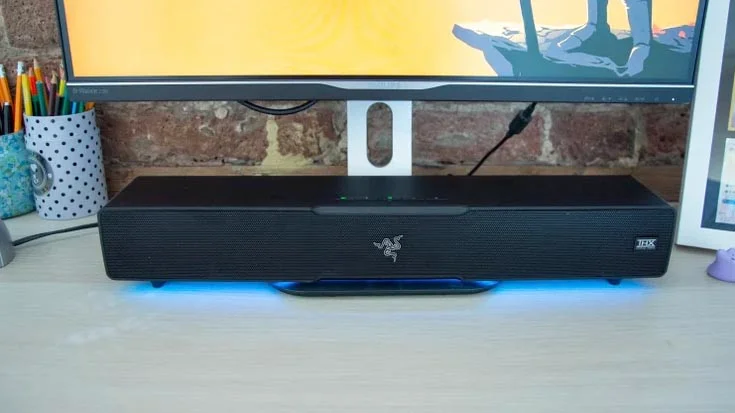
If you’re looking for a colourful, compact soundbar that’ll boost your PC audio, the Razer Leviathan V2 demands a serious look. The 500mm-wide bar slots neatly under a 25in monitor, and glows and pulses with colourful RGB lighting effects, customisable on the bar itself or via the Razer Synapse companion app. The subwoofer, meanwhile, can be tucked under your desk with minimal fuss.
The system delivers 65W of sound, which is more than enough when you’re sitting close to it, and THX Spatial Audio adds a level of immersion to compatible content. We loved how much low-end energy the sub produced in testing, giving film and game soundtracks all the power you could want, while the bar handles mids and treble with confidence.
Connection options are limited, but a USB cable is provided, and you can use Bluetooth to connect to your computer or phone. Speaking of phones, the Razer Audio mobile app lets you switch between various EQ presets, or create your own sound profile using a ten-band graphic equaliser.
Read our Razer Leviathan V2 review
Key specs – Speaker configuration: Stereo soundbar with subwoofer; Driver size: 2 x 0.75in, 2 x 2x4in + 5.5in subwoofer; Power output (RMS): 65W total; Frequency response: 45-20,000Hz; Audio inputs: USB (Type-C); Bluetooth: 5.2 (SBC, AAC); Outputs: None; Remote control: No; Dimensions (WDH): 500 x 91 x 84mm (soundbar); 220 x 220 x 242mm (subwoofer)

How to choose the best PC speakers for you
How much do I need to spend?
You can buy a little set of stereo (also known as 2.0) speakers for your PC or Mac for as little as £10, and while they may be an improvement on the tinny sound that emanates from most laptops and tablets, they’re never going to let you sit back and wallow in your favourite tunes.
So, even if you’re working to a tight budget, we’d generally advise spending around £30 on a basic set of speakers that do offer a real upgrade. If you’re willing to spend around £100, you’ll typically get far superior build quality and improved audio clarity, too.
Above £200, you’ll find speakers with greater amplification (measured in watts), which can deliver higher volumes and clearer sound. These also tend to be made of wood and look a lot more stylish. Anything more expensive than that and you’re in audiophile territory. Expect accurate, nuanced sound coupled with aesthetic appeal.
What connections do I need?
Most stereo PC speakers are not intended to be portable. They’ll spend most of their time sitting on a desk or shelf at home, so they’ll often use a 3.5mm audio cable to connect to your PC.
Many offer Bluetooth as an extra feature – so you can use them wirelessly with a smartphone or tablet – but you’ll generally get better results with a wired connection. That said, some high-end speakers also offer Wi-Fi connectivity, which uses your Wi-Fi network to deliver improved wireless sound quality.
USB inputs on smaller speakers are also commonplace. These allow them to draw power from their source device without any additional cables.
Should I buy 2.0 or 2.1 PC speakers?
For most people, the decision between 2.0 (stereo) and 2.1 (stereo plus subwoofer) systems will come down to space and neatness. The extra space and cabling required for 2.1 systems, which include two satellite speakers alongside a separate subwoofer, may be enough to put some people off straight away.
The benefit of a 2.1 system is that the smaller speakers can handle the less demanding upper frequencies, while the larger subwoofer handles the rumble and thump of the bass regions.
If you’re looking for the loudest, most bombastic sound on a budget – say, for gaming – a 2.1 system is a good shout. Spend similar money on a good 2.0 system, however, and you’ll generally get a better quality of sound, with more clarity and detail, and tighter, less exaggerated bass. It’s also worth remembering that some 2.0 speakers include a subwoofer output, allowing you to upgrade your speaker system in the future.


