To help us provide you with free impartial advice, we may earn a commission if you buy through links on our site. Learn more

- Now has a siren
- Slightly sharper 2K video
- Clever Arc two-camera mount
- Local clip storage requires a hub and USB thumb drive
- Some key functionality requires a subscription
- Two-camera image stitching is context-dependent
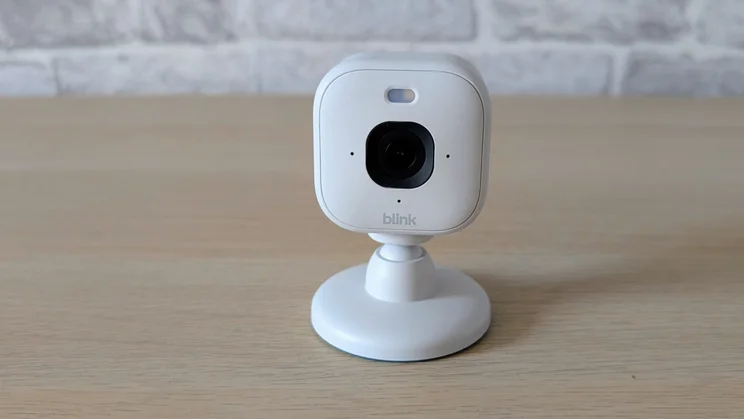
The Blink Mini 2K+ home security camera is the successor to the Blink Mini 2. Since our original review, Blink has reworked its marketing of the Blink Mini 2 somewhat: although it’s always been IP65 weather-resistant, Blink has now decided to call it an “Indoor Plug-in Home Security Camera” rather than a “Plug-in smart security camera.”
The on-paper improvements include higher-resolution video capture, the introduction of noise cancellation in the two-way audio system, the addition of a siren and a brighter LED spotlight to see further at night.
What do you get for the money?
The new Blink Mini 2K+ costs £40 for one camera, £70 for two or £95 for two and the Arc two-camera mount. The Arc on its own costs £25, so you’re not saving anything by buying it in a bundle with cameras. For reference, the Blink 2 is now available for £30.
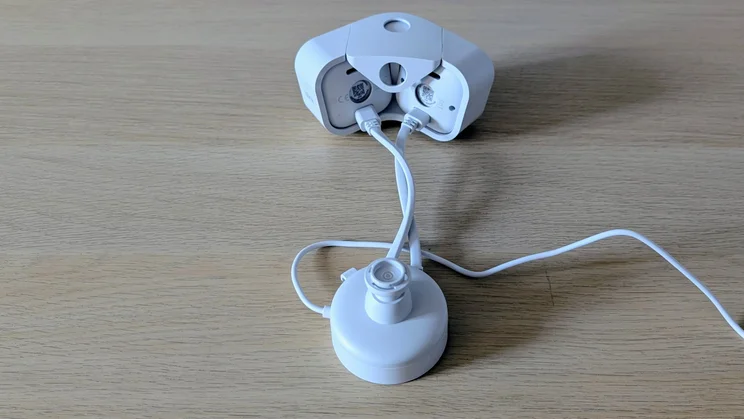
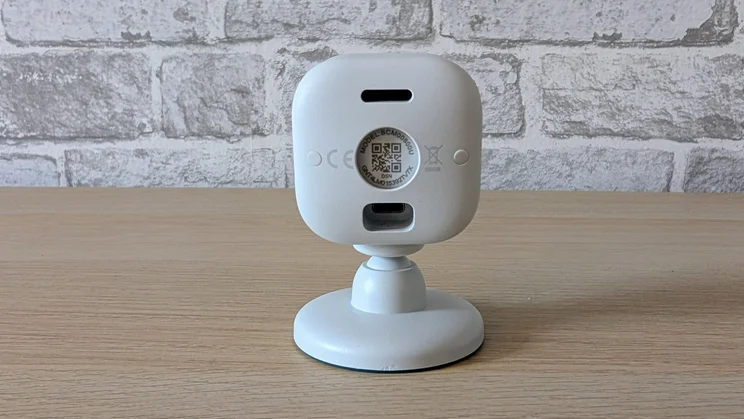
With each camera you get a simple snap-on adjustable stand, a USB-C power cable and a 7.5W mains USB plug.
The camera
Visually, the new Mini 2K+ looks very much like the Mini 2, with only the square rather than round lens surround giving the game away.
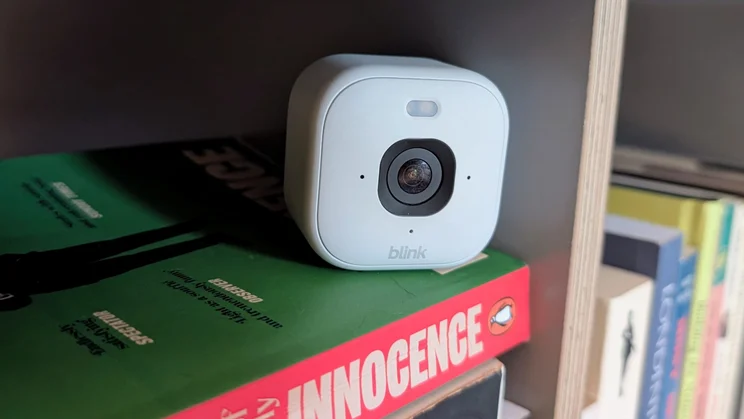
This Blink camera certainly still deserves its Mini name. At 65g and 51 x 51 x 40mm (the stand adds another 35mm to the height), it’s one of the smallest security cameras on the market. Available in black or white, it’s perfect for anyone who wants an unobtrusive system, but there’s a small catch: there’s no battery here. You’ll need to find a mains plug socket.
Like its Mini forebears, you can use the Blink Mini 2K+ as a chime for a Blink video doorbell. This is the principal reason I bought a Blink system: for the cost of three cheap Mini 2 cameras, I can hear my doorbell ring wherever I am in the house, sans phone, and keep an eye on the dog when I’m out or up in my office.
Doing so with any other system would require buying separate chimes and cameras, which would, in turn, cost more and occupy more power outlets.
The (optional) Sync Module
The Blink Mini 2K+ doesn’t come with one of Blink’s Sync Modules because, unlike the Blink Doorbell, it connects directly to your internet router over a 2.4GHz signal.
However, if you buy a Blink Sync Module 2 and a USB thumb drive, you can connect that to your Blink Mini 2K+ and use it to record and access footage (with caveats, see below).
This is where things get complex. Once upon a time, Blink doorbells came with a Sync Module 2, but now they come with a Sync Module Core. The Core does not have a USB port, so it can’t be used to store footage.
That means (and this part is important) that if you buy a Blink system and want to store footage locally, you’ll need to buy a Sync Module 2 for £40.
As is always the case with Blink and Ring systems, I’d strongly advise you to wait until you see a good bundle offer in one of Amazon’s Prime sales.
Looking back at my Amazon order history, I see I bought my Blink Doorbell during a Prime promotion and got two cameras basically for free and then bought a third camera in another offer for half price.
The Arc mount
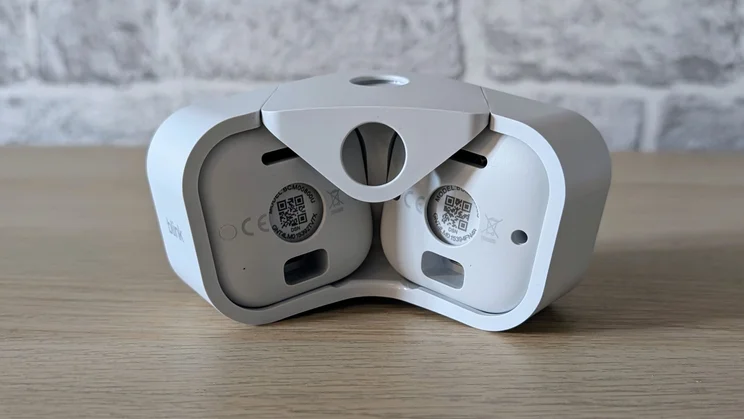
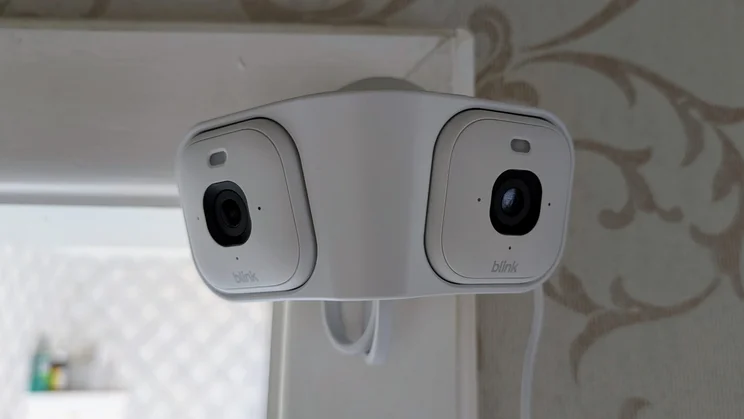
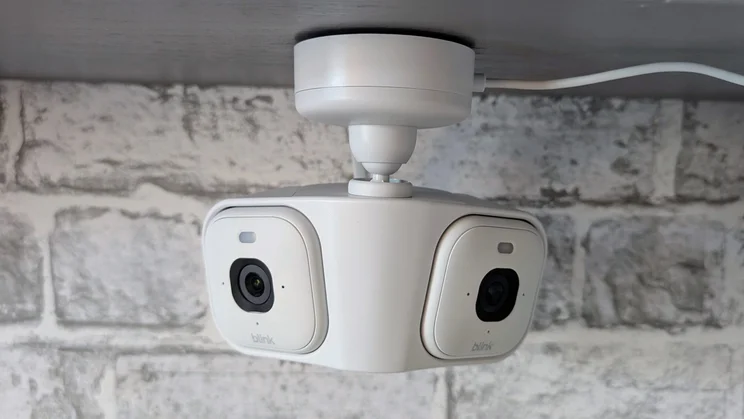
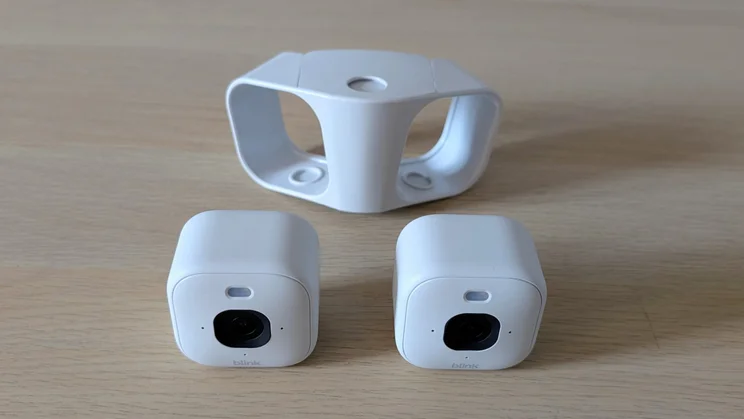
The Arc mount, which Blink also sent me for this test, is a simple but robust plastic frame into which you can slide two Blink Mini cameras.
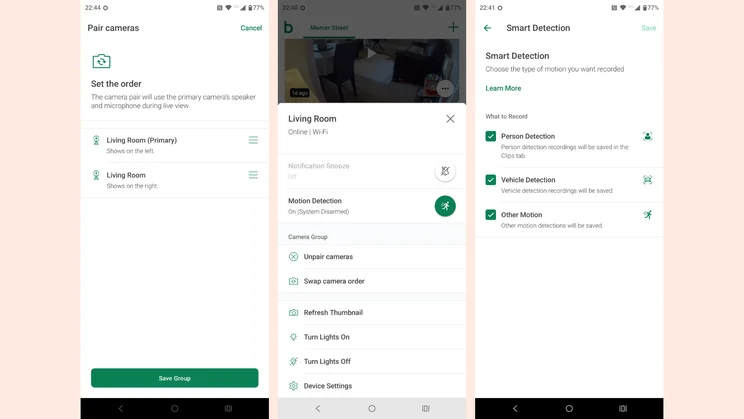
It comes with a 2-into-1 power supply and has two holes into which you can clip the same stand that fits the Blink Mini camera – one to mount it below a horizontal surface and one to mount it to a vertical face.
If you mount the Arc upside down, you can swap the video feed from both cameras through 180 degrees in the settings menu.
Do you need a subscription?
You don’t need a Blink subscription to store motion-activated recording footage, but several other features do require a subscription.
First and foremost, the Blink app will only deliver stitched 180-degree panoramic images with the Arc mount if you have a cloud subscription that covers both cameras.
Secondly, the motion discrimination system that separates detection into person, vehicle or other categories is also subscription-dependent.
It bears repeating: to store footage locally, you will need a Sync Module 2. Without a Sync Module 2 or a subscription, all you can do is receive basic motion detection notifications and open live video feeds.
The downside of depending on a Sync Module 2 is that it does not save live view recordings. It will only record when motion is detected.
A basic one-camera Blink subscription costs £2.50/mth or 25/yr. For multiple cameras, that increases to £8/£80.
The enhanced AI plans cost £5.49/£55 for one camera and £15/£150 for multiple cameras.
The AI plans add text video content descriptions, and the promise of future updates including Single Event Alerts and Unusual Activity Alerts, both of which you can currently get with Ring subscription plans.
How easy is it to set up?
As with all Ring and Blink devices, you will first need to set up an account (assuming you are new to Blink) and then link that to your Amazon account.
The next step is to connect the power cable, then scan the QR code on the back of the camera and follow the on-screen instructions in the app to finish the connecting process and name each camera that you’re adding.
It’s all pretty straightforward, but remember that, like previous cameras from Blink, the new Mini 2K+ only supports 2.4GHz Wi-Fi.
Things are not quite as easy when it comes to mounting your cameras on a wall. Unlocking the rotating clasp that secures the base of the Arc mount to the upper section, so you can screw the former into place, is thankfully much easier than trying to do the same with the individual camera stands.
That’s because the Arc mount is thicker: there’s something to grip on both sides while the camera stand base plate sits flush, so you have to push it against the palm of one hand while trying to twist off the smooth, circular upper part with your other hand. Doing it single-handedly is a challenge to say the least.
Is the companion app any good?
The Blink app is a pretty basic affair, not least because Blink’s cameras aren’t as feature-laden as some of the more expensive and larger competition.
I’ve got 14 smart home apps on my phone, a legacy of the various cameras and robotic vacuums that I’ve tested for Expert Reviews, and the only one of them doesn’t support a widget of any sort; the Blink app. That’s a poor show in this day and age.
In any security-related situation, how fast you can react to events is key, and that’s why we test the responsiveness of each camera we review. To do this, we run a raft of tests with the aim of measuring the speed of the camera system’s response to various triggers.
For example, we test how long it takes for an alert to be generated on the screen of the camera’s mobile app after motion is detected. We also time how long it takes to bring up the live feed from any alert, and how long it takes to bring up the live feed from the main screen of the app.
We also assess image quality in daylight and at night, check audio quality, spotlight or floodlight brightness (where applicable), plus we test out any AI detection features that are available to see if they actually work.
How does the Blink Mini 2K+ perform?
Image quality and night vision
Picture quality has been given a boost with video now streamed at 2,560 x 1,440 rather than 1,920 x 1,080 and still images captured (at the rate of one every hour; you can’t take a snap manually) at 1,280 x 720 rather than 640 x 360.
Nice though those improvements are, they are really only noticeable when you push the digital zoom to its maximum, when there is noticeably less degradation in image quality.
On paper, two features of the new Blink Mini are steps backwards. The single-camera field of view has dropped from 143 degrees to 138, and the frame rate has dropped from a maximum of 30fps to 25fps.
In actual use, the drop in viewing angle is difficult to notice, and videos that I downloaded from my Blink cloud account actually showed a 30fs frame rate from both my Blink 2 and Blink 2K+ cameras.
The quality of low-light infrared images looks much the same as they do from the Mini 2, and there’s still no passive nighttime colour option, which was a useful upgrade on the recent Blink 2K Outdoor.
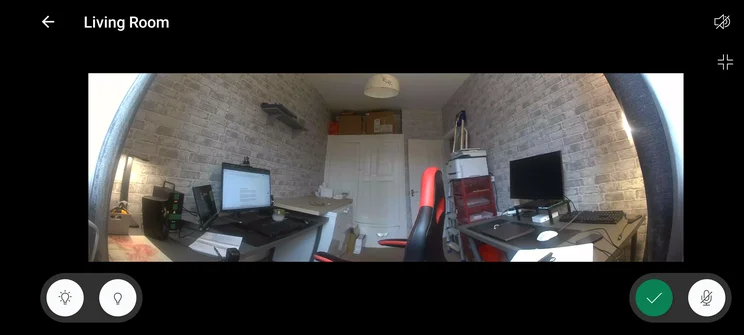
Fitting two cameras into the Arc mount massively widens the field of view to a genuine 180 degrees horizontal.
The two images are stitched together in the cloud, and the performance is generally pretty impressive.
Only when there’s rapid movement between the two camera views do you see two separate images appear before the algorithm joins them together into one.
Looking at a more or less motionless image, it’s very hard to see the stitch unless there’s a light source shining into one lens more than the other, which can cause half the image to look brighter than the other.
Floodlights, audio and siren
The LED light has received a brightness boost, but as with the increase in video resolution, the difference is difficult to discern with the naked eye. As mentioned above, the Blink Mini 2K+ still doesn’t support passive nighttime colour video.
New to the Blink Mini is the siren, something conspicuously absent from previous incarnations. The siren fitted to the Mini 2K is certainly loud enough to work as a deterrent, hitting 84.8dBA, but its usefulness is somewhat diluted by the fact it can’t be set to come on when motion is detected.
The quality of two-way audio communication has also been given a fillip thanks to a new microphone which includes active noise cancellation. In noisy surroundings, it’s now easier to hear what a person speaking into the camera is saying.
AI features
As all Blink’s AI services are delivered via the cloud, there’s nothing the new Blink 2K+ can do that the Blink 2 can’t, assuming you have the same level of Blink subscription.
Currently, the AI system doesn’t deliver anything beyond text descriptions of what triggered a motion detection event and the ability to discern between general motion and that triggered by a person or a vehicle. Facial recognition is still not supported.
Speed and responsiveness
Across the board, the new Blink Mini performed very much like the previous generation, which hardly came as a surprise: I suspect the networking tech inside is much the same.
I noticed no significant delays to motion alerts or the camera’s ability to serve up on-demand feeds from a live demand or from a request to Blink’s servers for a recording.
When it comes to working as a doorbell chime, the Mini 2K+ usually sounded a second or so before an alert sounded on my phone.
Are there any problems worth mentioning?
All the problems with the Mini 2K+ system that Blink sent me for review are related to the Arc mount and the way it operates.
Firstly, Blink has missed a trick when it comes to the LED spotlight. If you pair two cameras to work in the Arc mount and turn the light on manually via the live view page, only one LED triggers. To turn both on, you need to navigate to the controls for the other camera and turn it on manually.
You can set both to turn on when motion is detected, but again this involves accessing each camera’s settings and is dependent on both cameras detecting the same motion event.
Secondly, when you access Arc recordings made via live view, what you get is two separate recordings, one from each camera, not the stitched-together image you can watch as a live feed and that you get when the system makes a recording after a motion trigger.
The good news is that these are essentially software issues which can presumably be fixed cloud-side and which hopefully Blink will do.
Should you buy one?
For me, the primary reason to buy a Blink Mini is the ability to press it into use as a door chime as well as a security camera. Of course, that is dependent on your having a Blink doorbell or buying one along with your Mini cameras.
The second string to the Blink Mini’s bow is its diminutive size. Without the stand, it’s supremely easy to conceal on a bookshelf or anywhere else around the home or office.
Of course, the Blink Mini 2 ticks those same boxes just as well as the new 2K+ and also works with the Arc mount, so is the extra £10 over the original Blink 2 justified?
I’d argue not unless you must have the manual siren and improved noise-cancelling mic. If I were looking to add more Blink Mini cameras to my system, I’d go for the original Mini 2 and save the money.