To help us provide you with free impartial advice, we may earn a commission if you buy through links on our site. Learn more
- High-quality 4K 180-degree imagery
- No need for a paid subscription
- IP66 weatherproofing
- Expensive and no bundled chime
- Fixed battery
- Facial recognition requires a Tapo Hub
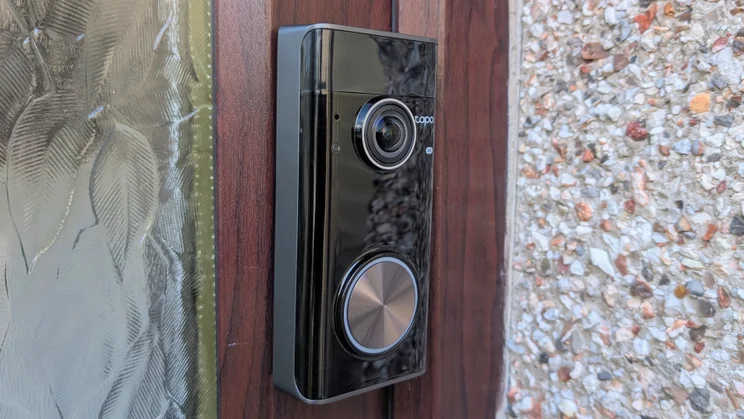
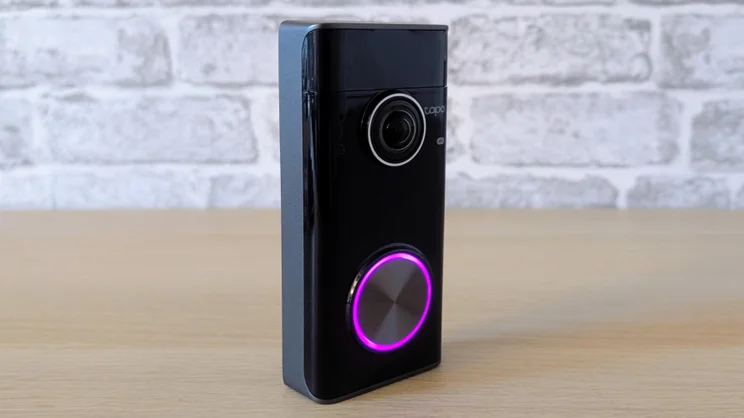
The Tapo D260 (or Doorbell Pro) is the company’s flagship wireless video doorbell. Its principal claim on your hard-earned money is its ability to stream and capture video at 4K resolution (3,840 x 2,928), rather than the more common 2.5K as found in the Ezviz EP8 Ultra or Tapo D235.
The D260 has another couple of other key unusual features, too, namely IP66 rather than IP65 weather-proofing, and support for 5GHz Wi-Fi.

What do you get for the money?
These features come at a price, however. At £219, the D260 is the most expensive video doorbell we’ve reviewed recently, and there isn’t much provided in the box considering the price.
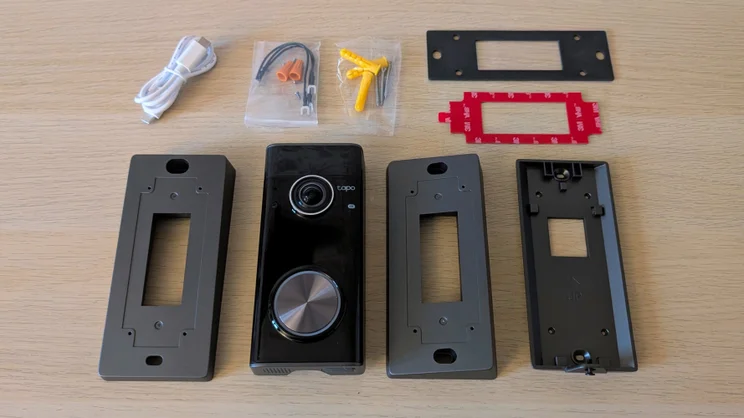
Alongside the doorbell itself, you get a flat mounting bracket, two angled mounts, one of which can be used to point the doorbell to the left or right, while the second adds some downward angle.
Tapo also bundles a short USB-C charging cable, two 3M sticky pads, a foam gasket, screws and raw plugs and the jumper cables and wire nuts to connect the doorbell to a low-voltage 8V or 12V AC supply.
However, there is no bundled chime, nor a solar panel, despite the fact that Tapo advertises the D260 as working with a solar panel. I plugged the 2W panel that came with the C645D security camera into the USB-C port in the back of the D260, and it started to charge the 10,050mAh battery.
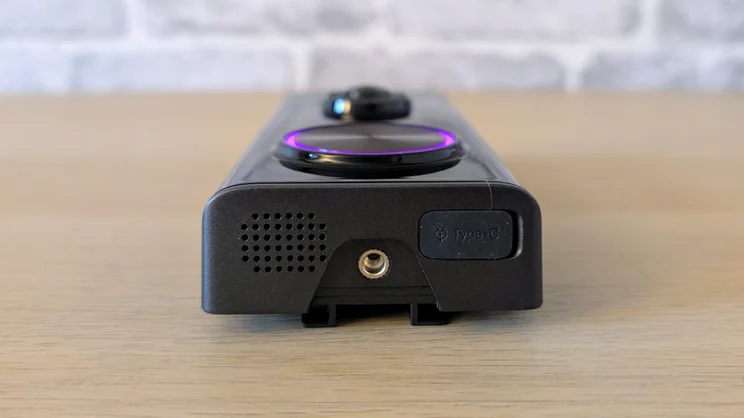
The USB-C charge port is located on the bottom of the doorbell body, so hooking it up to the power cable from a solar panel is pretty straightforward.
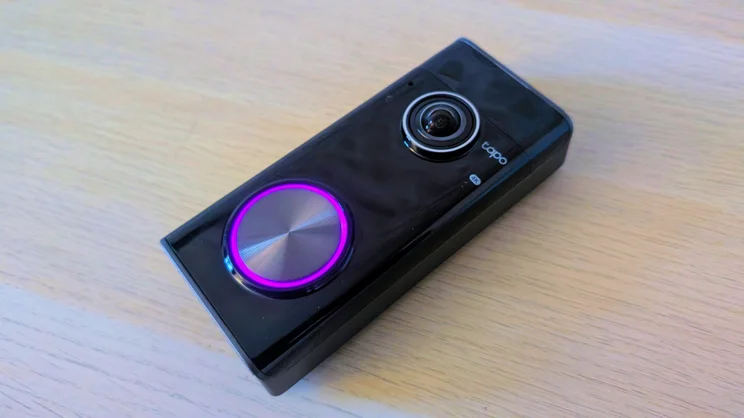
Physically, the D260 is a smart and stylish device. At 140.5 x 65.2 x 36.2mm and 306g, it’s more compact than most doorbells, and the design looks clean and elegant thanks to the glossy all-black fascia that houses the f/1.83 lens at the top and the engraved, LED-encircled doorbell button below it.
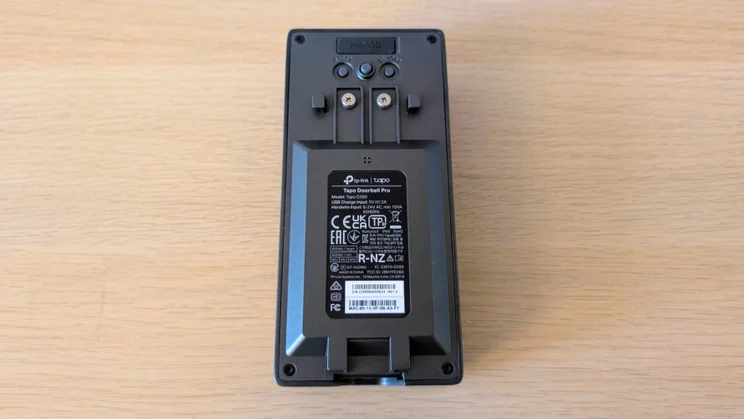
Around the back, you’ll find a slot for a MicroSD memory card, power and reset buttons, the terminals for a legacy mains supply and a pressure sensor that can detect when the doorbell is removed from its mount. At the bottom is a loudspeaker and the USB-C charge port.
Do you need a subscription?
Tapo does offer a cloud storage solution called Tapo Care, which starts at £2.99 per month (full details here), but unless you really do need off-site cloud storage of any recordings your camera makes, it’s an expense you can dodge.
The other benefits of Tapo Care are rich notifications and the option to tag and sort recordings, which are hardly must-have features in my book.
All other core functionality is yours for free, including the ability to store footage on an internal MicroSD card up to 512GB in size.
How easy is it to set up?
I found the various brackets that Tapo bundle easy to fix and easy to attach the doorbell to.
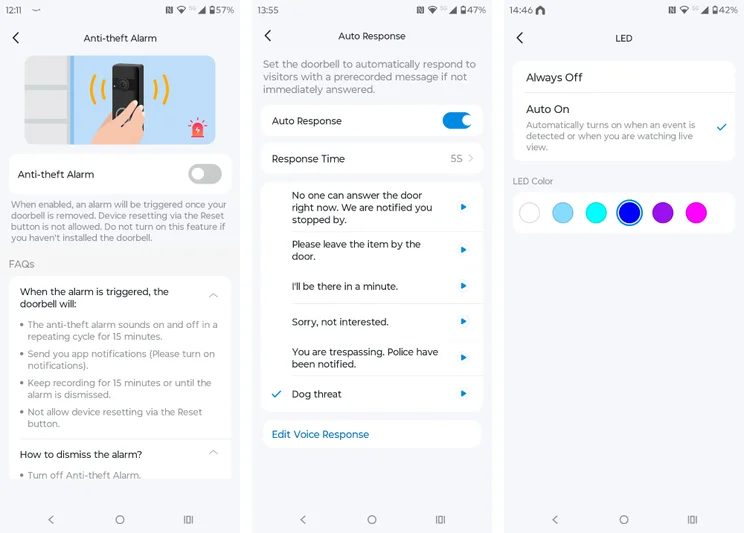
And thankfully, given the price, the D260 has a 95dB anti-theft alarm that sounds if any attempt is made to remove it without the alarm first being disabled via the app. However, for extra peace of mind, the doorbell is fixed to its bracket with a small Philips screw at the bottom.
Doing up or undoing said screw is not the easiest of tasks, and you will need a small-headed screwdriver because Tapo doesn’t include one. On the plus side, that means it’s very difficult for a thief to remove the doorbell from its mount.
Thanks to that anti-theft alarm and the small screw, I’d rate the D260 as one of the most secure doorbells on the market.
On the software side of things, adding the D260 to the Tapo app was the work of seconds once I’d charged the unit up and pressed the power button on the back.
If, like me, you’ve burrowed into the Tapo ecosystem, adding the D260 to the H500 Smart Hub is equally straightforward, and once added you can use the hub to store any recordings the D260 makes as well as work as a chime.
Is the companion app any good?
The Tapo app is logically laid out, with all the important features like privacy zones and motion trigger sensitivity settings exactly where you’d expect them to be, and there is some impressively granular data available on power consumption and system activity.
If there’s anything the app can’t do, I certainly didn’t come across it. For instance, it’s possible to adjust the system retrigger time, the buffer time, which determines how long the system keeps recording after a trigger event and even the maximum length of a single recording, up to a maximum of two minutes.
Again, I have to praise Tapo for its widgets. While many camera makers don’t bother with them, Tapo offers no fewer than 12 (for Android). The most useful of these can display the last image captured by the camera and open a live feed or clip list when you tap it.
As with all other Tapo cameras, the D260 supports integration with Google Home, Alexa and Samsung SmartThings. Basic voice commands worked well with the Google service.
How I tested the Tapo D260
In any security-related situation, how quickly you can react to events is key, which is why we test the responsiveness of each video doorbell we review. To do this, we run a raft of timed tests with the aim of measuring the speed of the camera system’s response to various triggers.
For example, we test how long it takes for an alert to be generated on the screen of the camera’s mobile app after motion is detected, or, in the case of a doorbell, how soon after the bell button is pushed. We also time how long it takes to bring up the live feed from a request sent via the app.
We also assess image quality in daylight and at night, check audio quality, spotlight or floodlight brightness (where applicable), and we test out the AI detection features to see if they actually work.
How does the Tapo D260 perform?
Image quality and night vision
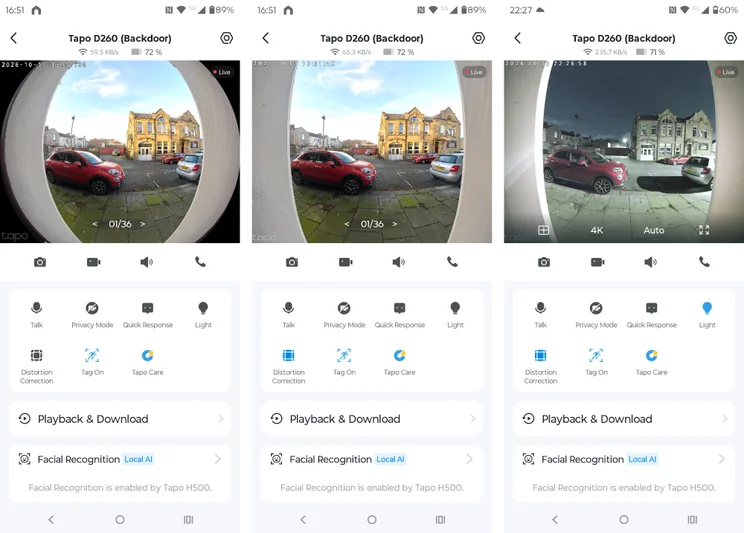
Picture quality is excellent, the 4K resolution paying obvious dividends both in broad daylight and at night. The level of clarity that the D260 can deliver is superior to any other doorbell I’ve encountered.
The most obvious benefit is when you take full advantage of the 24x digital zoom function. Things do get a little blurry above 10x, but the full zoom range is still entirely usable.
The 180-degree diagonal field of vision gives an impressively panoramic view of your doorstep, but it isn’t quite wide enough to give you a view of any packages left by the postie. For that, you’ll need to use the downward mounting bracket, which adds 15 degrees of extra downward viewing angle.
Wide-angle lenses can often give you an exaggerated fisheye view, which makes any vertical surfaces bend inwards at the top and bottom, but the Tapo app has a Distortion Correction button, which does a good job of correcting this.
For night-time viewing, you can choose between three modes: Infrared for a monochrome image; Doorbell mode, which activates the white LED ring light only when the doorbell is pushed; and Full-Color (sic) mode, which activates the LED whenever motion is detected or an on-demand feed is requested.
Unlike the Ezviz EP8 there’s no option to force full colour mode without activating the LED. If you manually disable the LED, the camera drops into infrared mode, no matter how bright the ambient light.
Lights, audio and siren
The light from the adjustable white LED that surrounds the doorbell button throws out more than enough light to clearly illuminate anyone at your door and beyond, should you want to throw some light down the garden path.
The LED can also be set to glow in one of six different colours when motion is detected, which makes for a more welcoming ambience for anyone approaching your door than a stark white light.
Two-way audio performance was very good, with conversations sounding loud and clear from both ends and with impressive suppression of wind noise. And, cleverly, when the bell is pressed the D260 initiates a phone call so you can instantly talk to your visitor. A voice disguise feature can be toggled to make a female voice sound deeper and thus more “male”.
Tapo also offers you a selection of five pre-recorded voice messages, which can either be initiated manually or automatically if a bell-push isn’t responded to within a certain amount of time, and you can add as many of your own custom messages as you like.
And you can pick from no fewer than 11 different chime sounds and adjust the volume of the doorbell itself. Given how loud the anti-theft siren is, it seems a missed opportunity not to have the option to trigger it manually for general deterrence duties.
AI features
As standard, the Tapo D260 can discriminate between people, animals, vehicles, packages, and general motion detection. I found the system to be wholly reliable, always correctly identifying the dog and me when we wandered past.
If you want facial recognition, you’ll need to buy the H500 (£160), which isn’t ideal, but if you have multiple Tapo cameras and want the other features that the H500 offers, like remote storage and the chime, it does make the cost a little easier to swallow.
Speed and responsiveness
I’ve been impressed by the networking performance of all the Tapo doorbells I’ve tested, and the new D260 proved every bit as solid a performer as the likes of the D235 and D210.
In all our tests, ranging from how fast the system reacts to a press of the doorbell to how quickly it reports motion and the speed it can deliver an on-demand video feed, the D260 is up with the very best.
Motion detection was particularly good thanks to the presence of radar enhancement, which also informs a bird’s-eye view of a trigger event at up to 30m, superimposed on Google Maps.
Given the bandwidth required to deliver a reliable high-quality 4K video feed, the D260’s support for 5GHz WiFi is also an advantage.
Are there any problems worth mentioning?
The stand-out feature of the Ezviz EP8 Ultra is the ability to recharge one of the two supplied batteries outside the doorbell unit and then swap them over in a matter of seconds.
That made having to dismount and plug the D260 into the mains to charge feel like a step backwards. To be fair, you have to do the same thing with most doorbells, so it’s not a problem unique to the Tapo.
But you’re still forced to do without your doorbell for a couple of hours when you’re recharging it, assuming you’ve not hardwired it to a power supply or attached it to a solar panel.
Tapo reckons a full charge could last for up to six months, but that is obviously dependent on how often it’s triggered, how often the LED light is used and a host of other movable parameters.
Over the course of a week, I fixed the D260 to my back door and set it to trigger every time anything passed by, and I religiously pressed it six times a day to simulate callers and held a two-way chat with myself for half those calls. I think that is a good simulation of heavy use.
In the course of that week, the battery level dropped from 100% to 79%, which suggests the need to charge it once every six weeks or so, which doesn’t seem too onerous.
If I’d set it up only to work when the doorbell button was pushed, which is how I have my Blink doorbell set, I’m confident I could reduce that charge cycle to bi-monthly, maybe even quarterly. I think, therefore, that Tapo’s claim of 6 months is a stretch.
Should you buy the Tapo D260?
There’s a lot to like about the Tapo D260 Doorbell Pro. It is a handsome and well-made device, and the video quality is the best there is. It’s feature-laden, too, and all the features you actually want are free rather than locked behind a subscription paywall.
Add to that IP66 weatherproofing and support for 5GHz Wi-Fi, and you have a comprehensive package. That said, £220 is a lot of money for what, at the end of the day, is a traditional video doorbell with only one lens, and a built-in battery that requires you to unmount the unit to charge it.
The Ezviz EP8 Ultra is a lot cheaper, has a downward-pointing second lens, a removable battery, a free chime and 32GB of built-in storage, so it’s still my ultimate recommendation, even if the video quality, connectivity and design can’t quite match the new Tapo.