
To help us provide you with free impartial advice, we may earn a commission if you buy through links on our site. Learn more
- Super sharp micro-OLED displays
- Effective eye- and hand-tracking control
- Premium feel, futuristic look
- Controllers not included in price
- Comfort levels not particularly great
- A little underpowered
Virtual reality headsets are nothing new these days, but when Apple joined the fray a few years back, it shifted the landscape. In response, Samsung’s engineers hit the lab and the result was the Samsung Galaxy XR, a premium headset very much in the same vein as the Apple Vision Pro, built from polished glass and aluminium with high resolution micro-OLED displays and the very latest in eye- and hand-tracking technology.
I had an initial hands-on session with the headset back in July and came away impressed. You can read about my first impressions on the Samsung Galaxy XR here, if you’re interested, but a short period with a product such as this is no substitute for days and weeks of experience. That’s what I have now, and I’m still, in general, quite positive about it, but I have also discovered quite a few annoying flaws.
Samsung Galaxy XR: What do you get for the money?
Let’s get the price out of the way first. At £1,699, the Samsung Galaxy XR is not cheap. It’s nowhere near the price of the Apple Vision Pro, admittedly, but it’s still a lot of money: more than three times the price of the Meta Quest 3 and well beyond the realm of impulse purchase, for most people, at least.
You do at least get something that feels every penny the next-generation piece of hardware: one that matches the Vision Pro for build materials, and for the exotic technology it squeezes into such compact confines.
Design and accessories
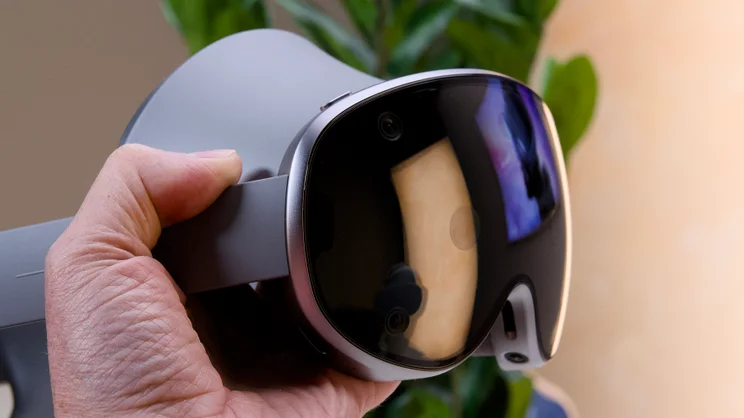
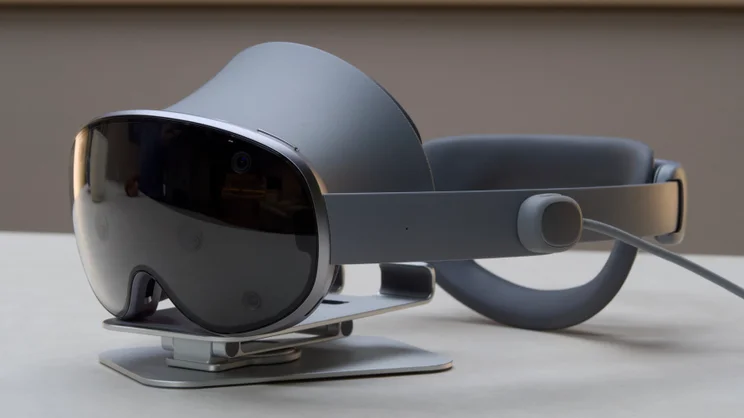
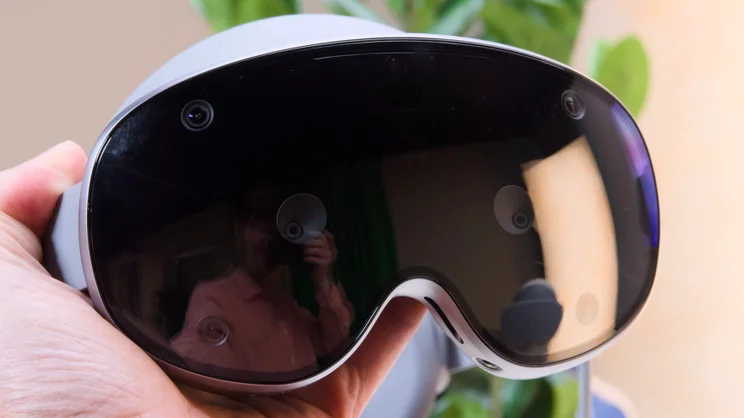
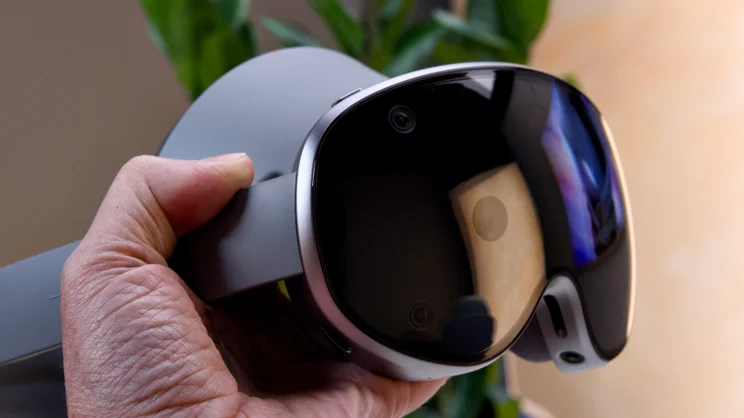
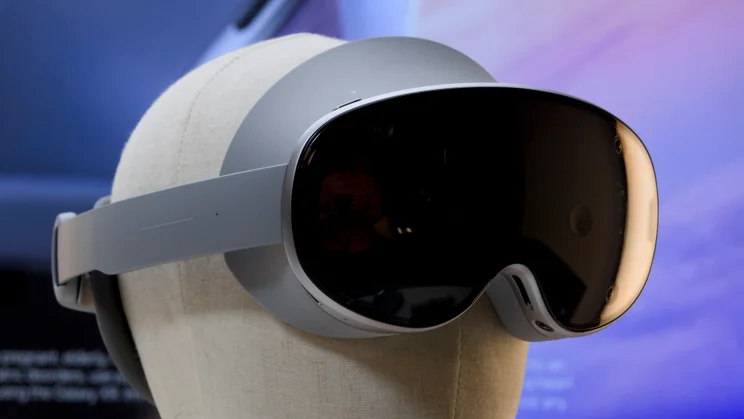
It’s not entirely plastic-free, but at the business end the Samsung Galaxy XR is constructed fully of glass and aluminium. That glass looks suitably futuristic, too: all smoked gloss black, polished to a high sheen, and punctuated intentionally with the cameras needed to feed video into your eyes from the world around you, and to track your hands and fingers so you can manipulate and navigate your way around the headset’s UI.
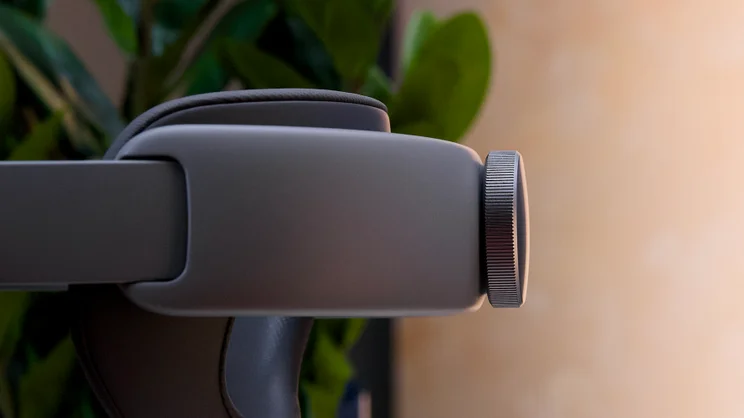
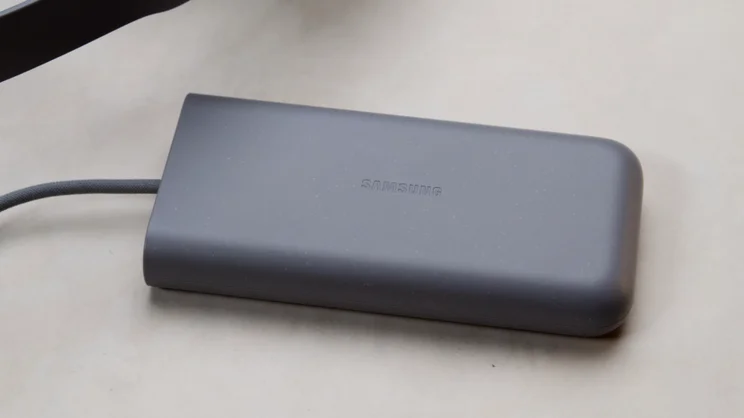
Connected to this main unit is a wide, stiff, sprung strap that stretches around the back of your head and is tightened with a large, knurled metal knob. In addition to this, there are two opposing pads that contact your head at the front and the rear. The padding on these is exceptionally well-judged; it’s not too soft, or too firm but still feels like it would last a fair while. The weight of the whole thing is a respectable 545g, not including the battery, which is tethered to the left arm of the headset by 113cm of flexible, braided cord.
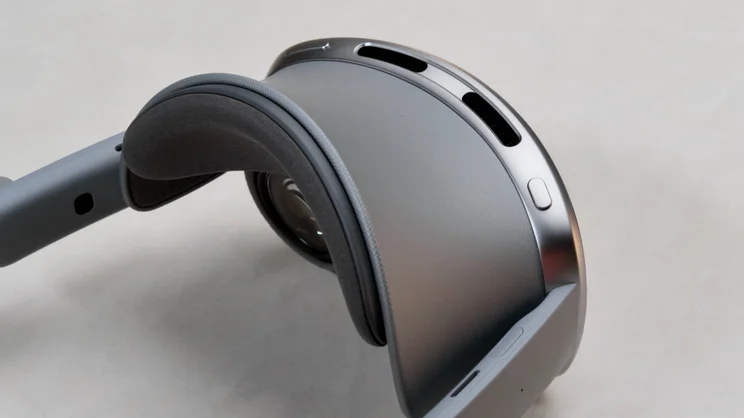
You’ll mostly be controlling the XR with your eyes and various hand gestures, but there are some physical controls on the Galaxy XR: a volume rocker on the top left edge of the visor frame, a power/shortcut button on the top right edge, and a touch sensitive area on the right-hand strap. You can also pair any peripheral you like with it – keyboards, mice and Bluetooth games controllers – but the official XR controllers aren’t included in the price.
These are £200 extra if you buy a pair at the same time as the headset, or £249 if you leave it and buy them later. You’ll need them, too, if you want to use the built-in Game Link tool to stream Steam games from your gaming PC or laptop.
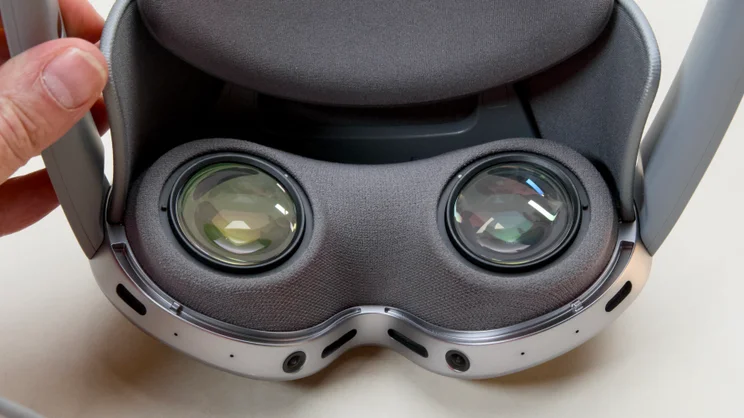
Other than the headset itself, you don’t get an awful lot of extras, it must be said: there’s a pair of magnetic light shields that clip onto the underside of the visor to keep reflections on the lenses at bay; a protective visor to keep the glass on the front scratch-free when you’re not using it; and a spacer for the forehead pad to position the headset further away from your face should you prefer to wear glasses with it. There’s also the facility to add prescription lenses, if you prefer not to do that.
Specifications
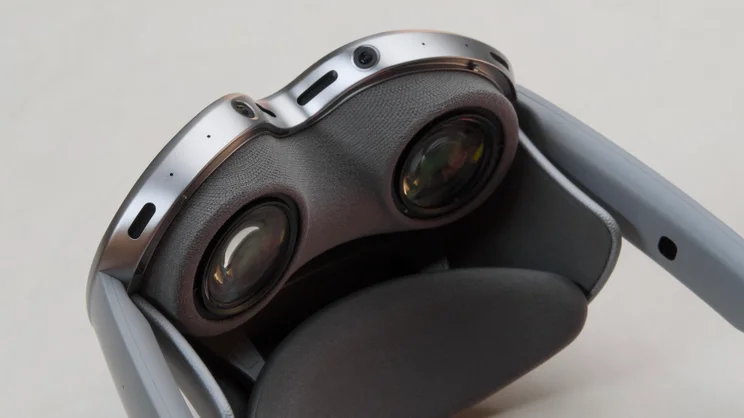
As with every other VR headset, the Galaxy XR uses a pair of lenses to focus your eyes on two high-resolution displays mounted just behind the surface of the visor. The result is a huge, cinematic screen that fills your vision and the hardware that delivers this is seriously impressive.
It consists of a pair of Micro-OLED displays at 3,552 x 3,840 per eye that refresh at up to 90Hz; that’s slightly sharper than the Apple Vision Pro, but not as smooth. The headset’s control and vision system is built around a series of 12 cameras. Two of these provide a video feed to the screens inside so you can see your surroundings as you use it, while six cameras are scattered around the headset to track the position of your hands so you can navigate the UI. As with the Vision Pro, you’ll mostly be controlling the Galaxy XR with hand gestures – pinches, swipes taps and so on, in virtual space.
The final four cameras reside inside the headset to track what you’re looking at, allowing you to use your eyes as a mouse pointer. Rather cleverly, Samsung also uses these cameras to monitor the alignment and fit of the headset and will pop up a warning if it senses you’ve put it on slightly skewiff.
As for audio, that’s delivered by spatial audio-enabled speakers embedded in each of the arms of the headset. These support head tracking, which worked perfectly for me, ensuring audio always sounded as if it was locked to the location of the app within the virtual UI.
Finally, the whole shebang is powered by a 2.4GHz Qualcomm Snapdragon XR2+ Gen 2 chipset backed up by 16GB of RAM and 256GB of storage for apps and files.
Android XR
This hardware setup provides all the horsepower needed to run Android XR, the operating system Google has developed specifically for headsets like this. Effectively, it’s a 3D, virtual reality version of the 2D Android software you’ll find on your smartphone. You can run apps from the Play Store here, interact with Google Maps, Gmail and all the other core Google apps as normal. But instead of filling the screen as they do on your phone, these apps float in front of you in 3D space. They can be resized and moved not only up, down, left and right, but also backwards and forwards.
And there’s no restriction here about the apps that you can install on the headset, aside from storage space. You can run any app you fancy, from games and streaming services to productivity apps. I’m currently typing this sentence using the Google Docs app with my Gmail running just off to the right side, and Slack to the left a short glance away. I’ve also linked a Bluetooth keyboard and mouse to it with no problems, as well as an Xbox-compatible gamepad and a pair of Bluetooth headphones. I’ve used the XR to stream video content from YouTube, Netflix HBO Max and Sky Go, and I’ve used it to play Android games from Diablo to Asphalt Legends, too, all with no issue at all.
None of this proved problematic until I attempted to use the headset’s built-in PC streaming capabilities. These allow you to quickly and easily link the headset to your laptop or PC to remote control it or play games. The Game Link facility looks particularly attractive. However, as mentioned above, it doesn’t work unless you have the official Samsung remote controllers connected. The built-in PC Link remote control facility is also limited to Samsung Galaxy Book laptops – although Samsung, in this case, is no different to Apple: a similar facility is available to Vision Pro users and only works with MacBooks.
Of course, there are workarounds involving third-party remote desktop software, but when I’m forking out £1,699 I don’t expect to have to use workarounds. As a result, if you’re planning on using this at all to connect to your PC for gaming, I’d advise you pick up the controllers when you buy the headset. Samsung is offering 30% off the retail price if you do this, which brings the price down to a slightly more reasonable £195.
How easy is it to control?
This is a bit of a mix. The headset picks up on your hand gestures super accurately and I liked being able to simply look at icons with my eyes and keep my hands by my side (or on my lap), pinching forefinger and thumb together lazily to click items. I was able to get quite quick at entering text for usernames and passwords in this way, too, using the floating virtual keyboard. You can type on the keyboard in the “normal way”, jabbing away with your fingers on the virtual keys, but I found the precision required for this was just too demanding and I frequently made errors.
After a short learning curve, I was swiping around the UI, scrolling, zooming and repositioning windows with abandon. It’s a very intuitive system overall. However, I didn’t find the gesture system 100% reliable. This was usually due to my hands being just out of range of the gesture-tracking cameras, or the thing I wanted to click being positioned too low in my field of vision and, therefore, also just out of range. As a result, I did find myself repositioning windows more often than I would have liked, so I could click the button or select the menu item I wanted.
I also found locating and launching apps a touch laborious as well. The default method is to hold your palm facing you and pinch your forefinger and thumb together to bring up the launcher, then swipe horizontally through your app drawer until you find what you’re looking for. It only shows you 15 apps per screen, however, and if you have a lot of apps installed, this can take some time.
Using voice search to do this would be quicker, but despite the billions invested in AI technology, Gemini refuses to do this most basic of things, which is just baffling. Bixby can do it, but you have to use precisely the right app name or it will fail and run a web search for you instead. Is this really what we’re destroying the planet for?
How comfortable is the Samsung Galaxy XR to wear?
No matter how impressive the technology, if you can’t bear to wear it for as long as it takes to watch a modern movie, then I’m afraid it has failed. This is the fundamental problem with all of these relatively bulky headsets. It was a problem for the Apple Vision Pro and it’s a problem here, too. Yes, the Galaxy XR is lighter than the Vision Pro and, yes, you can wear it for hours at a time, but it takes some acclimatising to. The first few times I wore it, I had to take it off after 20 minutes or so because I just couldn’t put up with the pressure it exerted on my forehead.
I’ve got to the point now where I’m just about used to it. I wore it for the better part of a day to write and edit articles, answer email and Slack messages, and to participate in Google Meet video calls, but I don’t think I could wear it day in, day out. Your mileage may vary, of course, but despite all its efforts, Samsung still hasn’t produced the perfect fit. My main point of contention here are the pressure points the forehead pad creates at the front of your head, which become very uncomfortable after a while.
I was also somewhat disappointed by the amount of light leakage I experienced around the sides of the visor, which in turn created reflections off the surface of the lenses. To be completely fair to the Galaxy XR, this isn’t hugely obvious when the XR fills your field of vision with bright, colourful graphics, but for watching movies and TV, I’d like the sharpest, cleanest image possible and this can interfere with that.
How did the Samsung Galaxy XR perform?
Generally speaking I didn’t have much of a problem with the performance levels of the Samsung Galaxy XR, either. It got a little warm at times during testing and I did experience the occasional slow down, but the biggest limitation in day to day use was the hard limit on open apps.
If you have more than four apps open, it will automatically minimise the one used the longest time ago. Fine, you might think, just stick to four apps. However, if you work like I do with Google Docs, Sheets, Chrome, Slack and Gmail all open that instantly puts you over the limit, and I frequently found myself taking a peek at one app to check something then coming back and wondering where on earth the app I’d had open to the side had gone.
I did run some formal tests, just to see how it compared with other mobile devices, and was surprised by the results. In Geekbench 6, the six core 2.4GHz Qualcomm Snapdragon XR2+ Gen 2 chipset delivered single and multi-core scores slower than a Google Pixel 8a. Compared with the M5 in the latest Vision Pro (and also the older Vision Pro, which had an M2 in place), this chipset appears to be wildly underpowered.
Here’s how the XR compares with some popular, relatively current smartphones, just in case you’re interested:
Battery life is no less important. If you’re brave enough to strap this on your head while you’re working in a coffee shop or in an airport lounge, you’re going to want to know how long it lasts on a single charge. You can plug it into the mains or a USB power bank and keep it topped up as you use it but that’s another cumbersome wire to contend with when you’re waving your hands around to move, resize, scroll and select.
Alas it’s not great. Samsung rates it at “up to 2.5hrs” and so I attempted to verify that using our regular battery test. I set the display at 50% brightness (as of yet, we have no way of setting the brightness formally on such displays), which is a touch below what I’d been running it at in normal use. I fired up our test video in VLC and measured how long it lasted. The result was a rather unimpressive 1hr 43mins, barely long enough to get you through half of The Odyssey.
If you’re planning to use it for work, then, you’ll definitely need to top it up with a power bank or by hooking it up to the mains. I managed around half a morning before getting the low battery warning.
Should you buy a Samsung Galaxy XR?
I can’t really recommend you go out and buy a Samsung Galaxy XR, but I do like it – mainly for its technical accomplishments. The display is stunningly sharp and on a par with (if not superior to) the Apple Vision Pro. And it’s a lot cheaper than Apple’s headset as well.
The spatial audio is brilliant, too, and the hand- and eye-tracking works beautifully, most of the time. Plus, you can run pretty much any app you fancy. I love spreading my work out into 3D space, and being able to watch a huge, cinema-sized screen wherever I happen to be.
However, for every positive, there’s a negative that comes into play. The comfort levels aren’t quite there for me – I always felt relief when taking this thing off after wearing it for an hour or so. You can’t really get a full light seal, and the performance is, well, not as good as I’d expect for the money. Battery life, while fairly standard for standalone headsets like this, is pretty disappointing, too, and it doesn’t come with the controllers in the box, which are required for some functions to work properly. Again, I’d expect more for the money.
Don’t get me wrong, I do like the Samsung Galaxy XR. It sits right on the cutting edge of VR/AR headset technology, but just like the Apple Vision Pro the price puts it out of reach of most sensible consumers. If you want to give VR a try but don’t want to spend this much cash? The Meta Quest 3 includes the controllers, runs on similar hardware and costs around £500. Sure, you’ll be missing out on the super-sharp visuals delivered by the Galaxy XR, but you’ll also be more than £1,500 better off.


